













If you’re listed in the Dubsado Community Directory, PartnerPage, or any referral-style directory, you’re probably getting leads delivered to your inbox. They look great – high intent, already pre-qualified – and then… they just sit there, because unlike the rest of your business…. they’re manual *puke*.
Let’s talk about that.
These aren’t traditional “referrals.” They’re structured, cold-but-warm leads delivered by email. But because they land in Gmail instead of Dubsado, they create micro-friction that kills your speed to respond – and your ability to track what’s working.
If you want those high-quality leads to actually convert, you need a system that makes them usable, not another label or another spreadsheet.
Let me show you exactly how I automated my own directory leads using Gmail and Zapier, and how you can use the same framework for any lead-generating platform.
Why Directory Leads Deserve Automation
Directory leads should be easy money. They’ve already heard about you, vetted your offer, and filled out a standard form. That’s gold.
But here’s what usually happens:
- They land in Gmail, not Dubsado
- You star the email… and forget
- There’s no consistent intake
- You reply late (or not at all)
- You miss the chance to track the source
And the worst part? You’re not the only one doing it. That same lead probably emailed five other Certified Specialists too.
Automation solves this with smarter routing, not more tools.
The Core Framework: How It Works
You don’t need a whole tech stack to make this happen. The secret is separation. Gmail and Zapier handle intake. Dubsado handles the experience.
Here’s the high-level breakdown:
- A directory lead email lands in Gmail
- Gmail auto-labels it using filters
- Zapier watches for that label
- Zapier extracts the key details from the email
- Zapier creates a new project in Dubsado
- Dubsado starts the right workflow automatically
That’s it. And once it’s set up, you can duplicate the whole system for every referral source.
Step-by-Step: Automating PartnerPage or Any Directory
Step 1: Create a Gmail Label + Filter
Start by identifying what makes a directory lead email unique – subject line, sender, or keywords in the body.
Create a Gmail filter that applies a label like:
Dubsado Partner LeadCertified Directory InquiryReferral Directory Lead
This label becomes your trigger.
Step 2: Trigger a Zap in Zapier
Inside Zapier, set up a new Zap that triggers on:
New Labeled Email in Gmail
This ensures your automation only runs when that specific type of lead shows up.
It’s the cleanest way to separate noise (inbox junk) from real revenue opportunities.
Step 3: Extract the Good Stuff with Formatter
Most directories send emails in a consistent structure. That’s your advantage.
Zapier offers a tool called Formatter that helps you pull information out of that email body.
For simple, structured fields like email address and phone number, you can use the built-in options under Formatter > Text > Extract Email Address or Extract Phone Number. Just drop in the body of the email as the input and Formatter will pull out the first valid match.
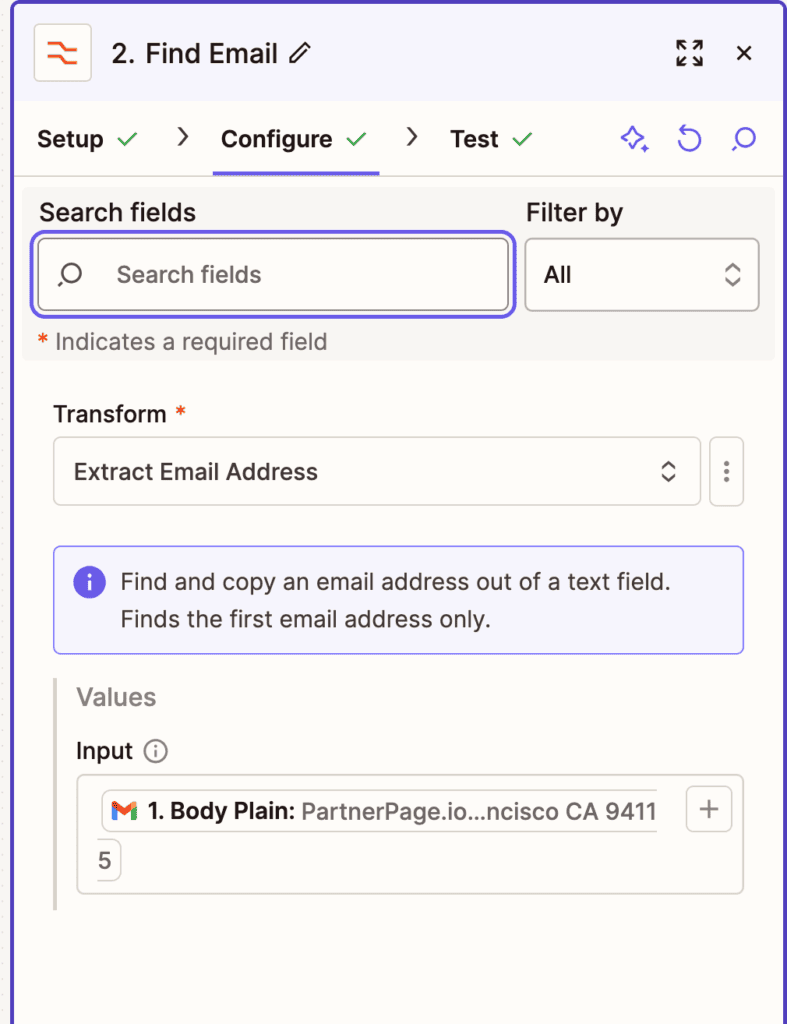
For more custom fields, like First Name or Company, you’ll use Formatter > Text > Extract Pattern. This lets you write a simple regular expression to match exactly what you need. For example:
First name: (.*)That pattern tells Zapier: look for the words “First name:” and grab everything that comes after it.
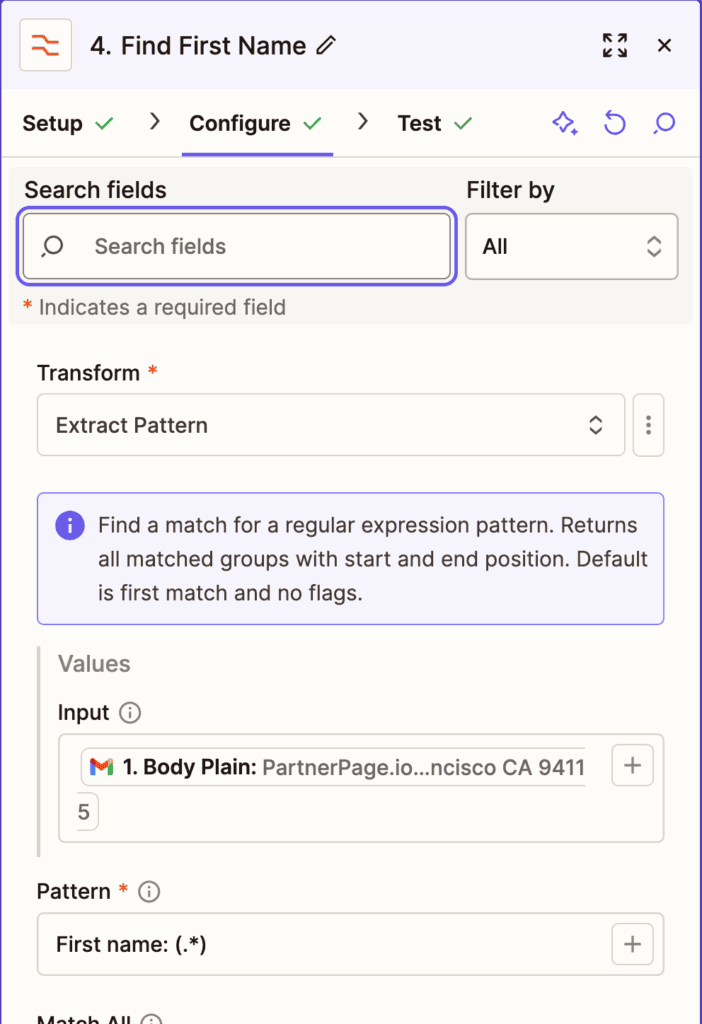
You’ll repeat this process for each custom field you want to capture – Last Name, Website, Services Needed, etc. It takes a few extra minutes to get it just right, but once you do, your system will capture leads cleanly and consistently.
Step 4: Clean Up That Data
Before you send it to Dubsado, polish it. Use another Formatter by Zapier step for each field to do the following:
- Proper case for names
- Remove line breaks
- Standardize phone numbers
- Trim whitespace (no more “Hi name ,” with that annoying space between the name and the comma)
Formatting protects your workflows, email personalization, and smart fields.
Step 5: Create a Project in Dubsado
Now comes the payoff.
Use Zapier’s Dubsado integration to create a new project. Map in:
- Contact info
- Project title
- Lead source
- Then trigger your lead workflow.
Boom – it’s now inside Dubsado, and everything else runs on rails.
Use This for Any Standardized Referral Directory
This isn’t just for Dubsado’s own directory. If the platform sends leads in a consistent format, this automation works.
Try it with:
- Software partner directories
- Certified expert listings
- Educator referral programs
- Business membership directories
- Agency handoff pipelines
All you have to do is adjust:
- The Gmail filter logic
- The label name
- The lead source in Dubsado
- The workflow you start
Same intake system. Different door.
Lessons for Dubsado Certified Specialists
If you’re a Certified Specialist, every listing you’re in should have infrastructure behind it. Period.
Here’s why:
1. Email delivery ≠ manual handling
Inbox = temporary. Dubsado = permanent. Don’t let a random email be the only place that lead exists.
2. Speed beats personalization
You can still be thoughtful after they’re in your system. But nothing replaces a fast, branded first touch – automatically.
3. Intake should be invisible
If it takes 15 minutes and your memory to enter someone manually into Dubsado… it’s broken.
4. Multiple directories, one system
You don’t need a new workflow for every listing. Just duplicate your Zap, tweak the trigger, and keep everything inside Dubsado running off one template.
5. Gmail should never be your CRM
Say it with me: If the lead lives in your inbox, it’s at risk.
Final Thought: Marketing is Visibility, Operations is Readiness
You earned that directory listing. Now you need the infrastructure to make it work, because being operationally ready is what pays the bills.
This tiny automation flips the switch from “hoping they follow up” to “systematically converting interest into income.”
You don’t need new tools for this, just a better strategy.
Want more behind-the-scenes intel like this?
Check out my other tips, tricks, and automations inside the Not-So-Secret Society of System Strategists – it’s where I share the real stuff that keeps systems sharp and client experiences smooth.
Ongoing COO-level support to maintain and refine your systems as the business grows so operations stay steady and decisions stop piling up on your plate.

Support
Custom Dubsado, Airtable, and Moxie systems designed for capacity, not survival. Built around how your business actually runs so growth does not create more chaos.

Systems
Map, audit, or optimize the system that is slowing your business down. Workflows, offers, tech stacks, or the process that keeps living in your head instead of your business.

Strategy
services
These are.
Busy isn't a business plan.


In this power-packed session, I show you how to connect Airtable + your CRM for smarter tracking, simplified workflows, and insights that actually move your business forward.
From Guesswork to Growth with Airtable


A step-by-step guide to setting up your new Dubsado account, area by area, so your trial ends with a system you can actually use.
21 Ways to Max Out Your Dubsado Free Trial

Hot Seat, Hot Takes, Hot Damn.

Free masterclasses that show you exactly how scalable businesses are built.




© 0000 Cait Potter Creative, LLC
Privacy Statement and Terms & Conditions