













Harmony Baby Concierge: Dubsado for Hiring, Onboarding and Managing Care Staff
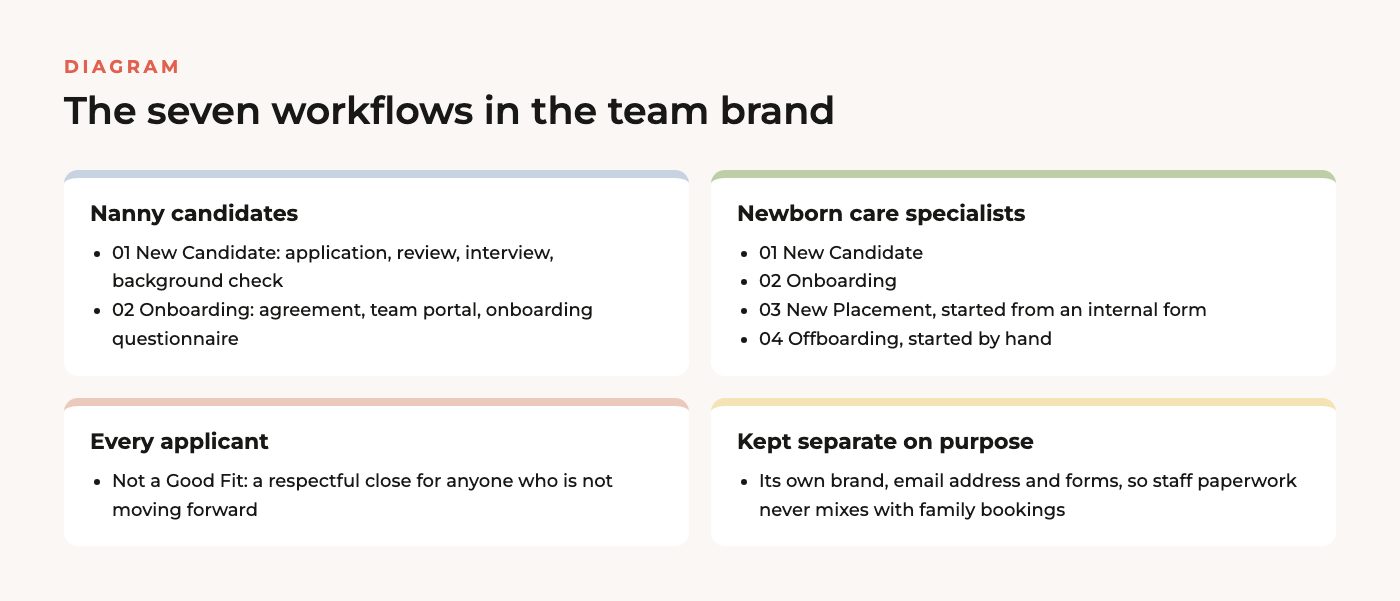
Most people think of Dubsado as a way to book clients, but I use Dubsado for hiring all the time, and Harmony Baby Concierge is one of my favorite examples. Harmony is a nanny agency and newborn care business that also offers sleep consulting, which means it depends on a steady pool of nannies and newborn care specialists who have been interviewed, checked and prepared before they ever meet a family. As part of a done-for-you Dubsado setup, I built a separate team side of their account that takes each candidate from the first application to placement, with seven workflows doing the follow-up that used to live in the owner’s head and inbox.
Dubsado for hiring: results at a glance
- Service: Done-For-You Dubsado Setup
- A separate Dubsado brand just for the care team, with its own email address and forms
- 7 team workflows covering nanny candidates, newborn care specialist candidates, placements, offboarding and a respectful “not a good fit” reply
- 19 workflows in total across the team brand and the client brand
- 9 project stages that show exactly where every nanny candidate stands, from new application to placed
- Automatic reminders at 48 hours and 7 days, so unfinished paperwork gets chased without anyone remembering to do it
- Workflow testing guides for both brands, so the team could practice on test candidates before going live
Service Provided
Done-For-You Dubsado Setup, with a second Dubsado brand for the care team and, later, a refresh of the team forms and the nanny welcome guide.
About the Client
Harmony Baby Concierge supports families with new babies. Families come to them for overnight newborn care, for help finding a long-term nanny, and for sleep consulting when a baby (and everyone else in the house) needs better nights. The business describes itself as a nanny agency, a postpartum doula service and an educational consulting practice all at once, and the common thread is people. Every service only works if there is a trusted caregiver ready to show up, so recruiting and preparing that team is as much a part of the business as booking families.
This post covers the staff side of the build. The family side, where parents inquire, get a proposal and book care, has its own case study: Dubsado for nanny agencies at Harmony Baby Concierge.
The Problem
Hiring caregivers for families is careful, slow work, and there are a lot of small steps that have to happen in the right order. Someone applies. A person on the team reads the application and decides whether it is worth an interview. The interview has to be scheduled, the candidate needs to authorize a background check, references need to be called, and only then can the candidate sign an agreement and start learning how the agency works. If any one of those steps waits on someone remembering to send an email, good candidates go cold and take another job.
At the same time, all of this was competing for attention with the family side of the business. Candidate messages were competing for the same inbox as family inquiries, and without a shared system it was hard to tell at a glance who was waiting on an interview, who still owed paperwork and who was ready to be matched with a family. The owner wanted a system the whole admin team could follow, where the next step for each candidate was obvious and the routine messages went out on their own.
The Solution: A Separate Dubsado Brand for the Care Team
The first decision I made while mapping the process was to keep candidates and families apart. Dubsado lets one account run more than one brand, and each brand gets its own name, sending email address, forms and templates. I set up a team brand alongside the main client brand, so a nanny applicant never receives anything that was written for a paying family, and the team can look at the hiring pipeline without wading through family bookings.
Inside that team brand, every candidate is a project. A workflow is a list of steps that Dubsado carries out for that project, such as sending an email, sending a form, moving the project to a new stage or giving a team member a task. Some steps run on a timer and some wait for something to happen, like a form being submitted or an interview ending. Where a human decision is needed, the workflow gives the right person a to-do, and checking it off is what moves the candidate forward.
From application to interview
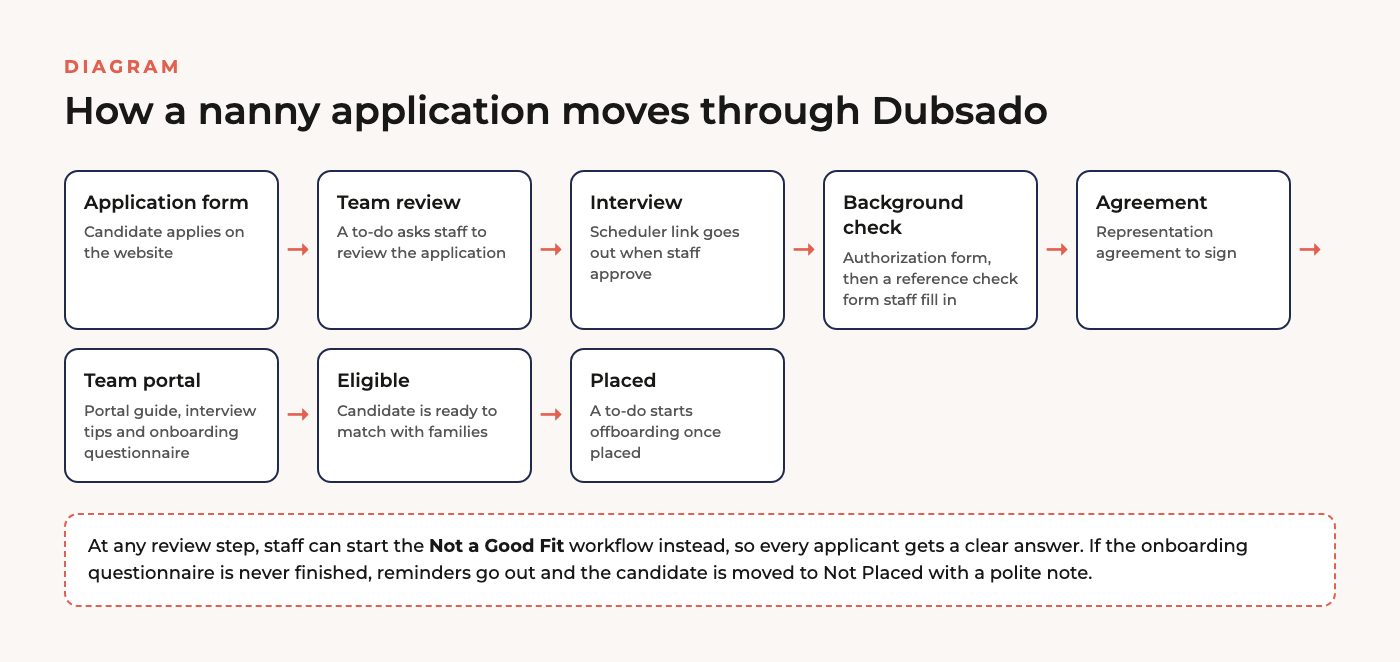
It starts with the nanny candidate application on the website. When someone submits it, Dubsado creates a project for them, labels it as a nanny candidate, moves it to the New Application stage and gives a team member a to-do to review it. If the candidate looks like a good fit, the team member checks off the to-do and Dubsado sends the candidate a link to book an interview on the team’s calendar. The project moves to Interview Requested, and once a time is booked it moves again to Upcoming Interviews, so the admin team can see every interview on the horizon in one view.
Background checks and references
When the interview ends, the team member gets another to-do. If it went well, checking it off sends the background check authorization form. If the candidate has not completed it after 48 hours, Dubsado sends a reminder. Once it comes back, the project moves to Doing Background Check and an internal reference check form appears on the project. That form is only visible to the team, so references can be recorded right next to the candidate’s file instead of in a separate notebook. A final to-do walks the team member through running the check, calling references and setting the candidate’s portal password before onboarding begins.
Onboarding new team members
Onboarding is its own workflow, and it starts automatically when the hiring workflow finishes. The candidate gets an email letting them know they have been accepted, along with the nanny representation agreement to review and sign within 48 hours. After they sign, Dubsado opens up their team portal, which is a private page where they can find everything the agency has sent them. They get a guide to using the portal, interview tips for meeting families, and an onboarding questionnaire to complete within a week.
If the questionnaire sits unfinished, Dubsado sends a reminder. If it is still not done after that, the candidate gets a kind note saying the agency will assume they are not ready right now and can reapply later, and the project moves to Not Placed. When the questionnaire is finished, the project moves to Eligible Nannies, which is exactly the list the team pulls from when a family needs a match. Once a nanny is placed, a to-do prompts the team to send offboarding information and close the project.
Newborn care specialists and placements
Newborn care specialists follow a parallel track with their own application, their own onboarding workflow and two more workflows for the work that comes after hiring. When a family books a specialist, the team fills out an internal form that starts a new placement workflow for that specialist. When the placement ends, the team starts an offboarding workflow by hand.
A clear answer for every applicant
At every point where a person decides whether a candidate moves forward, the to-do gives them a second option: start the Not a Good Fit workflow instead. It sends a respectful reply and closes the project, so nobody who applies is left wondering what happened to their application.
Testing It Before It Went Live
Hiring workflows are not something you want to try for the first time on a real candidate. With the build, I delivered a workflow map and a testing guide for each brand. The testing guide explains how to start each workflow, which ones start themselves, and which ones the team starts by hand, and it encourages the team to apply as a pretend candidate from a personal email address so they can see every message from both sides. That practice run is where a team goes from nervous to confident about letting Dubsado send things on their behalf.
Coming Back to Refresh the Team Side
Harmony came back to me later to bring the team brand up to date. I rebranded every form in the team brand and refreshed a few more so the whole thing felt consistent. I also rebuilt the nanny welcome guide as a form inside Dubsado, so the team can edit it directly instead of keeping a separate design file up to date and exporting it every time something changes. The owner only had to add short team bios and a photo from one of their quarterly events.
The Results
- Every candidate starts from an application form and lands in a workflow, so nothing depends on someone remembering to reply
- Interviews, background check authorizations and agreements go out the moment a team member approves the previous step
- Unfinished paperwork is chased automatically, and candidates who drop out are closed politely instead of lingering
- The admin team can see every candidate’s stage, from new application to eligible to placed, without asking anyone
- Candidate and family communication stay in separate brands, each with its own forms and email address
Frequently asked questions
Can you use Dubsado for hiring?
Yes. Dubsado treats each applicant as a project, so the same tools a business uses to book clients, like forms, scheduling links, agreements, stages and reminders, work just as well for recruiting. At Harmony Baby Concierge the hiring side runs in its own brand, which keeps candidate emails and forms separate from the ones families see.
Can Dubsado handle background checks?
Dubsado does not run background checks itself. What it does well is the paperwork and follow-up around them: sending the authorization form, reminding candidates who have not completed it, giving the team a private reference check form on each candidate’s project, and reminding a team member when it is time to make a decision.
Related case studies and reading
- Case study: Harmony Baby Concierge: Dubsado for nanny agencies and newborn care booking
- Case study: The Party Bar: Dubsado for party rentals
- Read: Done-For-You Dubsado Setup
Want a setup like this for your team?
If your business hires, onboards or places people, I can build that side of Dubsado for you as part of a done-for-you Dubsado setup, right alongside the client experience.


In this power-packed session, I show you how to connect Airtable + your CRM for smarter tracking, simplified workflows, and insights that actually move your business forward.
From Guesswork to Growth with Airtable


A step-by-step guide to setting up your new Dubsado account, area by area, so your trial ends with a system you can actually use.
21 Ways to Max Out Your Dubsado Free Trial

Hot Seat, Hot Takes, Hot Damn.

Free masterclasses that show you exactly how scalable businesses are built.




© 0000 Cait Potter Creative, LLC
Privacy Statement and Terms & Conditions


