













Love + Water Photography: Dubsado for Photography Teams, From Inquiry to Gallery
If you are looking at Dubsado for photography teams, this is what it looks like when a busy studio stops running its client experience out of a snoozed inbox. Love + Water Photography is a Maui portrait team owned by Shawn and Adam Ravazzano, known for colorful portraits from the land and sea. I built them a done-for-you Dubsado setup that answers every inquiry, sends every proposal, books every session and keeps their associate photographers on track, so Shawn could stop being the one who remembers everything.
Dubsado for photography teams: results at a glance
- Service: Done-For-You Dubsado Setup
- 10 Dubsado workflows covering couples, maternity, family, boudoir, lifestyle and elopement sessions, plus associate photographers
- 175 client steps mapped, 157 of them automatic (90%), leaving 18 for the team to do by hand
- 23 email templates, 19 forms and 5 payment plan options
- An estimated 1,300 hours a year handled automatically, worth about $32,600 a year in assistant time, according to the project’s ROI report
- About 4,400 follow-ups, reminders and updates a year that now happen for every client, instead of depending on someone remembering
Service Provided
About the Client
Love + Water Photography is Shawn and Adam Ravazzano’s Maui portrait team. They photograph couples, families, expecting parents, elopements, boudoir and lifestyle sessions, for people who live on the islands and for visitors planning a trip. They also run a print shop, the Land + Sea Store, and work with associate photographers so they can serve clients across the islands.
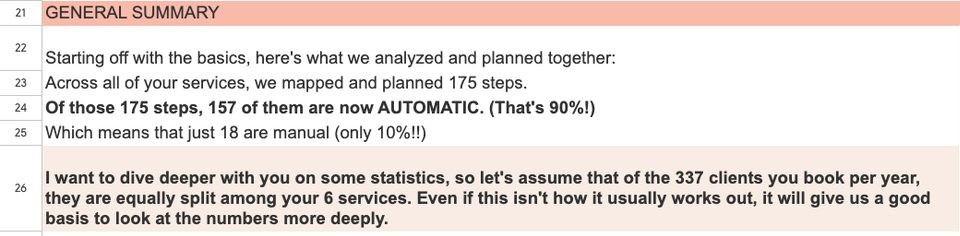
That adds up to a lot of people. The ROI report we built together counted six services and about 337 clients booked a year. Every one of those clients needs a quick reply, a clear proposal, a payment plan, a questionnaire about their session, reminders before the big day and a gallery afterward. When a session goes to an associate, there is a second person to coordinate as well.
The Problem
Shawn had used another client management tool for years, but she had never been able to set up automation in it. Every step depended on her. When someone filled out the inquiry form on the website, she wrote back by hand. When she sent a proposal and did not hear back, she snoozed the email so it would pop up again and remind her to follow up. She told me she usually had 15 to 20 of those snoozed emails coming back every week, just for leads. Booking confirmations, session details and reminders were all sent by hand too.
For a studio this size, that meant the owners were spending their days on admin instead of shooting and growing the business, and any inquiry that slipped through the cracks was a booking that went to someone else. They wanted the opposite: a system that did as much as possible on its own and still felt personal and on brand to the people booking them.
How We Mapped It
We started with a workflow mapping call, where Shawn walked me through what happens from the moment someone reaches out to the moment their gallery is delivered. She also sent me the emails she had been sending by hand in her old system, so I could rewrite them for Dubsado in her voice instead of starting from a blank page.
The biggest decision was how to handle six different kinds of sessions without building six copies of everything. Each session type has its own inquiry path, because a boudoir client and an expecting family need different proposals, different questions and a different tone. But once someone books, the experience is the same for everyone. So I gave each session type its own lead workflow and sent every booked client into one shared booked workflow. That keeps the setup easy to maintain: if Shawn wants to change what happens before a session, she changes it in one place.
We also mapped the associate side of the business, which most studios handle with a group text. When a session is going to an associate photographer, Dubsado asks that photographer whether they are available, follows up if they do not answer, and after the session asks them for their RAW files, which are the unedited photos the team edits and delivers.
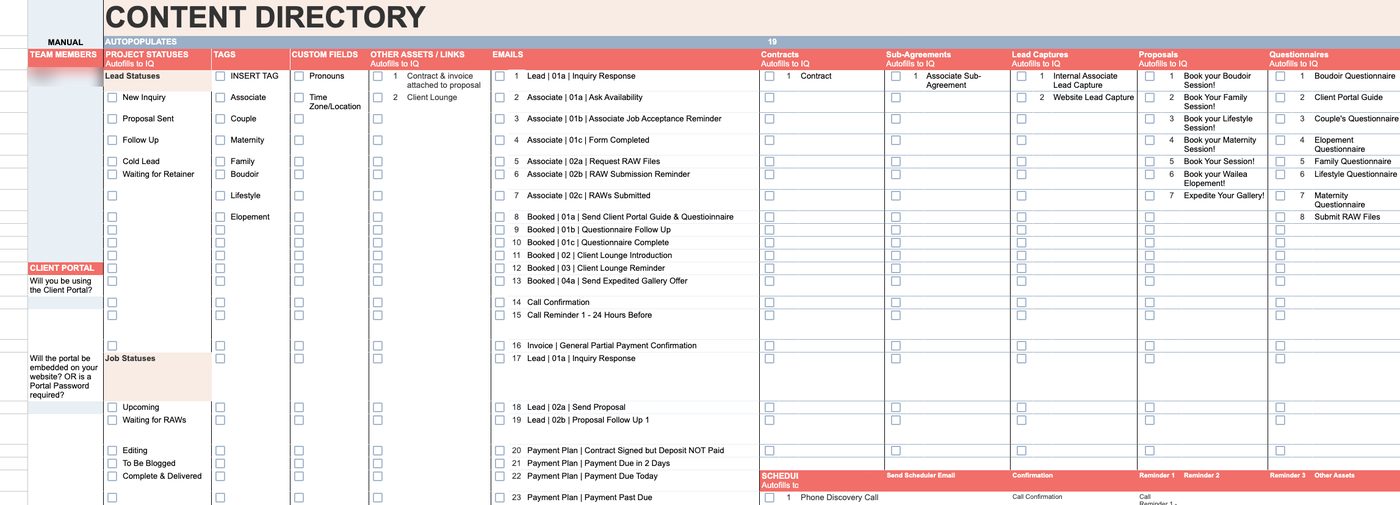
The Solution: A Dubsado Workflow for Every Step of the Client Experience
Inquiries and proposals
When someone fills out the inquiry form, Dubsado replies right away to let them know the team is checking the calendar, tags the inquiry with the type of session, and a few minutes later sends a proposal. Each session type has its own proposal, built with images from the studio’s own galleries, and clients can add extras like an additional guest or a gown rental before they book. The proposal, the contract and the first invoice all live together, so a client can choose a package, sign and pay in one sitting.
If the client does not complete the proposal, Dubsado sends a friendly follow-up three days later and moves the inquiry into a follow-up stage, and after ten days it marks it as a cold lead. That one change replaced the stack of snoozed emails Shawn used to keep. Clients choose from five payment options, from paying in full up front to splitting the total into four installments, and Dubsado sends the payment reminders on its own.
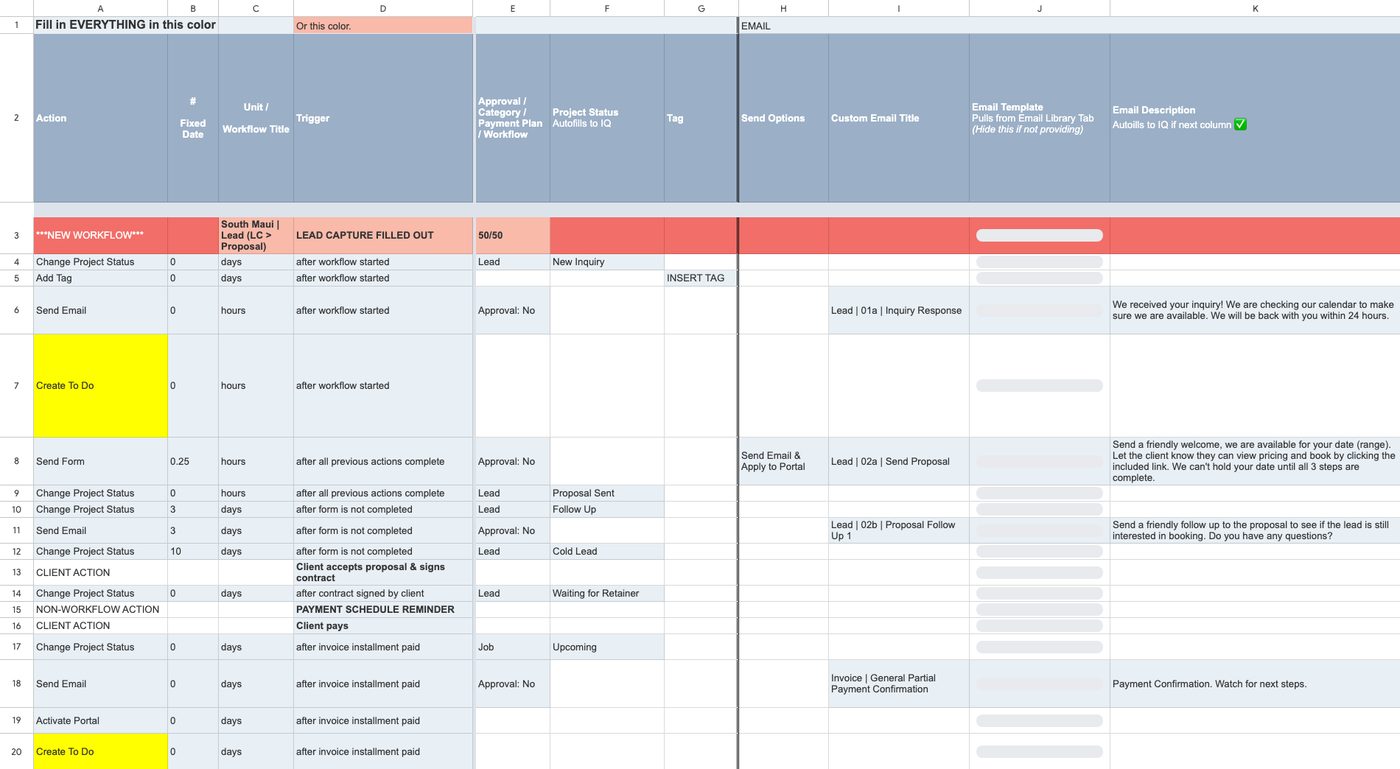
After someone books
As soon as the first payment comes in, Dubsado confirms it, opens the client’s portal, which is a private, branded page where they can see their documents and invoices, and sends a guide to the portal along with a questionnaire about their session. If the questionnaire is still waiting a week later, Dubsado sends a gentle reminder. Two weeks before the session it reminds clients to look through the studio’s client lounge for planning tips, and three days before it offers expedited gallery delivery as an add-on.
After the session
Once the session date passes, the project moves to editing on its own, and the team gets reminders to start the gallery and to blog the session. From there it moves to complete and delivered, and a year later Dubsado archives it so the project list stays clean. With ten project statuses across leads and booked clients, Shawn can open Dubsado and see where every client stands without digging through email.
Associate photographers
The associate workflow asks the photographer to confirm the job through a short form and nudges them if they have not answered within about two days. After the session it asks for the RAW files, reminds them if the files are overdue and archives the job once everything is in. Associate inquiries also get their own proposal, so the client knows from the start which photographer will be with them.
The Results
Across the whole setup we mapped 175 steps, and 157 of them now happen without anyone touching them. The 18 that are left are mostly reminders for the team, like starting a gallery or confirming details, so nothing depends on memory anymore. The ROI report estimates that this takes about 1,300 hours of work off the team’s plate each year, which would cost around $32,600 a year at a $25 an hour assistant rate. That estimate is deliberately conservative: it only counts the time a task really took when someone did it by hand, and how often it actually got done.
The best measure came from Shawn herself, in an email she sent me unprompted once the setup was live:
I can’t believe how much time Dubsado is saving me. I usually get 15-20 snoozed emails to remind me to follow up a lead each week… and I didn’t get ONE this week, it followed up for me?!
Shawn Ravazzano, Love + Water Photography
In her review she added that she noticed clients booking much more quickly once they started receiving the new proposals, and that everything looked branded and beautiful.
Our business is completely automated. Transformed. After 7 years with another CRM, I finally use workflows, and we even get tips.
Shawn Ravazzano, Love + Water Photography
When the setup was finished, I walked Shawn through every workflow and email on a recorded offboarding call, sent her flowcharts of the whole system and a next steps guide, and stayed on email support while the team put it to work. The system also grew with them. When Shawn and Adam moved to Florida and their team began serving both Hawaii and Florida, they came back to me to rework the setup for the new structure, including a new elopement workflow.
Frequently asked questions
Can Dubsado work for a photography team with associate photographers?
Yes. Dubsado can send forms and reminders to anyone, not just clients, so an associate can confirm a job, get reminders and submit their files through the same system that runs the client side. At Love + Water, associates have their own workflow that tracks each job from availability check to RAW file delivery.
Do I need a separate workflow for every type of session?
Usually only for the inquiry stage, where each session type needs its own proposal and questions. After booking, most photographers can share one booked workflow, which is what we did here, so changes only need to be made in one place.
Related case studies and reading
- Case study: Mathilda Louise Photography: Dubsado for photographers
- Case study: First Fruits Farm: Dubsado for nonprofits
- Read: Dubsado for photographers
Want a setup like this for your photography business?
I build done-for-you Dubsado setups for photographers and creative teams who want every inquiry answered, every proposal followed up and every session prepped without keeping it all in their heads.


In this power-packed session, I show you how to connect Airtable + your CRM for smarter tracking, simplified workflows, and insights that actually move your business forward.
From Guesswork to Growth with Airtable


A step-by-step guide to setting up your new Dubsado account, area by area, so your trial ends with a system you can actually use.
21 Ways to Max Out Your Dubsado Free Trial

Hot Seat, Hot Takes, Hot Damn.

Free masterclasses that show you exactly how scalable businesses are built.




© 0000 Cait Potter Creative, LLC
Privacy Statement and Terms & Conditions


