













Airtable for Nonprofits: Running a Survivor Career Readiness Program in One System
This Airtable for nonprofits case study follows a nonprofit that helps survivors of human trafficking build careers. Its career readiness program runs in semesters, and the people in it are rebuilding their working lives on their own terms. I built the Airtable system the program runs on and I still support it as the program changes. The staff use it every day to move people from their first application all the way through graduation, and to show funders what the program actually does for the people it serves.
Airtable for nonprofits: results at a glance
- Service: Done-For-You Airtable Setup with ongoing support
- One program database with 14 connected tables and 621 fields, built around a single record for each participant in each semester they take part in
- More than 1,900 participant semester records and more than 700 attendance entries handled in the system so far
- 15 live automations that keep each participant’s status current without anyone updating it by hand, as of October 2026
- 12 staff workspaces with 47 active pages, each one built for a specific job on the team
- 237 program automations documented across three connected tools, so the team can see what runs where
Service Provided
Done-For-You Airtable Setup, custom dashboards, and ongoing systems support
About the Organization
The organization works alongside survivors of human trafficking, and its career readiness program is one of the most direct ways it does that. Someone interested in the program starts with a short self-assessment and an application. Once they are accepted, they join a semester that runs through two core courses with live discussion sessions, and they complete an assessment at each step so the team can see how their confidence and readiness are changing. After graduating, people can keep coming back to take electives in specific career areas.
The coursework is only part of it. Participants can ask staff for help with whatever is getting in the way, meet with a life coach, and hear about jobs and training opportunities the team finds and shares with them. New participants get a welcome package in the mail, and graduates get one too. A small staff runs all of this, and they are the same people answering support requests, logging coaching sessions and preparing reports for funders.
The Problem
When I started on the program side, the information about each participant was spread across several tools that did not agree with each other. Applications and course progress lived in the online course platform. Assessment answers were collected in spreadsheets. Support requests came in through a separate form that had no connection to anything else, so staff had to match each request to the right person themselves. Dozens of automated connections had been added over time to move information between these tools, and old ones and new ones were running side by side, so when something went wrong it was hard to tell which one had caused it.
That showed up in the day-to-day work in very real ways. The same person could end up with more than one record, which made it hard to answer a simple question like how many people had graduated. The enrollment count on the dashboard did not match what staff knew to be true, and we eventually traced it to one automated connection that had quietly stopped updating records. The assessments people took at the start and the end of a semester did not ask the same questions, so it was difficult to show how much someone had grown. And every funder report meant someone sitting down and pulling numbers together by hand from several places.
What I Built
Decisions we made while mapping
I started by documenting what was already running. Between Airtable, the tool connecting the apps to each other and the course platform itself, the program depended on 237 separate automations, and I logged every one of them along with the steps a participant moves through, so the team could finally see what each automation did and where it lived. The ones that had been replaced were switched off and labeled with a note explaining why, so nobody turns them back on by accident.
Then, before building anything new, I walked through the program with the team from a participant’s first application to their last elective and asked where each piece of information should live and who should be able to change it. A few decisions came out of that which shaped everything else. The first was that Airtable, a flexible shared database the whole team can work in, would be the single source of truth for program data. The course platform still delivers the courses, but if the two ever disagree about who is enrolled or who has graduated, Airtable is the one the team trusts.
The second decision was to let what participants actually do drive their status, instead of asking staff to remember to update it. The third was about people who leave the program. We agreed that a graduate who steps away keeps their graduate standing and their access to past courses, while someone who leaves before graduating is cleared from the course lists, and if they come back later the system picks them up again. We also simplified who qualifies for a welcome package so it depends on one clear step instead of several, and we wrote down a cleanup process for duplicate records that staff now follow together, checking the person first and then their semesters.
A program database built around the semester
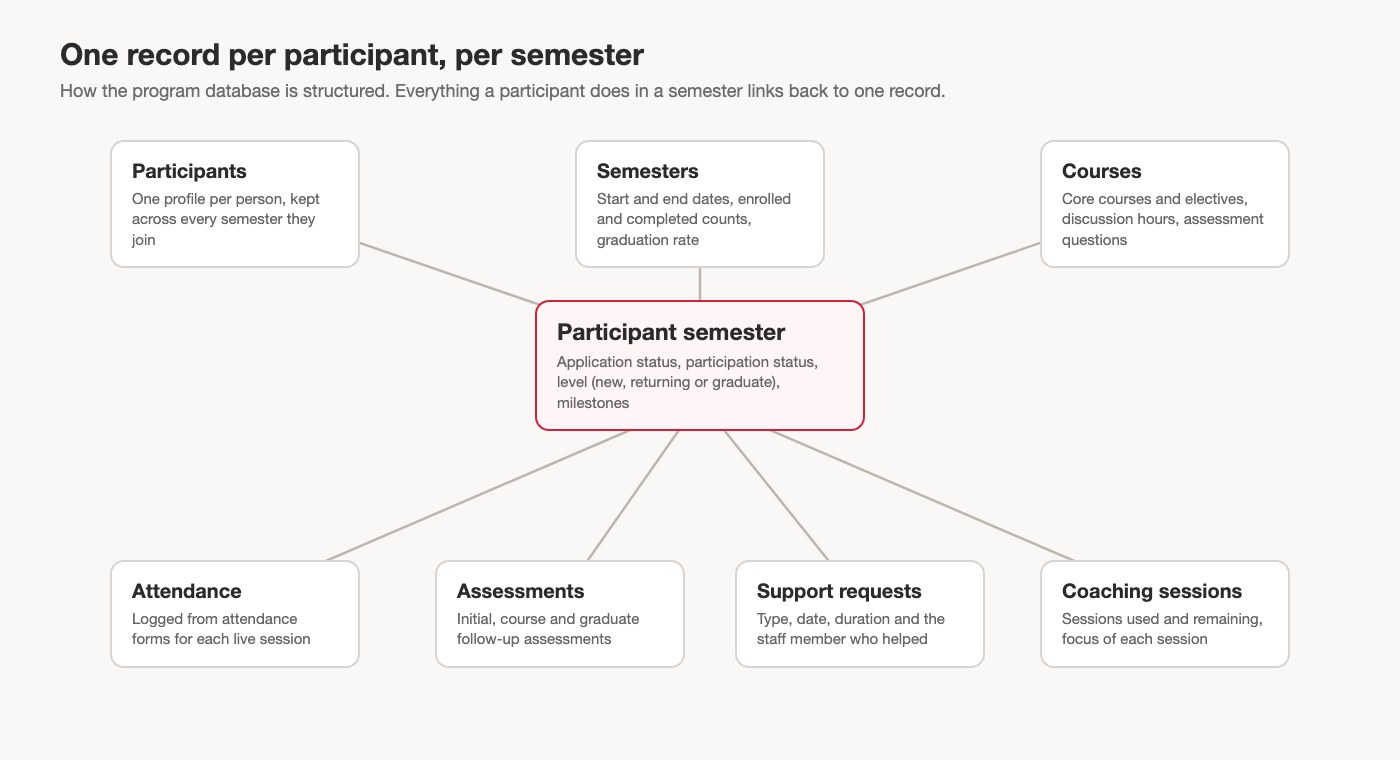
Every participant has one profile that stays with them for as long as they are involved. Each time they join a semester, the system creates a separate semester record for them, so the team can see someone’s whole history across semesters without ever creating a second copy of that person. Attendance, assessments, support requests, coaching sessions and course progress all connect back to that semester record, which means a staff member can open one person and see everything that happened for them that semester in one place.
Status that keeps itself up to date
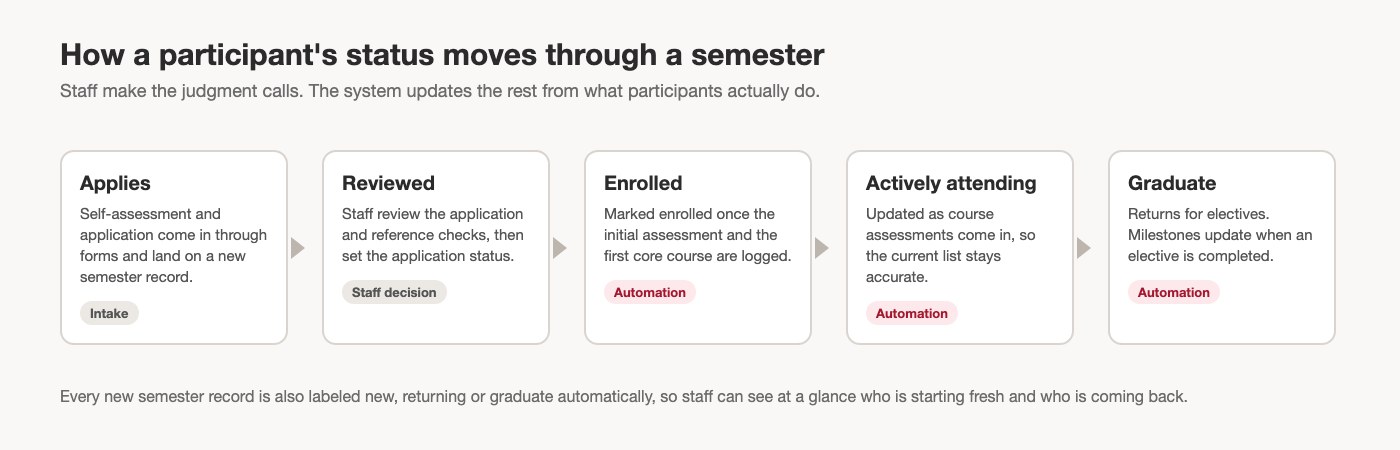
Once staff review an application and accept someone, the system takes over the routine updates. When a participant’s first assessment and first core course are logged, they are marked as enrolled. When their course assessments start coming in, they are marked as actively attending, so the current participant list is always accurate without anyone combing through it. Each new semester record is labeled automatically as a new, returning or graduate participant, and when a graduate completes an elective, their milestones update on their own.
Some of the automations are small, but they remove the kind of task that quietly eats a staff member’s week. When a participant finishes the first steps of the program, the system flags them for a welcome package and records when it ships. When a participant updates their email address on an attendance form, the system finds their record, changes it and sends them a confirmation. Discussion hours are copied onto each attendance entry at the moment it is logged, so changing a course next semester never rewrites the hours people earned in the past.
Support, coaching and opportunities in the same place
The old support request form was replaced with one that connects straight to the participant’s record. A participant enters their email, picks their name and describes what they need, and staff then add the date, how long the help took and what kind of support it was. Over time that gives the team a real picture of how much hands-on support each person receives, which used to be invisible. Life coaching sessions are logged the same way, with a running count of sessions used and sessions remaining, and every job or training opportunity the team shares is recorded along with how many participants heard about it and how many followed up.
A workspace for each job on the team
Staff do not work in the raw database. They work in simple screens built for one job at a time, which Airtable calls interfaces. There is one for reviewing applications and reference checks, one for logging attendance that also shows who has not been logged yet, one that lists missing assessments, one for preparing and shipping welcome and graduation packages, and one for managing the current semester. Leadership has its own dashboard with the program numbers they look at most, and there is a page with training and how-to guides so new staff can find their way around without waiting for someone to show them.
Reporting on outcomes, during the program and after it
Each semester keeps its own count of who enrolled and who completed, along with a graduation rate, so those numbers are ready whenever someone asks for them. Reporting dashboards break participation down by demographics, course hours, coaching, support and shared opportunities, and the team can filter them by semester. Participants answer the same core questions about career confidence at the start of the program and again at the end, so the change is easy to see side by side. Graduates are also invited to a follow-up survey that asks about their career field, their paid work and whether they can cover their bills each month, which gives the team a way to measure what happens long after the last class. When someone leaves early, a short survey captures why, so those reasons can be tracked over time.
The Results
- Applications, enrollment, attendance and graduation are tracked in one place, semester after semester, with Airtable as the record the team trusts
- Participant status updates itself as attendance and assessments are logged, so the current list is accurate without anyone maintaining it
- Support requests and coaching sessions are tied to the right person, so the team can finally see how much one-on-one help each participant receives
- Funder and leadership reports come from dashboards that are always current, instead of numbers pulled together by hand
- The team runs the system day to day, with me supporting changes as the program grows
The team now treats Airtable as the record they trust for the program, and the system keeps changing with them. When the program tried a new semester format, new participants registered through a form that was not connected to Airtable yet, so they could not use the support request form, which looks for an existing record. I set up a temporary version right away that let anyone submit a request by typing their name, and I was upfront that it was the quick fix: those requests would need to be matched to the right people once registration data was brought in. Nothing was lost, and the team kept tracking support while the proper connection was planned.
Frequently asked questions
Can Airtable run a semester-based nonprofit program?
Yes. This program gives every participant one profile and a separate record for each semester they join, so the team can follow someone across several semesters, see who is new or returning, and report on each semester without duplicating anyone.
How do you keep sensitive participant data safe in Airtable?
Staff work in screens that show only what each role needs, and reporting dashboards use counts and summaries instead of individual records. Anything shared outside the team, including this case study, stays at the level of structure and totals.
Related case studies and reading
- Case study: Live Wilder Studio: an Airtable dashboard fed by Dubsado
- Read: Signs Your Nonprofit Has Outgrown Its Spreadsheets
- Read: How to Build a Grant Tracking System for a Small Nonprofit
Want a system like this for your nonprofit?
If your program data is spread across course platforms, spreadsheets and forms that do not talk to each other, I build Airtable systems that bring it into one place your team can trust. See how I work with nonprofits, or look at a Done-For-You Airtable Setup.


In this power-packed session, I show you how to connect Airtable + your CRM for smarter tracking, simplified workflows, and insights that actually move your business forward.
From Guesswork to Growth with Airtable


A step-by-step guide to setting up your new Dubsado account, area by area, so your trial ends with a system you can actually use.
21 Ways to Max Out Your Dubsado Free Trial

Hot Seat, Hot Takes, Hot Damn.

Free masterclasses that show you exactly how scalable businesses are built.




© 0000 Cait Potter Creative, LLC
Privacy Statement and Terms & Conditions


