













Updated October 2026: added Dubsado 3.0’s built-in project notes, and updated the steps for 3.0.
Keeping comprehensive client notes is essential for any business. Whether it’s to ensure you cover all necessary points during a meeting, present information in a user-friendly format, or easily share insights with your team, having organized client notes makes a big difference. In this blog, we’ll explore how Dubsado’s dynamic questionnaires can be used to achieve this efficiently. Say goodbye to scattered notes, as we guide you through the process of creating, templatizing, and sharing client notes within Dubsado.
Start with Dubsado 3.0’s built-in notes
Dubsado 3.0 gives every project a Notes tab. Open the project, click Notes, and click the plus button to add a note with a title. The same area holds Call logs, Meeting notes from Dubsado’s notetaker (still labeled Lab), and Contact notes that follow the person across every project they have with you. For quick notes after a call, this is all you need.
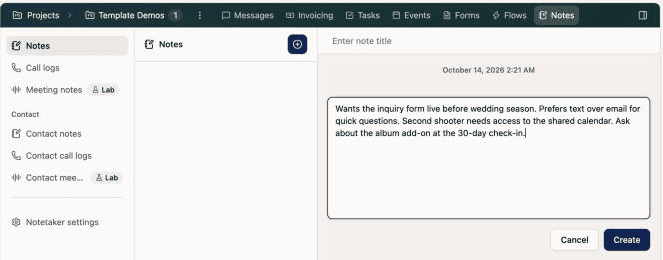
Where the questionnaire method below still wins is structure. If you want the same questions answered for every client, a template your team fills out the same way every time, custom fields that save answers to the client’s profile, or a Flow that moves forward when you submit your notes, use a questionnaire.
Benefits of Using Dubsado Questionnaires for Client Notes:
- Customization: Tailor your questionnaires to fit your business’s specific note-taking requirements. Add as many questions and fields as needed, ensuring you cover all essential details during client interactions.
- Templatization: Save time and effort by creating standardized note templates. Avoid repetitive note-taking and maintain consistency across your client base.
- Confidentiality: With the “Apply to Project Only” option, you can guarantee that your client notes remain private. Share only relevant information with your team for enhanced collaboration.
- Easy Access: Access your questionnaires directly within Dubsado’s platform, keeping your notes and client management in one place.
Step 1: Creating Your Custom Client Notes Questionnaire
In Dubsado 3.0, go to Forms and then Form templates, and create a new questionnaire. Here, you can create a new questionnaire tailored to your specific note-keeping requirements. Add questions and note fields that you want to include in your client notes. The flexibility of Dubsado questionnaires allows you to design a format that suits your unique business needs! You can even create and map custom fields to store key information on their profile after you’ve submitted the form.
Step 2: Streamline Workflow with Automation
Take it a step further and save time by automating the process. In your Flow template, add a Send Form step as part of your client process. By choosing Apply to project only under Form Delivery, you can ensure that only you and your team have access to the form, maintaining confidentiality and professionalism.
Step 3: Use the Questionnaire to keep Client Notes in Dubsado
Now, when the Flow is applied to the client project, the notes questionnaire will be automatically applied to the project.
Click “View” and then “Open” to open up the questionnaire in a new tab that you can then fully edit and fill in!
When you’re done, hit “Save Draft” or “Submit” to save the information! If you use the “Submit” button, you can even have your Flow run additional steps to happen after you’re done with your notes. Seriously, this opens up a whole lot of automagic!
Cool hack, right?
Dubsado questionnaires offer a powerful solution for streamlining client notes and enhancing organization within your business. Say goodbye to generic note-taking and embrace the customization and templatization features that Dubsado provides. By creating tailored questionnaires, automating the process, and ensuring confidentiality, you can improve your client interactions and collaboration with your team.
Stay ahead in your business by leveraging Dubsado’s dynamic questionnaires for keeping comprehensive client notes. Whether you need to present information effectively, streamline your workflow, or ensure accurate client data, Dubsado has you covered.
Ready to optimize your client notes organization with Dubsado? My free Dubsado setup guide walks you through the rest of your account step by step, so you can get the full potential of this versatile platform for your business success.
If you’d rather have your whole client process built for you, that’s exactly what my Dubsado setup services are for.
Ongoing COO-level support to maintain and refine your systems as the business grows so operations stay steady and decisions stop piling up on your plate.

Support
Custom Dubsado, Airtable, and Moxie systems designed for capacity, not survival. Built around how your business actually runs so growth does not create more chaos.

Systems
Map, audit, or optimize the system that is slowing your business down. Workflows, offers, tech stacks, or the process that keeps living in your head instead of your business.

Strategy
services
These are.
Busy isn't a business plan.


In this power-packed session, I show you how to connect Airtable + your CRM for smarter tracking, simplified workflows, and insights that actually move your business forward.
From Guesswork to Growth with Airtable


A step-by-step guide to setting up your new Dubsado account, area by area, so your trial ends with a system you can actually use.
21 Ways to Max Out Your Dubsado Free Trial

Hot Seat, Hot Takes, Hot Damn.

Free masterclasses that show you exactly how scalable businesses are built.




© 0000 Cait Potter Creative, LLC
Privacy Statement and Terms & Conditions


