














Updated October 2026: re-checked both companies’ pricing, automation features, fees and supported countries, and added who should switch and how.
If you’re choosing between Dubsado and HoneyBook, or you’re on HoneyBook and wondering whether you’ve outgrown it, this is the comparison I’d want someone to give me. I’m a Dubsado Certified Specialist and I’ve been building client systems in Dubsado since 2020, so I’m not neutral. I recommend Dubsado to most service businesses, and I’ll show you exactly why. HoneyBook is still a good tool for some businesses, and I’ll tell you when that’s you, too. Every price and feature below comes from Dubsado’s and HoneyBook’s own websites and help centers, checked in October 2026.
The short answer
Choose Dubsado if you want your automation to run the whole client process, from the first inquiry to the last invoice, and you want every form, email and link your clients see to look like your brand. It’s also the better fit if your clients pay large invoices by bank transfer, or your business is based outside the four countries HoneyBook supports.
Choose HoneyBook if your client process is simple, you want to be up and running this week with very little setup, and your business is in the U.S., Canada, the UK or Australia.
Dubsado vs HoneyBook at a glance (2026)
| Dubsado | HoneyBook | |
|---|---|---|
| Plans | Starter, Premier | Starter, Essentials, Premium |
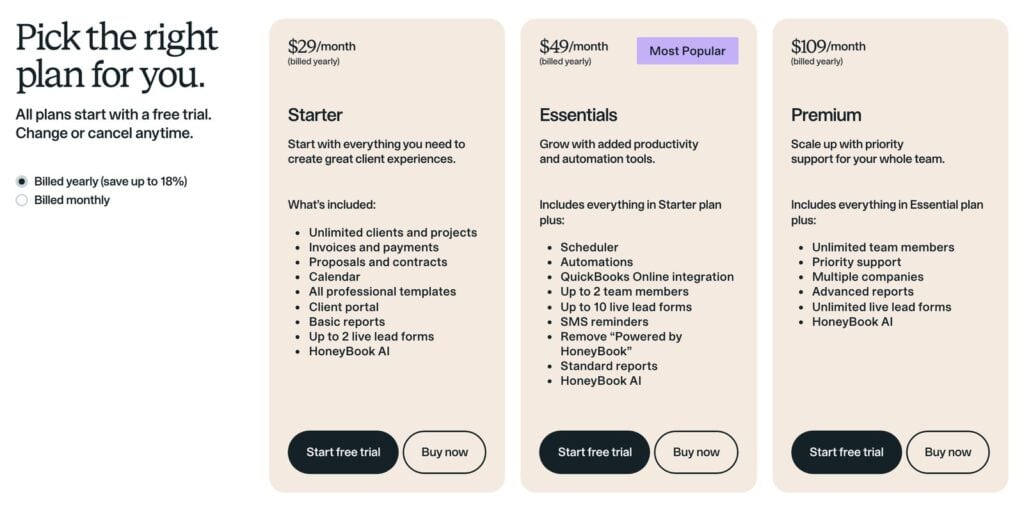
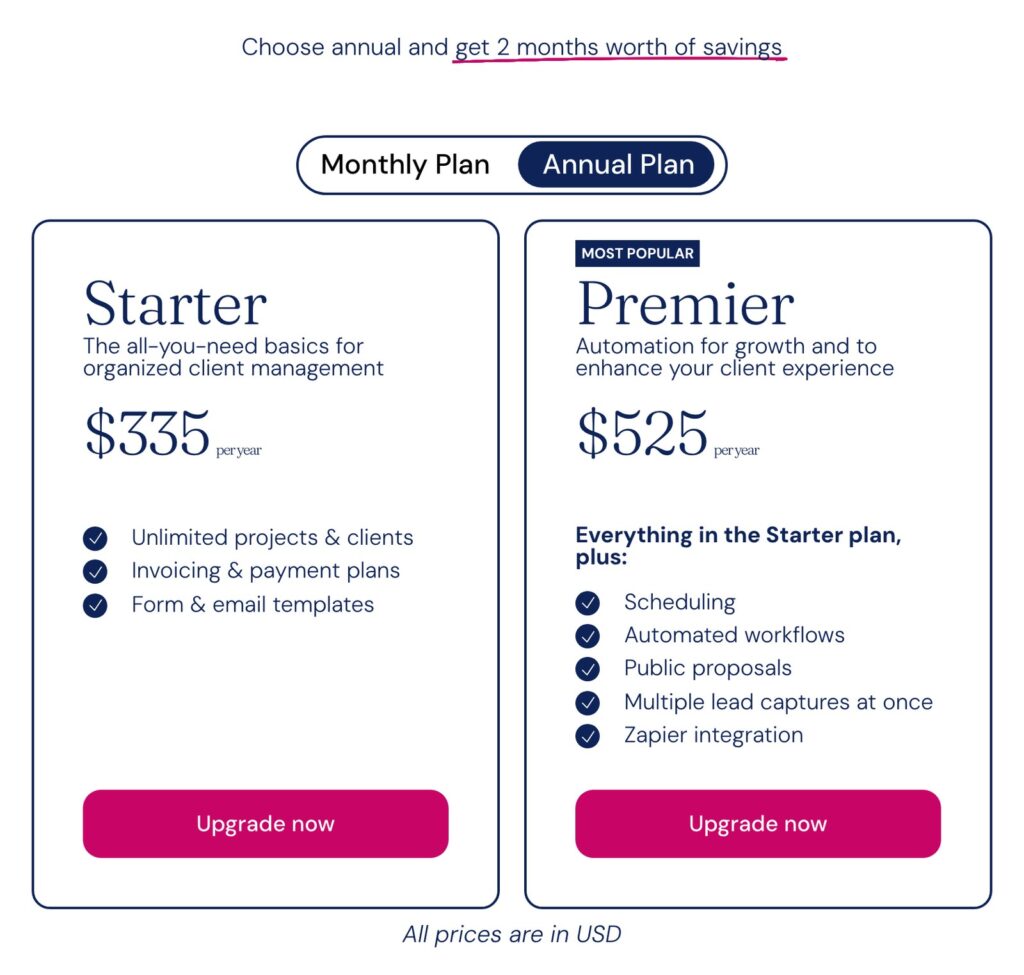
| Published price | Starter $335/year, Premier $525/year | Starter $29/mo, Essentials $49/mo, Premium $109/mo (billed yearly) |
| Plan you need for automation and scheduling | Premier ($525/year) | Essentials ($588/year billed yearly) |
| Free trial | 21 days of Premier, no card | 30 days, no card |
| Extra users | 3 extra users free, paid tiers after that | Essentials up to 2 team members, Premium unlimited |
| Card processing (US) | 2.9% + $0.30 on US cards with Dubsado Payments | Starts at 2.7% + 10¢ (its plan grid also lists 2.9% + 25¢) |
| ACH bank payments (US) | 0.8%, capped at $5 | 1.5% |
| Where your business can be based | Dubsado Payments supports businesses in 34 countries; your clients can be anywhere | U.S., Canada, UK and Australia |
Both companies lead with annual pricing. HoneyBook shows its prices as monthly figures billed yearly, so Essentials at $49 a month is $588 a year. Dubsado Premier, the plan with automation and scheduling, is $525 a year. If you sign up for Dubsado, my code XOCAIT takes 30% off your first payment: your first month on monthly billing, or your whole first year on annual. You can start your Dubsado trial with my code here. (Disclosure: it’s my Certified Specialist referral code.) The full breakdown of plans, add-ons and discounts is in my Dubsado pricing guide.
Why I recommend Dubsado for most service businesses
Your automation runs the whole client process
This is the biggest difference, and it’s the one that matters most once you have more than one service. Dubsado’s automations are called Flows, and a Flow can send a form, a contract, a scheduler or an invoice, create an invoice, update the project status, add tags, turn the client portal on or off, create a task for you, hold everything until the client does something, and start another Flow. So the contract goes out when the proposal is accepted, the scheduler goes out when the retainer is paid, and the portal opens when the project actually starts, without you touching any of it.
HoneyBook’s Automations 2.0 is a real improvement on what it had a few years ago. It can send emails and smart files, create tasks, add or remove tags, move a project to a new pipeline stage, and branch into Yes and No paths based on conditions like whether a contract was signed. Where it stops is the individual pieces of the client process. In HoneyBook your proposal, contract and invoice usually travel together as one smart file, and there’s no automation step to send a scheduler, create an invoice, or open and close the portal. For a business with one service and one path, that’s fine. For a business with several services, payment plans, and different next steps depending on what the client books, it means you’re still doing a lot of it by hand.
Love + Water Photography is a good example. Shawn had used another client management tool for years without setting up automation, and her done-for-you Dubsado setup now runs 157 of 175 client steps automatically. That’s work she no longer does by hand, and her clients get the same experience whether she’s at her desk or not.
Your client experience looks like YOUR brand
Dubsado forms are a blank canvas you can design to match your website, emails go out from your own Gmail or Outlook address once you connect it, and you can connect your own domain so the links for forms, invoices, schedulers and the client portal show your domain instead of Dubsado’s. When your brand is part of what you sell, the software should disappear.
HoneyBook looks polished out of the box, and that’s part of its appeal, though what your clients see is recognizably HoneyBook’s design. Removing the “Powered by HoneyBook” label from client communications is an Essentials feature, so on Starter it stays.
It costs less at the plan you’d actually use
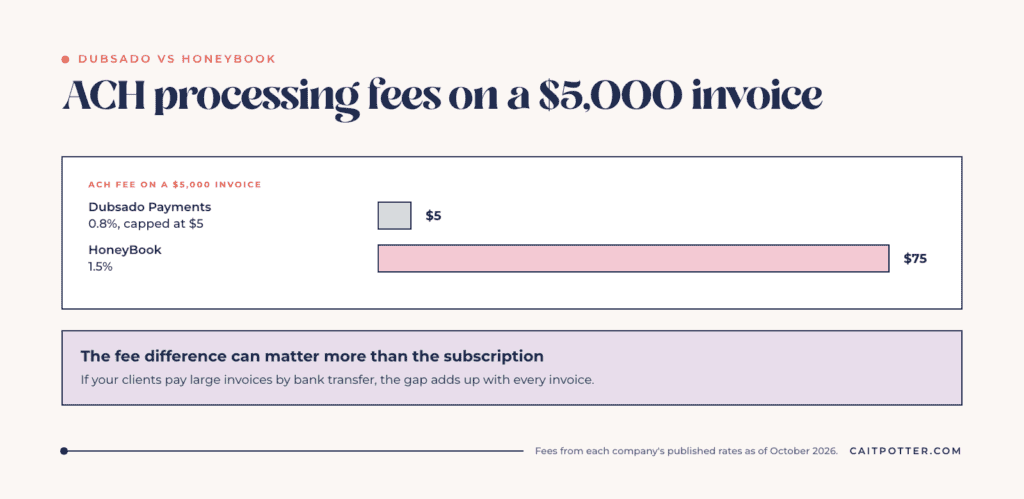
Most service businesses want automation and scheduling, which means Dubsado Premier ($525 a year) or HoneyBook Essentials ($588 a year). Dubsado also includes 3 extra users at no charge. The bigger gap is often in payment fees. If you’re in the U.S. and a client pays a $5,000 invoice by bank transfer, Dubsado Payments charges $5 because ACH fees are capped. HoneyBook’s 1.5% ACH fee on the same invoice is $75. The $70 difference on eight invoices like that is more than a full year of Premier. I go deeper on this in the truth about payment processing fees.
It works where you and your clients are
HoneyBook supports businesses based in the U.S., Canada, the UK and Australia. Dubsado’s help center lists 34 countries where businesses can take payments with Dubsado Payments, and your clients can be located anywhere. I’ve worked with clients all over the world, so this one matters to me.
It connects to the rest of your business
Dubsado Premier includes a Zapier integration and a bookkeeping integration. I mapped out which tools connect natively and which need Zapier in my guide to Dubsado integrations.
Where HoneyBook is genuinely strong
I want you in the tool that fits your business, so here’s the fair version. HoneyBook is easy to learn, and it has built-in guidance that makes getting started feel manageable. Its automations have Yes and No conditions built in. HoneyBook AI is included, the free trial runs 30 days, and your clients can log into the HoneyBook client portal with a link emailed to them instead of a password. If you’re early in your business, your process is simple, and your priority is getting organized this month rather than building a client experience around how you actually work, HoneyBook is a reasonable choice.
The tradeoff shows up as the business grows. It adds more services, more payment plans and more steps that depend on what the client chose, and the tool that was easy on day one starts needing workarounds.
The honest downside of Dubsado: setup
Dubsado asks more of you up front. It can do more, so there are more decisions to make before anything runs, and most DIY setups stall when the owner opens the Flow builder and realizes they haven’t decided what should happen at each step. That’s a one-time cost, and it’s the reason so many people hire help.
If you want it done for you, my done-for-you Dubsado setup ($4,497+) starts with a process mapping session, then I build and test your whole system and hand it over ready to run. If you’d rather build it yourself with a plan, the done-with-you setup ($1,997) gives you the mapping session, a step-by-step course, templates and support. You can compare every option on my Dubsado setup services page.
Already on HoneyBook? How switching works
Switching is very doable, and you don’t have to move everything in one weekend. You export your contacts from HoneyBook as a CSV, import them into Dubsado, let projects that are mid-payment-plan finish where they are, and start every new inquiry in Dubsado. The part that makes or breaks it is mapping your process before you rebuild anything, instead of recreating your HoneyBook setup screen by screen. The full step-by-step is in my guide to switching from HoneyBook to Dubsado, and if you want to hear from people who use HoneyBook every day, here’s my roundup of HoneyBook reviews.
Dubsado vs HoneyBook FAQ
Is Dubsado better than HoneyBook?
For a service business that wants its automation to run the whole client process and wants a fully branded client experience, yes. For a simple process and the fastest possible start, HoneyBook can be the better fit.
Is Dubsado cheaper than HoneyBook?
At the plan most service businesses need, yes. Dubsado Premier, which includes automation and scheduling, is $525 a year. HoneyBook Essentials, its plan with automation and scheduling, is $49 a month billed yearly, which is $588 a year. Payment fees matter too: in the U.S., Dubsado Payments caps ACH fees at $5, and HoneyBook’s ACH fee is 1.5%.
Which countries can use HoneyBook?
As of October 2026, HoneyBook supports businesses based in the U.S., Canada, the UK and Australia. Dubsado Payments supports businesses in 34 countries, and your clients can be located anywhere.
Can I move from HoneyBook to Dubsado?
Yes. HoneyBook lets you download your contacts as a CSV, and Dubsado imports a CSV under Contacts. Signed contracts can be uploaded to projects as PDFs, and open invoices are re-created in Dubsado. My HoneyBook to Dubsado guide walks through every step.
Is Dubsado hard to learn?
It takes longer to set up than HoneyBook because it does more. Mapping your process before you build makes the biggest difference, and so does getting help with the setup. Once it’s built, running it day to day is straightforward.
Is there a Dubsado discount code?
Yes. My Certified Specialist code XOCAIT takes 30% off your first payment, which is your first month on monthly billing or your whole first year on annual. Details are in my Dubsado pricing guide.
Ongoing COO-level support to maintain and refine your systems as the business grows so operations stay steady and decisions stop piling up on your plate.

Support
Custom Dubsado, Airtable, and Moxie systems designed for capacity, not survival. Built around how your business actually runs so growth does not create more chaos.

Systems
Map, audit, or optimize the system that is slowing your business down. Workflows, offers, tech stacks, or the process that keeps living in your head instead of your business.

Strategy
services
These are.
Busy isn't a business plan.


In this power-packed session, I show you how to connect Airtable + your CRM for smarter tracking, simplified workflows, and insights that actually move your business forward.
From Guesswork to Growth with Airtable


A step-by-step guide to setting up your new Dubsado account, area by area, so your trial ends with a system you can actually use.
21 Ways to Max Out Your Dubsado Free Trial

Hot Seat, Hot Takes, Hot Damn.

Free masterclasses that show you exactly how scalable businesses are built.




© 0000 Cait Potter Creative, LLC
Privacy Statement and Terms & Conditions


