












Dubsado for publishers makes the most sense once you look at what one sale actually starts. At a local print guide, a regional magazine or a city publication that sells featured placements, one signed advertiser kicks off months of work: a questionnaire, a creative meeting, a photo shoot, image approvals, a spread or ad proof, final approval, the launch, and then the renewal conversation for next year. Most publishers I talk to run all of it out of an inbox, a production spreadsheet and their own memory, and it works until you have thirty members at thirty different stages.
Publishing is harder to systemize than most service businesses, and Dubsado covers most of it once it’s set up for the sale and production separately, with a few jobs that belong in other tools. Everything here is current for Dubsado 3.0, where workflows are now called Flows. The example throughout is a real build: The Scout Guide Phoenix & Scottsdale, a local edition of a national print guide that sells annual memberships to independent businesses.
Why a publication is harder to systemize than it looks
From the outside, a membership or ad sale looks like any other service: inquiry, call, proposal, contract, invoice. The difference is everything that happens after the contract is signed. Four things make it harder:
- The sale is over fast. At The Scout Guide Phoenix & Scottsdale, every member goes through a discovery call, a proposal, a contract, payment, a member questionnaire, a creative meeting, a photo session, image review, image approval, spread review, spread approval, the launch and renewal. Only the first five are sales.
- Every member is at a different stage. One business is still deciding, another is booking a photo session, and a third owes you a spread approval by Friday. A production spreadsheet shows where everyone is only if somebody keeps it current by hand.
- Other people do part of the work. Photographers, a design team and often an outside bookkeeper all touch each member. If the process depends on the editor relaying every handoff, the editor becomes the bottleneck.
- Print deadlines don’t move. A late approval from one advertiser can hold up a page, and chasing approvals one email at a time is exactly the work that gets dropped during the busiest weeks of the volume.
Map the membership as two halves: the sale and production
Before anything gets built, I map the whole member journey, and for a publication I split it in two. The first half is the sale: getting a good-fit business from inquiry to signed and paid. The second half is production: getting that member through the creative meeting, the photos and every approval on time. Each half gets its own set of Flows, so the sales process keeps running for new applicants while members who already paid move along on their own track.
This split matters more than any setting in Dubsado. When I see one enormous Flow trying to move a business from first inquiry to final proof, it is almost always the reason the owner stopped trusting their automations. The owner and the team can’t tell what it is supposed to do, so they avoid touching it, and it slowly goes stale.
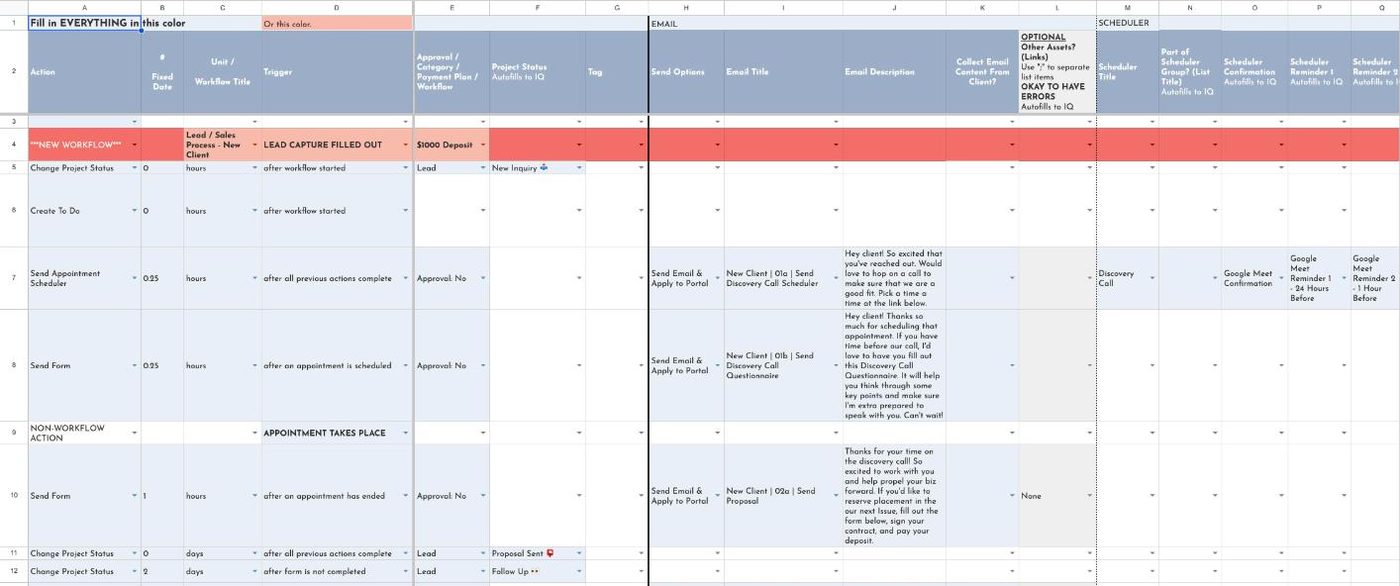
For that edition, mapping both halves came out to 12 workflows and 116 steps, from the first application to the renewal. 100 of those steps now run without anyone touching them. My complete guide to Dubsado workflows walks through the general method.
How I set up Dubsado for a publication
An application, not an open inquiry form
Curated publications turn people down, so the lead capture works as an application. When a business applies, the editor reviews it. Good fits get a link to book a discovery call through a Dubsado scheduler, plus a short questionnaire to fill out before the call. Businesses that aren’t a fit get one of three polite replies, based on location, category or general fit, and each one includes a link to the wait list. Saying no kindly and consistently is part of protecting the brand, and it’s much easier when the reply is already written.
A proposal and contract that follow up on their own
After the discovery call, the proposal goes out with the contract. If it sits unsigned, four follow-up emails go out on a schedule, and if there’s still no answer, the project moves to a cold lead status. The editor doesn’t have to keep a list of who still owes a signature, and every applicant gets the same number of nudges no matter how busy the week is.
Build around your bookkeeper instead of changing how they work
I’d tell every publisher to copy this setup. The Phoenix & Scottsdale edition works with an outside bookkeeping team that sends every invoice from its own accounting software. I could have forced invoicing into Dubsado, but asking the bookkeepers to change their whole process for one client is how a system gets quietly ignored. So after a member signs, the project waits in a “waiting for payment” status. When the bookkeeper records the payment in Dubsado, the member moves into onboarding and the next emails start on their own.
This setup works because Dubsado’s invoice triggers respond to manually logged payments as well as card payments, so a Flow can start the next step the moment a payment is recorded.
One form for each approval, with reminders built in
Once a member is paid, a welcome email points them to their client portal, the private page where every form and document for their project is in one place. The onboarding Flow sends the member questionnaire and the creative meeting scheduler, then photo session prep, then next steps after the session.
Image selection, image approval, spread review and spread approval each have their own Dubsado form. The Flow sends the form, reminds the member when it’s due, confirms when it’s done, and moves the project to the next status. This is where publishers get the most time back, because approvals are the step everyone forgets to chase until the deadline is already close.
Plan the renewal before the first member signs
A publication with annual memberships depends on renewals, so they were part of the map from the start. When a volume launches, members move to an “up for renewal” status, and returning members go through a shorter version of the sales process with a new project for the new volume. If renewals are an afterthought, you end up rebuilding the sales conversation from scratch every year with people who already said yes once.
Let Google and Zapier handle the files
Two file problems took real time before the setup. Members send in lists of their own clients so copies of the guide can be mailed to them, and the team had been creating a separate spreadsheet link for each member by hand so no member could see another member’s list. I replaced that with one link in the workflow that makes each member their own private copy of a template. The editor still merges the lists at the end, but collecting them takes no setup at all.
A Zapier connection also builds a Google Drive folder set for each new member, with folders for the creative meeting form, final photos, logos, member-provided images and the member profile. The editor, the photographers and the designers always know where files go. If you’re weighing which connections Dubsado handles on its own and which need Zapier, my post on Dubsado integrations breaks it down.
Where Dubsado is the wrong tool for a publisher
Dubsado runs the client side of a publication well. It is not a production or layout tool, and three jobs belong somewhere else:
- Design proofs still get made in your design tool. Dubsado can send the approval form, remind the member and record the answer. The spread itself, and any markup on it, happens wherever your designers work.
- Ad inventory and page planning belong somewhere else. If you need to see how many pages are sold, which categories are full or how a volume is laid out, that’s a database job. For a publication that needs that view, I’d build it in Airtable alongside Dubsado rather than try to force it into project statuses.
- Combining member data is still a manual step. Because each member fills in a private copy of the mailing list template, someone still merges those lists at the end of a volume.
What it gives back
The project’s ROI report estimated about 440 hours a year back for the editor, worth roughly $11,080 in assistant time, and about 1,375 follow-ups, reminders and updates a year that now happen for every member instead of depending on someone remembering. Those are estimates from the mapping, and the real number depends on how many members a volume has. The bigger change is that every member gets the same experience whether the editor is on deadline or on vacation.
If your publication sells placements and then runs months of production for each one, that’s the kind of build I do in a done-for-you Dubsado setup. You can see the other publishing and media builds on the publishing and media results page, or read about how I approach Dubsado setup in general.
FAQ
Can Dubsado handle approvals for print ads?
Yes. In The Scout Guide Phoenix & Scottsdale setup, image selection, image approval, spread review and spread approval are each a Dubsado form. The Flow sends the form, reminds the member when it’s due, and moves the project to the next status when it’s complete. The proof itself is still made in your design tool.
Which Dubsado plan does a publication need?
Premier. Flows, the built-in scheduler and the Zapier integration are all Premier features, and the setup in this post depends on all three. Starter covers forms, invoicing, payment plans and client portals, but not the automation.
Our bookkeeper invoices from accounting software. Can Dubsado still move members forward?
Yes. Dubsado’s invoice triggers respond to manually logged payments, so when the bookkeeper records a payment in Dubsado, the Flow can start onboarding right away. That’s how the Phoenix & Scottsdale edition runs it.
Does this work for magazines and other media businesses, not just print guides?
The same structure fits any publication that sells a placement and then produces something for each buyer: a sales half that ends at signed and paid, and a production half with an approval form for every sign-off. The forms and statuses change with your process, and the split stays the same.
Ongoing COO-level support to maintain and refine your systems as the business grows so operations stay steady and decisions stop piling up on your plate.

Support
Custom Dubsado, Airtable, and Moxie systems designed for capacity, not survival. Built around how your business actually runs so growth does not create more chaos.

Systems
Map, audit, or optimize the system that is slowing your business down. Workflows, offers, tech stacks, or the process that keeps living in your head instead of your business.

Strategy
services
These are.
Busy isn't a business plan.


In this power-packed session, I show you how to connect Airtable + your CRM for smarter tracking, simplified workflows, and insights that actually move your business forward.
From Guesswork to Growth with Airtable


A step-by-step guide to setting up your new Dubsado account, area by area, so your trial ends with a system you can actually use.
21 Ways to Max Out Your Dubsado Free Trial

Hot Seat, Hot Takes, Hot Damn.

Free masterclasses that show you exactly how scalable businesses are built.




© 0000 Cait Potter Creative, LLC
Privacy Statement and Terms & Conditions