













A Dubsado onboarding workflow covers the stretch between “they booked” and “we’re kicking off.” It’s the part of the client experience where a new client decides whether they made the right call. When it’s built well, they get a clear welcome, they know where everything lives, they hand you what you need, and the kickoff call is on the calendar without a single email from you. When it’s built badly, or done by hand, they wait, they wonder, and you spend the first week of the project chasing questionnaires.
This guide walks through what to automate in that window in Dubsado 3.0, where workflows are now called Flows, plus what I’d leave manual and how to test it. If you need the basics of actions and triggers first, start with the Dubsado 3.0 changes and come back.
Decide what “booked” means
Before you build anything, define the moment onboarding starts. For most service businesses, a client is booked when two things are true: the contract is signed and the first payment is in. Not one or the other. If your onboarding starts on the signature alone, you’ll eventually onboard someone who never pays the retainer.
Write that definition down, then write down what has to happen between that moment and kickoff, in order. That list is your onboarding Flow.
Where the onboarding Flow starts
I keep onboarding in its own Flow, separate from the inquiry and booking steps. That way you can test it on its own and fix it without touching your sales process. There are two clean ways to start it:
- From your booking Flow. Add a Start A New Flow action at the end of the inquiry Flow, triggered after the proposal is completed. The onboarding Flow applies to the same project automatically. If you quote custom work, here’s how to set up Dubsado proposals for custom quotes so clients can accept without picking a package.
- From a public proposal. If clients accept a public proposal straight from your website, choose the onboarding Flow as that proposal’s default Flow. When the client submits it, Dubsado creates the project and starts the Flow.
Either way, the first steps of the onboarding Flow should hold everything until the client is actually booked.
The onboarding steps worth automating
Here’s the sequence I build most often, from booked to kickoff. Adjust the timing to your process.
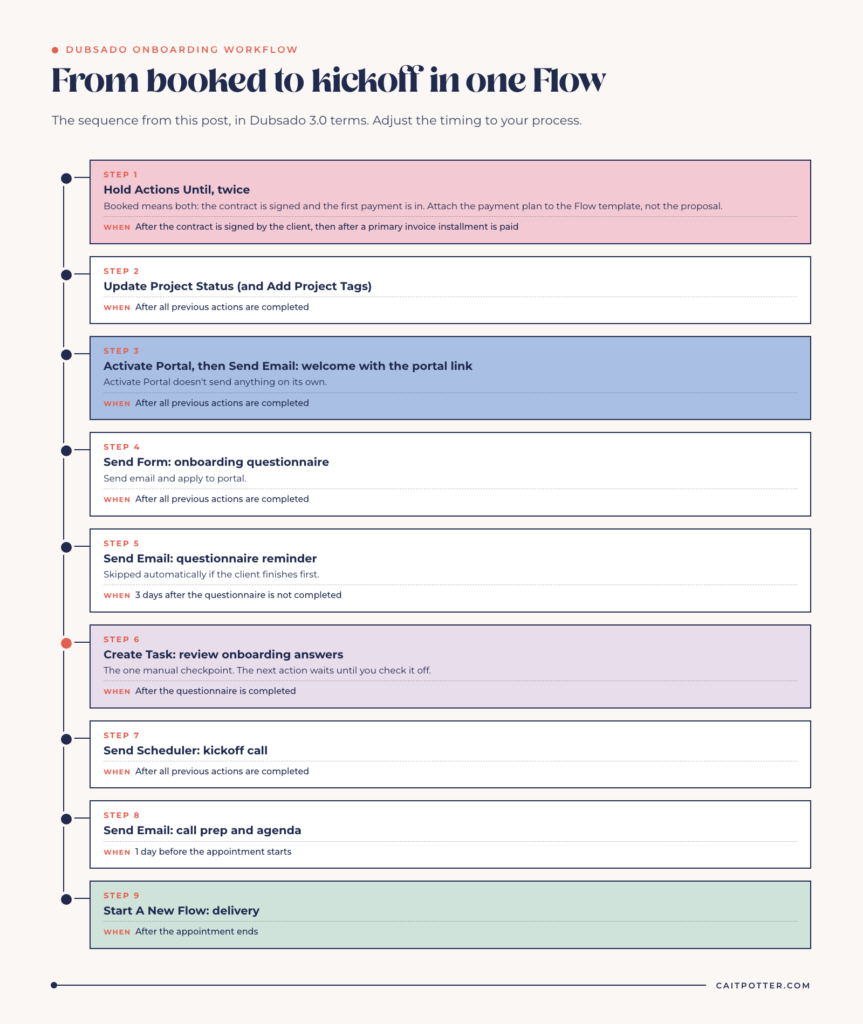
1. Hold until the contract and payment are both in
Add two Hold Actions Until steps. Set the first to trigger after the contract is signed by the client, and the second after a primary invoice installment is paid. The Flow waits at the first hold until the signature comes in, then at the second until the payment does. Every action after them uses the “after all previous actions are completed” trigger, so nothing moves until both conditions are met.
The installment trigger only works when the Flow template has a payment plan attached. Attach the plan to the Flow, and leave the proposal’s own payment plan setting empty. If both have one, the Flow errors, even when the plans match.
2. Update the project status
Use Update Project Status to move the project into a booked or onboarding status. Add Add Project Tags if you track services or seasons with tags. It costs nothing to automate, and it means your project list is always accurate. If you’re unsure which to use for what, here’s how I use project statuses vs tags.
3. Open the client portal and send the welcome email
Activate Portal gives the client access to their portal, but it doesn’t send anything. Follow it with a Send Email welcome that includes the portal link smart field. The portal link only works in that email if Activate Portal ran earlier in the Flow.
The welcome email is where you set expectations: what happens next, how long each step takes, how to reach you, and what you need from them. Write it once, carefully. Every client gets that version, including the ones who book during your busiest month.
4. Send the onboarding questionnaire
Use Send Form to send your questionnaire, triggered after all previous actions are completed. If you want the client to find everything in one place, choose “Send email and apply to portal.”
Ask only for what you need before kickoff. Anything you’ll learn on the call can wait for the call.
5. Remind them if it isn’t done
Add a Send Email reminder triggered three days after the questionnaire is not completed, and a second one a few days later if you want. If the client finishes before the reminder is due, Dubsado skips it automatically. If you resend the questionnaire yourself, the timer resets for every reminder watching it. I wrote more about this in automatic form reminders.
Bon Vie Bookkeeping uses this for document collection: clients get a needs checklist form after booking, and automated reminders go out until the documents are in.
6. Review their answers before kickoff
Add a Create Task triggered after the questionnaire is completed: “Review onboarding answers. Check off this task to automatically send the kickoff scheduler.” The next action uses “after all previous actions are completed,” so it waits for you. This is the one manual checkpoint I keep in almost every onboarding Flow. It means you read their answers before you book time with them.
I use tasks here instead of manual approvals. An approval holds one action, and you have three hours after it triggers to approve it before it errors. A task waits as long as you need. I explain the rest in why I never use Dubsado workflow approvals.
7. Send the kickoff scheduler
Use Send Scheduler to send your kickoff call scheduler. Sending it from inside the Flow matters. Appointment triggers only watch a scheduler sent by a Send Scheduler action in the same Flow, so that’s the only way the next step can react to the booking.
8. Prepare them for the call
Add a Send Email triggered one day before the appointment starts, with the agenda and anything they should bring. The scheduler’s own reminder emails still send separately, so make sure the two don’t repeat each other.
9. Hand off to delivery
Finish with a Start A New Flow action triggered after the appointment ends, which applies your delivery Flow. Or add a Create Task if you’d rather start delivery by hand.
What to leave manual
Automation makes messy things messy faster, so not every step belongs in the Flow. I leave these manual on purpose:
- Personal notes. If you want to mention something specific from the discovery call, gate the email behind a task and edit the email before you check the task off.
- Portal passwords. No Flow action sets one. If you share the public portal link, add a task to set the client’s password. If you send each client their own portal link instead, they don’t need a password at all.
- Anything that changes per client. Custom timelines and one-off add-ons usually belong in a task, not an automated email.
Mistakes that slow onboarding down
- Sending everything at once. If the welcome email, questionnaire and scheduler all use “0 days after all previous actions are completed” with no task between them, the client gets three emails in a minute. Space them with triggers that match what the client just did.
- A questionnaire that asks for things you already have. If your lead capture or proposal collected it, map those fields and don’t ask again.
- Deleting the review task instead of completing it. Deleting a Flow-created task marks it complete, but the next action won’t fire on its own. Check it off.
- Building it straight into a live project. Test it first.
Test your onboarding Flow
Create a test project with your own email address and apply the Flow. Sign the contract and record a manual payment to clear both holds. Then fill out the questionnaire, check off the task, book the kickoff and watch every email land in your inbox. Use Force now for anything timed days out. If something turns red on the Flow, fix it, click Retry, and resume the Flow if it paused.
Get your onboarding built
Onboarding is the first part of your system a new client experiences, and the part most worth getting right. If you want it mapped and built for you, a done-for-you Dubsado setup covers onboarding along with every other Flow in your business. You can compare every option on my Dubsado setup services page.
Frequently asked questions
When should a Dubsado onboarding workflow start?
When the client is actually booked. For most businesses, that means the contract is signed and the first payment is in. Use two Hold Actions Until steps so the onboarding steps wait for both.
Can the onboarding workflow start automatically from my proposal?
Yes. End your booking Flow with Start A New Flow, triggered after the proposal is completed. Or, if clients accept a public proposal, set the onboarding Flow as that proposal’s default Flow.
Does the Activate Portal action email my client?
No. It only turns on their portal access. Follow it with a Send Email that includes the portal link.
How do I stop my client getting every onboarding email on day one?
Use triggers that respond to what the client did, like “after a form is completed,” instead of stacking several actions at “0 days after all previous actions are completed.” Put a task between steps when you need to review something first.
Do I need Dubsado Premier for an onboarding workflow?
Yes. Flows are a Premier feature and don’t appear on the Starter plan.
Ongoing COO-level support to maintain and refine your systems as the business grows so operations stay steady and decisions stop piling up on your plate.

Support
Custom Dubsado, Airtable, and Moxie systems designed for capacity, not survival. Built around how your business actually runs so growth does not create more chaos.

Systems
Map, audit, or optimize the system that is slowing your business down. Workflows, offers, tech stacks, or the process that keeps living in your head instead of your business.

Strategy
services
These are.
Busy isn't a business plan.


In this power-packed session, I show you how to connect Airtable + your CRM for smarter tracking, simplified workflows, and insights that actually move your business forward.
From Guesswork to Growth with Airtable


A step-by-step guide to setting up your new Dubsado account, area by area, so your trial ends with a system you can actually use.
21 Ways to Max Out Your Dubsado Free Trial

Hot Seat, Hot Takes, Hot Damn.

Free masterclasses that show you exactly how scalable businesses are built.




© 0000 Cait Potter Creative, LLC
Privacy Statement and Terms & Conditions


