













Updated October 2026: new Dubsado 3.0 screenshots.
When you’re in an industry like Interior Design, Event Planning, Stationery Design, or any other custom service where you need to use Dubsado to issue a quote-like proposal, you’ll love this hack for allowing your clients to move forward on a proposal/contract/invoice even if they don’t select a package or add-ons! And as an extra bonus, it’s SUPER simple!
The short answer: a Dubsado proposal is the form your client uses to choose packages, and it’s the only Dubsado form that creates an invoice. When you quote custom work, there may be nothing for the client to choose. Add a “Thank you!” package for $0, mark it pre-selected, and clear out its text. Your client can move on to the contract and invoice without picking anything, and the only sign of it is a $0 line on their invoice.
The screenshots below are from Dubsado 3.0 (October 2026). The video is from 2.0, but the steps are the same: the package element still has a Pre-selected setting, and you can still clear its text. In the 3.0 builder the package can go back to showing its name and price after you clear it, so check Preview before you send the proposal.
ONE
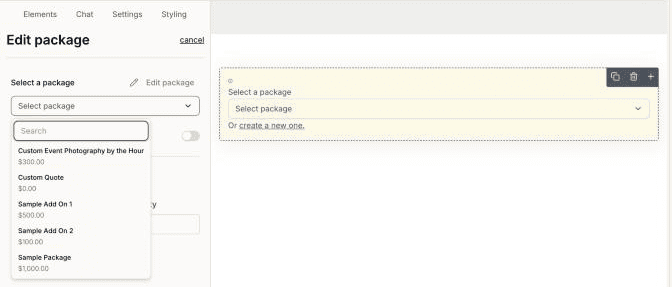
Insert a package at the top or bottom of the proposal. The line item should say “Thank you!” for a price of $0.
TWO
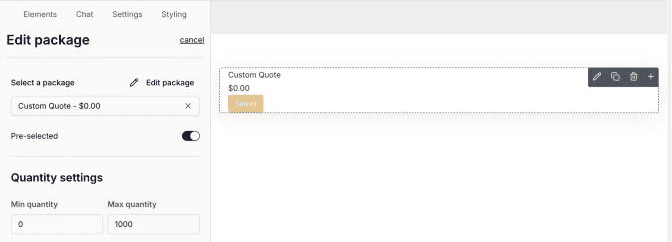
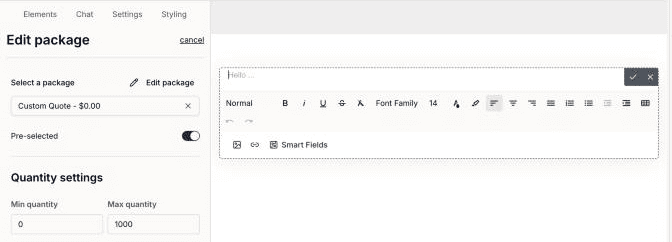
Mark the package “pre-selected”.
THREE
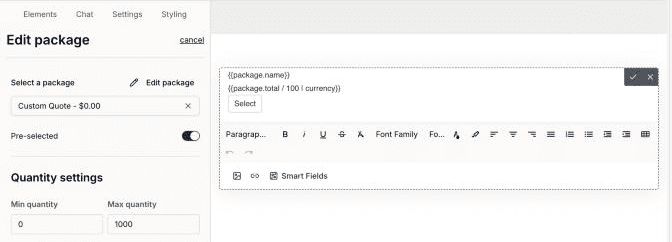
Then delete all content out of the text box.
FOUR
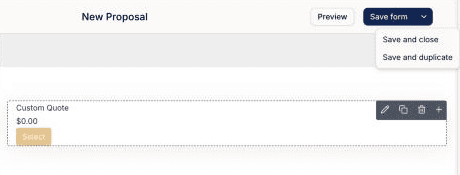
Save & Close.
Done!
Your client won’t even know it’s there, but the proposal will let them move forward. All that changes is a “thank you!” line item is added to their invoice.
What to know about Dubsado proposals for custom quotes
Packages come first. You build them under Invoicing, then Packages, and drop them into the proposal. Editing a package inside a proposal doesn’t change the original package template, so you can adjust the quote for one client without touching your others.
A proposal always creates an invoice when the client submits it, even if “Include invoice” is set to No. That setting only controls whether the client sees the invoice right away. If you turn on “Include contract,” the client signs after submitting the proposal and before they reach the invoice. Each proposal takes one contract, and it can’t change based on the package the client picks.
If you collect a deposit with a payment plan, attach the plan to the proposal or to your flow, not both. Dubsado’s help center says the two conflict and the flow errors.
Discount codes don’t work on quote-like proposals. If you’re giving a client a discount on a custom quote, take it off the invoice before you send the proposal.
Dubsado proposals FAQ
What is a proposal in Dubsado?
A proposal is a Dubsado form where clients choose from your packages, and it creates their invoice from what they chose. You can connect a contract and invoice to it so the client chooses, signs, and pays from one link.
Can a client accept a Dubsado proposal without selecting a package?
Yes, with the $0 package above. Pre-select a “Thank you!” package with no text, and the client can submit the proposal and move on to the contract and invoice without choosing anything.
Will my client see the $0 package?
Only on the invoice. The package has no text on the proposal, and the invoice shows a “Thank you!” line item for $0.
Can clients use a discount code on a custom quote proposal?
No. Dubsado says discount codes don’t work on quote-like proposals, so calculate the discount and apply it to the invoice yourself before you send it.
Do I need Dubsado Premier for proposals?
Not to send them. You can send proposals, contracts, and invoices on Starter. A public proposal, the kind you embed on your website to create new projects, needs Premier.
Custom quotes don’t rule out automation either. Hobart & Haven, a wedding stationery studio built on custom quotes and proofs, has 128 of 146 mapped steps automated.
If your quotes need more than a $0 workaround, Dubsado Form Conditional Logic lets you show or hide fields based on what the client selects and limit package choices, and the Peony proposal template gives you a designed proposal to start from.
Not sure how this fits with the rest of your workflows? A professional Dubsado setup maps your whole process first, then builds it.
Ongoing COO-level support to maintain and refine your systems as the business grows so operations stay steady and decisions stop piling up on your plate.

Support
Custom Dubsado, Airtable, and Moxie systems designed for capacity, not survival. Built around how your business actually runs so growth does not create more chaos.

Systems
Map, audit, or optimize the system that is slowing your business down. Workflows, offers, tech stacks, or the process that keeps living in your head instead of your business.

Strategy
services
These are.
Busy isn't a business plan.


In this power-packed session, I show you how to connect Airtable + your CRM for smarter tracking, simplified workflows, and insights that actually move your business forward.
From Guesswork to Growth with Airtable


A step-by-step guide to setting up your new Dubsado account, area by area, so your trial ends with a system you can actually use.
21 Ways to Max Out Your Dubsado Free Trial

Hot Seat, Hot Takes, Hot Damn.

Free masterclasses that show you exactly how scalable businesses are built.




© 0000 Cait Potter Creative, LLC
Privacy Statement and Terms & Conditions


