













EmployIndy: A Technology Assessment, Then Tool Selection, Then Adoption
I was Director of Systems Integration at EmployIndy, the workforce development board for Indianapolis, an organization of roughly 75 people. The job came down to two things: choosing the right tools for the organization, and then getting the team to actually use them. The work followed the order I still use with clients today. First I learned what technology the organization already had, then I chose tools to fill the gaps, and then I rolled them out in a way that made sense to the people who had to live with them.
EmployIndy systems integration: results at a glance
- Role: Director of Systems Integration for an organization of about 75 people
- The organization’s first system inventory, cataloging the tools in use across every team
- Asana rolled out across the organization as the shared tool for projects and tasks
- One performance dashboard workbook covering 7 programs, with a data tab behind each one
- Processes mapped and written up as how-to guides in several formats, from written steps to recorded video walkthroughs
My Role
I was on staff as Director of Systems Integration. Before that, I had worked on the program side of EmployIndy, managing youth employment programs that ran through a network of community providers. I came into the systems job already knowing what it felt like to run a program on spreadsheets and email, and that shaped how I approached every part of it.
About EmployIndy
EmployIndy funds and runs workforce programs across the city, working with community providers, employers, schools and public funders. Its programs range from youth employment and job readiness to apprenticeship recruitment and a talent network that connects job seekers with employers. Different teams ran different programs, and over the years each team had picked its own tools to get its work done.
The Problem
When every team chooses its own tools, an organization ends up with a lot of software and no single picture of it. Nobody had a full list of which systems EmployIndy used, what each one was for, and where two tools were doing the same job. Work was tracked in email, in spreadsheets and in whichever tool a team had adopted on its own, so coordinating across teams usually meant asking around.
That has costs that are easy to miss until something goes wrong. When a process only lives in one person’s head, it leaves when they do. When nobody knows every system in use, nobody can plan for what happens if one of them fails or is compromised. And when leadership asks how programs are performing, someone has to go gather the numbers from each team by hand.
What I Did
A technology landscape analysis and the first system inventory
I started by inventorying the tools in use across the organization: what each team used, what they used it for, and where information was duplicated or stuck. That became EmployIndy’s first system inventory. It gave leadership one view of the technology landscape before anyone bought anything new, and it gave the organization a starting point for improving its cybersecurity and continuity planning, because you cannot protect or back up a system you do not know you have.
Mapping how the work actually happens
Alongside the inventory, I mapped the organization’s processes, meaning the step-by-step way a piece of work moves from one person or team to the next. The goal was to capture institutional knowledge, the things people knew how to do that were not written down anywhere, and to catalog it so it would not walk out the door when someone left. I drew some of these as flowcharts in Lucidchart, a diagramming tool, so a person could see a whole process on a single page and spot where it handed off between teams.
How-to guides people would actually use
Once a process was mapped, I wrote it up as a standard operating procedure, which is a plain set of instructions for doing a task the same way every time. I made these in several formats because people learn differently. Some were written step by step, and some were short recorded screen videos where I walked through a task on screen, such as how to update the staff directory, so someone could watch it done once and then follow along.
Choosing tools by fit
With the landscape mapped, choosing new tools became a question of fit: which tool would meet the most needs across teams without creating another silo, another place where information gets stuck. For shared work management, that was Asana. Asana is a project management tool where every task has an owner, a due date and a place for updates, so a team can see who is doing what without sending an email to find out.
Rolling out Asana so people used it
Picking a tool is the easy part. I set Asana up around how each team already worked and rolled it out team by team, so the structure made sense to the people using it instead of being handed down from the top. Adoption was the measure that mattered to me, so I let each team’s real workflow decide how its projects were organized.
Dashboards for program performance
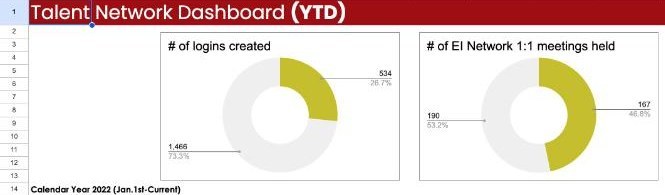
I also built reporting so leadership could see how programs were doing without chasing each team for numbers. I set up one performance dashboard workbook in Google Sheets with a section for each program and charts showing progress toward its goals. Behind the dashboard, each of the 7 programs had its own data tab, and every tab was labeled by how its numbers arrived: some were pulled in automatically from the program’s own reports and some were entered by hand. That small label told everyone which numbers would update on their own and which needed a person to keep them current.
The tabs themselves were built to answer the questions leadership actually asked. The talent network tab, for example, listed each goal next to the progress so far, the percent of the goal reached, last week’s change, a status such as on track or off track, and a note on where the data came from, so anyone reading it could trust the number and know where to check it.

The Results
- EmployIndy had its first system inventory, a clear map of its technology and where tools overlapped
- The inventory gave the organization a starting point for cybersecurity and continuity planning
- Tool decisions were based on documented needs instead of preference
- Teams moved shared work into Asana with a structure built around how they work
- Processes that lived in people’s heads were mapped and written down in formats people could follow
- Performance for 7 programs could be seen in one dashboard workbook
The order is the part I still use with every client. I learn what you already have, I choose tools that fit how your team really works, and I treat adoption as the finish line. A tool your team ignores costs the same as one they rely on, so getting people to use it is the real work.
Related case studies and reading
- Case study: Impact Actual: a tech stack recommendation for a coaching firm
- Read: Dubsado vs HoneyBook: Why I Chose Dubsado, and When HoneyBook Fits Better
- Read: What Is a Systems Strategist? (And When You Actually Need One)
Not sure which tools your organization needs?
Map what you have before you buy anything else. Tech stack consulting maps what you have and what you need. For bigger builds, see custom systems and how I work with nonprofits.


In this power-packed session, I show you how to connect Airtable + your CRM for smarter tracking, simplified workflows, and insights that actually move your business forward.
From Guesswork to Growth with Airtable


A step-by-step guide to setting up your new Dubsado account, area by area, so your trial ends with a system you can actually use.
21 Ways to Max Out Your Dubsado Free Trial

Hot Seat, Hot Takes, Hot Damn.

Free masterclasses that show you exactly how scalable businesses are built.




© 0000 Cait Potter Creative, LLC
Privacy Statement and Terms & Conditions


