













A Dubsado setup costs anywhere from nothing but your own time to $4,497 or more, depending on who does the building. That range is why “what does a Dubsado setup cost?” is one of the most common questions I get. I’m a Dubsado Certified Specialist, I’ve built Dubsado setups for more than 150 businesses since 2020, and I publish my prices. So here’s the honest Dubsado setup cost breakdown: what each option costs, what it includes, and what doing it yourself actually costs you.
Dubsado setup cost at a glance
| Option | Investment | Who builds it | Timeline | Support after launch |
|---|---|---|---|---|
| DIY | Your time (plus the Dubsado subscription) | You | Usually months | Dubsado’s help center and support team |
| Done-With-You | $1,997 | You, with my plan, a course, and support | 4 weeks | 4 weeks of support while you build |
| Done in a Week | $3,997+ | I do | One week | 14 days of Hiccup Help |
| Done-For-You | $4,497+ | I do | About 4 weeks | 30 days of support |
| System Design | $500+ | I design it | Scheduled at kickoff | 1 round of revisions |
All of these sit on top of the Dubsado subscription itself, which is $335 a year for Starter or $525 a year for Premier. If you want your setup to automate anything, you need Premier, because Flows (Dubsado 3.0’s name for workflows) and schedulers are Premier features. My code XOCAIT takes 30% off your first payment: your first month on monthly billing, or your whole first year on annual. You can start your Dubsado trial with my code here. (Disclosure: it’s my Certified Specialist referral code.)
Why a professional setup costs what it does
Here’s the thing: a full Dubsado setup is mostly about the backend of your business, which is the backbone of HOW you do what you do. Anyone can click around in the software. What you’re paying for is someone who knows what your client should experience at each step, which steps can run without you, and how to build it so it doesn’t fall apart the first time your business changes.
A good setup pulls together skills you rarely find in one person: process strategy, project management, copywriting that sounds like you, form design, and the ability to teach you a complex system so you can run it yourself afterward. The task board I use to manage setups has dozens of tasks that have to happen in a specific order. Do them out of order and you end up stopping halfway through one task to go build the piece you forgot.
What you get out of it is time, consistency, and security. Every client gets the same experience whether you’re having a great week or a terrible one. Automation doesn’t make that experience impersonal. It means EVERYONE gets your best day.
What each option includes
Done-With-You: $1,997
For hands-on owners who want to build it themselves with an expert plan. We map your process together in a 120-minute Process Mapping Session, then you build over 4 weeks with a step-by-step course (video, written, and click-by-click instructions, with lifetime access). You also get 6 code-free form templates, 40+ canned email templates, Canva templates, client portal customization, payment plan mapping, and support from me while you build. When you’re done, you know exactly how your system works, because you built it. See the Done-With-You setup.
Mamacita Margarita took the done-with-you route and finished building in 4 weeks, with 100 of 121 steps automated and a 1588% return on investment.
Done in a Week: $3,997+
The full done-for-you build on a fixed one-week schedule. Monday is your Systems Blueprint Intensive, included. You review the map within 24 hours, I build Tuesday through Thursday, and your system goes live Friday, with 14 days of Hiccup Help after handoff. It only works if you can give feedback inside that 24-hour window, so it’s for owners who can clear the week. See Done in a Week.
Done-For-You: $4,497+
I map, build, and test your whole system, then hand it back ready to run in about four weeks. It includes a 120-minute Process Mapping Session, every workflow we map in that session, payment plan mapping, client portal customization, custom code-free forms, canned emails written to sound like you, your packages and products entered for you, a live 1:1 offboarding call, a detailed Next Steps Guide, and 30 days of support. See the Done-For-You Dubsado setup.
Mill Pond Estate is one done-for-you example: 92% of client experience tasks automated, 258 hours saved a year, and a 455% return on investment.
System Design add-on: $500+
Design only, no workflow setup. You get a signature proposal design, lead capture form setup, contract template styling, plus a branded client portal and email signature as bonuses, with one round of revisions. It works on its own if your system runs fine but your forms don’t match your brand, and you can add it to a Done-With-You setup or to a DIY build if you want the building to be yours and the design to be mine. Additional forms are priced per form. See System Design.
Not sure which one you need? Start with a Systems Blueprint Intensive ($497). In one 2-hour working session we map your client journey, find what’s breaking, and decide exactly what your Dubsado setup needs, whoever ends up building it. Every option is also laid out side by side on my Dubsado setup services page.
What a DIY Dubsado setup really costs
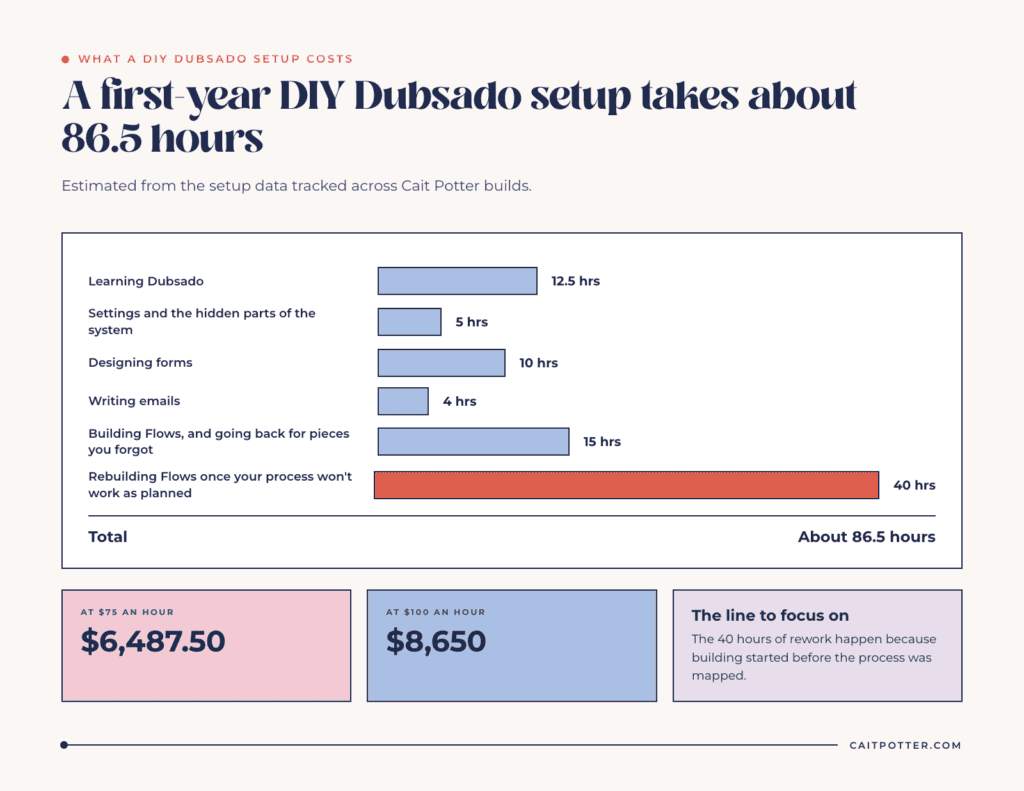
DIY looks free because you don’t write anyone a check, but you pay in hours, and hours are the most expensive thing a small business owner has. Here’s my estimate for a typical first-year DIY setup, calculated from the setup data I track across my own builds:
| DIY task | Estimated time |
|---|---|
| Learning Dubsado | 12.5 hours |
| Setting up settings and the hidden parts of the system | 5 hours |
| Designing forms | 10 hours |
| Writing emails | 4 hours |
| Building Flows (and going back for the pieces you forgot) | 15 hours |
| Rebuilding Flows once you realize your process won’t work as planned | 40 hours |
| Total | About 86.5 hours |
And that’s before the 3 to 4 hours a week many owners keep spending on tasks they couldn’t figure out how to automate.
Now put your own number on it. Multiply those hours by what an hour of your time is worth, whether that’s your billable rate or what you’d earn if those hours went to client work. At $75 an hour, 86.5 hours is $6,487.50. At $100 an hour, it’s $8,650. Either way, it’s more than any of the options in the table above, and it doesn’t count the leads that slip through while the system is half-built, the proposals that go out late, or the clients who get a different experience depending on how busy you were that week.
The 40 hours of rework is the line I’d focus on. It’s where most DIY setups stall, and it happens because the building started before the process was mapped. You can’t automate a process you don’t understand.
If hiring out isn’t in the budget yet
At least skip the rework. Map before you build. Dubsado Alchemy takes your answers about how your business actually runs and gives you a build-ready Workflow Map, with every email, form, scheduler, and workflow step mapped together. Your first credit is free. And if you want a strategist’s eyes on your process before you build, the Systems Blueprint Intensive is designed for exactly that.
How to choose
- Choose DIY if your process is simple, you enjoy learning software, and you have the hours to spare.
- Choose Done-With-You if you want to build it yourself but with a plan and someone to ask when you get stuck.
- Choose Done in a Week if you want it built for you and can clear one week for fast feedback.
- Choose Done-For-You if you want it built and handed back on a normal timeline.
- Add System Design to Done-With-You or DIY if your forms and portal need to look like your brand.
If you’re still deciding whether Dubsado is the right platform at all, read my Dubsado vs HoneyBook comparison or my overview of what Dubsado is and who it’s for. For more on the return you can expect, see the ROI of working with a systems strategist.
Keep reading: Dubsado pricing for 2026, including the best Dubsado discount.
Dubsado setup cost FAQ
How much does a Dubsado setup cost?
It depends on who builds it. My Done-With-You setup is $1,997, Done in a Week starts at $3,997, and Done-For-You starts at $4,497. A design-only System Design package starts at $500. DIY costs your time, often 80 or more hours in the first year.
How long does a Dubsado setup take?
Done in a Week takes one week. Done-For-You and Done-With-You take about four weeks. DIY setups often take months, mostly because of rework.
Is it worth hiring a Dubsado specialist?
If your time is worth more than a few dollars an hour, usually yes. A specialist brings the process strategy, not just the software knowledge, and that’s what prevents the rework that makes DIY setups so expensive.
Do I need Dubsado Premier for a professional setup?
If you want automation, yes. Flows and schedulers are only on Premier. Starter can handle forms, contracts, and invoicing, but you’d send everything manually.
Ongoing COO-level support to maintain and refine your systems as the business grows so operations stay steady and decisions stop piling up on your plate.

Support
Custom Dubsado, Airtable, and Moxie systems designed for capacity, not survival. Built around how your business actually runs so growth does not create more chaos.

Systems
Map, audit, or optimize the system that is slowing your business down. Workflows, offers, tech stacks, or the process that keeps living in your head instead of your business.

Strategy
services
These are.
Busy isn't a business plan.


In this power-packed session, I show you how to connect Airtable + your CRM for smarter tracking, simplified workflows, and insights that actually move your business forward.
From Guesswork to Growth with Airtable


A step-by-step guide to setting up your new Dubsado account, area by area, so your trial ends with a system you can actually use.
21 Ways to Max Out Your Dubsado Free Trial

Hot Seat, Hot Takes, Hot Damn.

Free masterclasses that show you exactly how scalable businesses are built.




© 0000 Cait Potter Creative, LLC
Privacy Statement and Terms & Conditions


