
















Dubsado 3.0 is the biggest change to the platform since I started building in it in 2020. It’s a ground-up rebuild, launched in late 2025, and Dubsado has been shipping updates to it almost every few weeks since. If you set up your account in 2.0 and haven’t looked closely since, some of what you built works exactly the same, some of it looks different, and a few things are worth testing before a real client finds the problem for you.
This post is for existing Dubsado users. I’ll cover what changed, what has come back over the last year, and what I’d check and rebuild in your account. Everything here is pulled from Dubsado’s own announcement and changelogs through October 2026.
What Dubsado 3.0 actually is
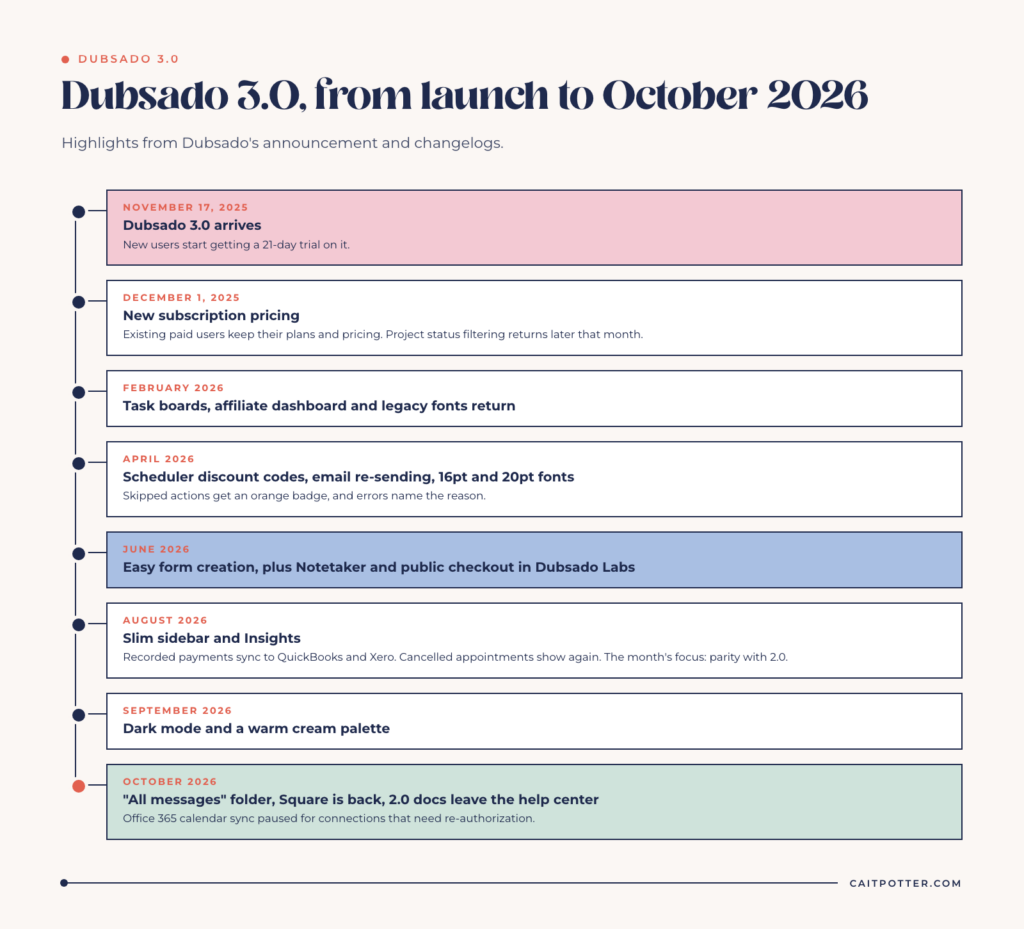
Dubsado describes 3.0 as a complete rebuild meant to make the platform faster to learn and easier to use. Dubsado’s 3.0 help center collection dates the new version to November 17, 2025, the same day new users started getting a 21-day trial on it. New subscription pricing followed on December 1, 2025. Existing paid users kept their plans and pricing, according to the launch announcement. (For what Dubsado costs and who it’s for, see my overview of Dubsado.)
The rebuild touched almost every screen you use as the business owner. Your clients’ side changed much less, which matters for how worried you should be.
What changed in Dubsado 3.0
Workflows are now called Flows
The most visible rename: workflows are now Flows, built in a node-based builder. The concept is the same. A Flow is still a sequence of actions applied to a project, triggered by things like a signed contract or a paid invoice, or by a set number of days. You’ll still see “workflow” used in some of Dubsado’s own changelogs, so don’t let the two names confuse you. They’re the same feature.
Projects, lists, and views
Lists across the platform can now display as a table or a Kanban board, with columns, filters, and grouping you configure. The Projects list works as a customizable workspace in either view. When 3.0 launched, project statuses weren’t fully back yet. Dubsado brought status filtering back in December 2025, so you can filter the project list by status again and see a count for each one. If you use statuses to track where every client is, this was the update that made 3.0 usable for you. (If you’re still deciding between statuses and tags, here’s how I use project statuses vs tags.)
Messages
Email moved into a Messages inbox with Inbox, Sent, and Archive folders, threading, built-in templates, and scheduled sending. You can also reassign an email from one project to another. In October 2026, Dubsado added an “All messages” folder that shows every thread for a project or contact.
Invoicing and payments
Invoicing now lives outside of projects as its own area, with recurring invoices, transaction views, packages, discounts, payment plans, and autopay editing in one place. Manually recorded payments now sync to QuickBooks and Xero (added in August 2026), and Square is available again alongside PayPal as of the October 2026 changelog.
Calendar, schedulers, and time tracking
The calendar was rebuilt with month, week, day, and upcoming views. Scheduler availability now follows your brand time zone from your calendar and time zone settings rather than your browser’s time zone. There’s also a global time tracker that calculates earnings at a rate you set.
The look
In August 2026 the top bar was replaced with a slim sidebar, and finance reports, project reports, and the chart of accounts moved into a section called Insights. In September 2026, dark mode arrived and the palette shifted from cool gray to warm cream. Dubsado says client-facing pages, emails, and portals look unchanged by that redesign.
What came back, and what’s new, in 2026
A lot of the frustration with 3.0 in its first months was about things that existed in 2.0 and weren’t there yet. Dubsado has been closing those gaps steadily. The August 7, 2026 changelog says outright that the month’s work was focused on bringing 3.0 to parity with 2.0. Some of the returns that matter most for a working setup:
- Project status filtering (December 2025)
- Task boards, redesigned, and the affiliate dashboard (February 2026)
- Legacy fonts in the form builder, so proposals can match your brand again (February 2026)
- Scheduler discount codes, email re-sending, and the 16pt and 20pt font sizes (April 2026)
- Cancelled appointments showing again in project and contact views (August 2026)
And some genuinely new tools:
- Easy form creation (June 2026). Describe a form or upload a PDF, and Dubsado generates it with smart fields mapped. This is 3.0 only, and the original builder is still there.
- Notetaker (June 2026). A Dubsado Labs feature you turn on in Settings that joins video calls and gives you a recording, transcript, and summary.
- Public checkout page (June 2026). Another Labs feature, rolling out slowly, where clients enter their own payment amount.
- Skipped-action badges (April 2026). Skipped workflow actions now show an orange badge and skip icon, and workflow errors tell you the specific reason something failed.
Is Dubsado 2.0 going away?
Not yet. For now, accounts can still switch back to 2.0, and Dubsado hasn’t announced a retirement date. But Dubsado is clearly pushing everyone toward 3.0. Its October 2026 changelog says the 2.0 help docs have moved out of the help center (you can still reach them by chatting with Dubbie), the help center is now organized around 3.0, and new features like easy form creation are 3.0 only. I’d treat 3.0 as the version your business runs on and plan accordingly, rather than building anything new in 2.0.
What to check and rebuild in your account
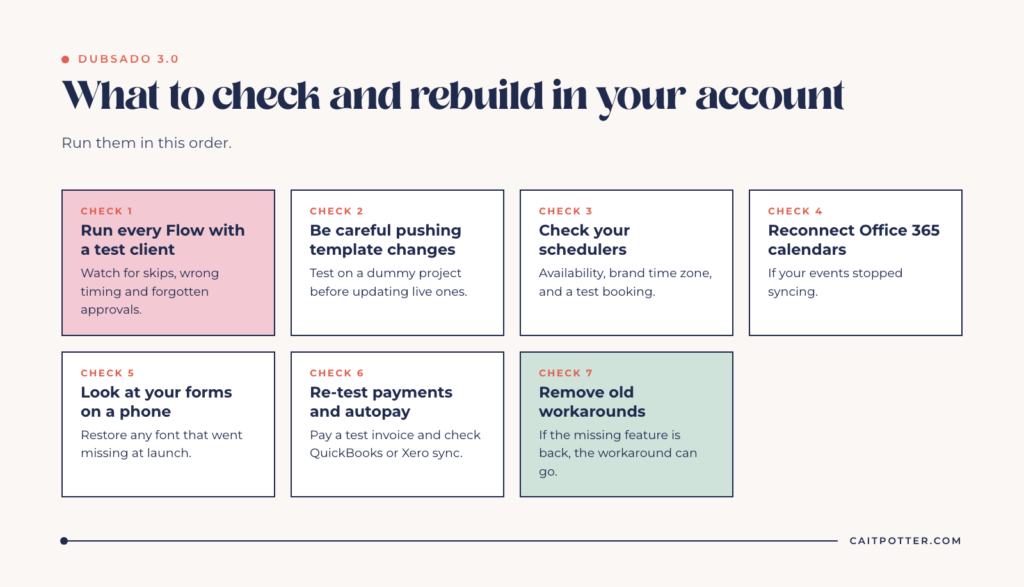
You probably don’t need to rebuild everything. In my clients’ accounts, 2.0 workflows carried over cleanly as Flows. But whether something carried over and whether it works the way you think it does are two separate questions, and both are worth confirming. Here’s the checklist I’d run, in this order.
1. Run every Flow with a test client
Create a test project with your own email address and push it through each Flow from start to finish. Watch for actions that skip, send at the wrong time, or wait on an approval you forgot about. The orange skip badges make this much easier to spot than it used to be. And if you’re still relying on workflow approvals, read why I never use Dubsado workflow approvals before you rebuild them as-is.
2. Be careful pushing template changes to active projects
When you update a Flow template and push it to projects already in progress, Dubsado now warns you that triggered actions can’t be undone. Take that warning seriously. If a client is mid-project, test the updated template on a dummy project before pushing it to real ones.
3. Check your schedulers
Schedulers built in 2.0 had several fixes this year, including time zone and date range issues. Open each scheduler, confirm your availability and brand time zone, then book a test appointment and make sure the confirmation and reminders arrive.
4. Reconnect your calendar if you use Office 365
As of October 1, 2026, Dubsado paused Office 365 calendar sync for connections that need re-authorization for Microsoft’s new API. If you’re on Microsoft and your events stopped syncing, reconnecting is probably the fix.
5. Look at your forms on a phone
Your forms carried over, but now is a good time to review them as your client sees them. If your proposal relied on a font that went missing at launch, the legacy fonts are back, so you can restore it.
6. Re-test payments and autopay
Pay a test invoice. Confirm autopay is on where it should be and that your payment plan due dates calculate correctly. If you use QuickBooks or Xero, check that recorded payments are syncing.
7. Rebuild what you were working around
This is the step people skip. If you spent the last year working around something that was missing in 3.0, check whether it’s back now and remove the workaround. Workarounds that outlive the problem they solved are how accounts get messy.
When to get help with your 3.0 account
If you ran through that list and found more broken than working, or you never fully trusted your 2.0 setup to begin with, this is a good moment to rebuild rather than patch. A rebuild in 3.0 starts the same way any of my builds do: mapping your actual client journey first, then building Flows, forms, and schedulers around it. You can see all of my Dubsado setup services, including a fully done-for-you Dubsado setup and a done-with-you option if you’d rather do the building yourself with a plan. If you’re brand new to the platform, start with getting started in Dubsado.
Keep reading: Dubsado pricing for 2026.
Dubsado 3.0 FAQ
Do my 2.0 workflows still work in 3.0?
In my clients’ accounts, yes. Their 2.0 workflows carried over cleanly and show up as Flows. Test each one with a test project anyway, because several workflow and scheduler bugs were fixed during 2026 and you want to confirm yours behaves the way you expect.
Are project statuses gone in Dubsado 3.0?
No. Status filtering on the project list came back in December 2025, with a count for each status.
Do I need to rebuild my forms?
Usually not. Review them as a client would, especially on mobile, and restore any branding that relied on fonts that were missing early on. Legacy fonts returned in February 2026.
Did Dubsado 3.0 change the price?
New pricing took effect December 1, 2025. According to Dubsado’s announcement, existing paid plan users kept their plans and pricing.
Ongoing COO-level support to maintain and refine your systems as the business grows so operations stay steady and decisions stop piling up on your plate.

Support
Custom Dubsado, Airtable, and Moxie systems designed for capacity, not survival. Built around how your business actually runs so growth does not create more chaos.

Systems
Map, audit, or optimize the system that is slowing your business down. Workflows, offers, tech stacks, or the process that keeps living in your head instead of your business.

Strategy
services
These are.
Busy isn't a business plan.


In this power-packed session, I show you how to connect Airtable + your CRM for smarter tracking, simplified workflows, and insights that actually move your business forward.
From Guesswork to Growth with Airtable


A step-by-step guide to setting up your new Dubsado account, area by area, so your trial ends with a system you can actually use.
21 Ways to Max Out Your Dubsado Free Trial

Hot Seat, Hot Takes, Hot Damn.

Free masterclasses that show you exactly how scalable businesses are built.




© 0000 Cait Potter Creative, LLC
Privacy Statement and Terms & Conditions


