














Airtable for service businesses gets sold two ways. One version says it can run your entire business. The other says it’s a fancy spreadsheet. Neither is useful when you’re trying to decide whether to move your operations into it.
I’m Airtable Builder Certified and I’ve built systems for more than 200 organizations across 75+ industries, so I’ve watched Airtable replace a lot of tools well, and I’ve watched people force it into jobs it was never meant to do. This post draws the line. What Airtable can replace in a service business, what it can’t, and what the plan limits mean before you commit.
What Airtable is, in plain terms
Airtable is a database that looks like a spreadsheet. The difference that matters is linking. In a spreadsheet, a client’s name typed into five tabs is five separate pieces of text. In Airtable, a client is one record, and every project, task, invoice and note links back to it. Change the client’s email once and it’s correct everywhere.
On top of the data, Airtable gives you views (filtered and sorted versions of a table), forms, automations that run when records change, and Interface Designer, which builds simple pages your team works from without touching the raw tables. If you want a longer introduction, start with my post on Airtable as a database in a spreadsheet.
What Airtable can replace
The spreadsheets you copy every month
If you duplicate a spreadsheet tab every month to track leads, revenue or capacity, Airtable replaces that with one table and a filtered view per month. The history stays in one place, and you can compare this March to last March without opening two files.
Project and task trackers
Airtable handles project management well when your projects follow a repeatable structure. Projects link to tasks, tasks link to team members, and a kanban or calendar view shows what’s due. For example, a design studio can track each project’s phases, who owns each one, and how many active projects each designer has right now.
When an artist career management agency moved its work into one base with 13 linked tables, it replaced 23 separate client bases and now tracks more than 4,400 client projects in one place.
Intake that lands in someone’s inbox
Airtable forms write directly into a table, so a request becomes a record with a status instead of an email someone has to remember to forward. Form submissions don’t count as paid users on Airtable’s Team or Business plans.
Reporting stitched together by hand
If you pull numbers from three tools into a spreadsheet at the end of each month, Airtable can receive that data automatically through integrations like Zapier and show it on a dashboard. This is the work I do most often with Airtable, and it’s covered on my custom dashboard creation page.
Internal reference lists
Vendor lists, service menus, SOP indexes, equipment, templates. Anything your team looks up repeatedly and currently searches a shared drive for.
Equipment is a good example. The Party Bar tracks 226 rental variations in Airtable, each with its stock, price and restock time, while Dubsado runs the client side.
What Airtable can’t replace
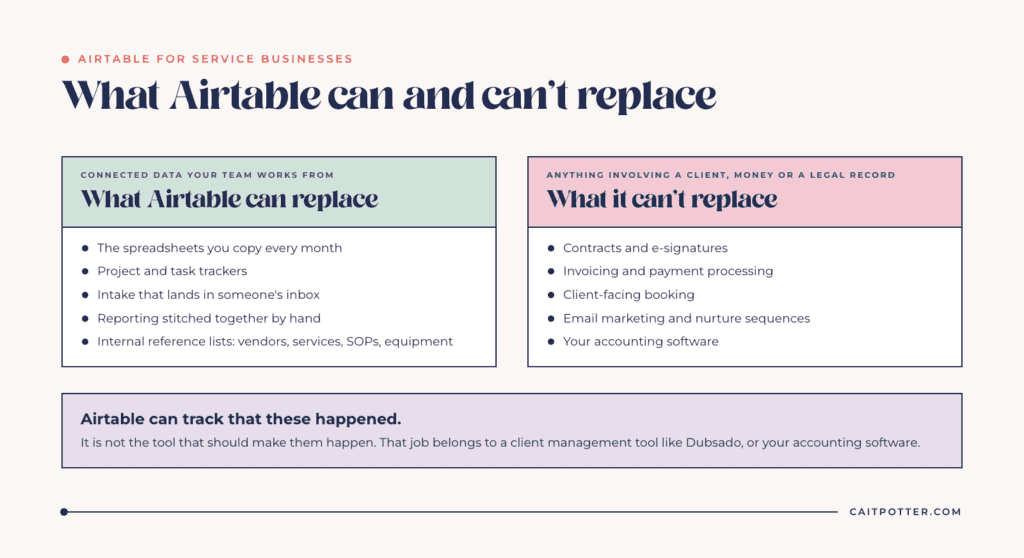
Everything on this list involves a client, money or a legal record. Airtable can track that each of these happened. It isn’t the tool that should make them happen, and building workarounds for them usually means stacking three or four extra tools around a base that was never meant to be client-facing.
Contracts and e-signatures
Airtable has no built-in contract signing. If clients sign agreements for each project, you need a tool built for that.
Invoicing and payment processing
Airtable can track what’s been invoiced and paid, but it doesn’t send invoices or process payments itself. A client management tool like Dubsado, or your accounting software, should own that.
Client-facing booking
Airtable doesn’t give clients a scheduler that checks your calendar and books a call. That belongs in a scheduling tool or your client management system.
Email marketing
Airtable automations can send emails, with limits by plan. On the Free plan, the “Send email” action can only reach collaborators on the base. None of this is a substitute for a newsletter or nurture sequence tool.
Your accounting software
You can report on financial data in Airtable. Your books, taxes and reconciliation still belong in accounting software.
If most of what you need is on this second list, Airtable probably isn’t your primary system. A client management tool is. I compare the two directly in Dubsado and Airtable, and the short version is that many service businesses end up using a client management tool for the client side and Airtable for everything behind it.
The plan limits that matter for a service business
Airtable’s plan limits shape what you can build, so check them before you design anything. These are from Airtable’s pricing page and support documentation as of October 2026.
| Plan | Price | Records per base | Automation runs a month | Editors |
|---|---|---|---|---|
| Free | $0 | 1,000 | 100 | Up to 5 |
| Team | $20 per user a month billed annually | 50,000 | 25,000 | Billed per editor |
| Business | $45 per user a month billed annually | 125,000 | 100,000 | Billed per editor |
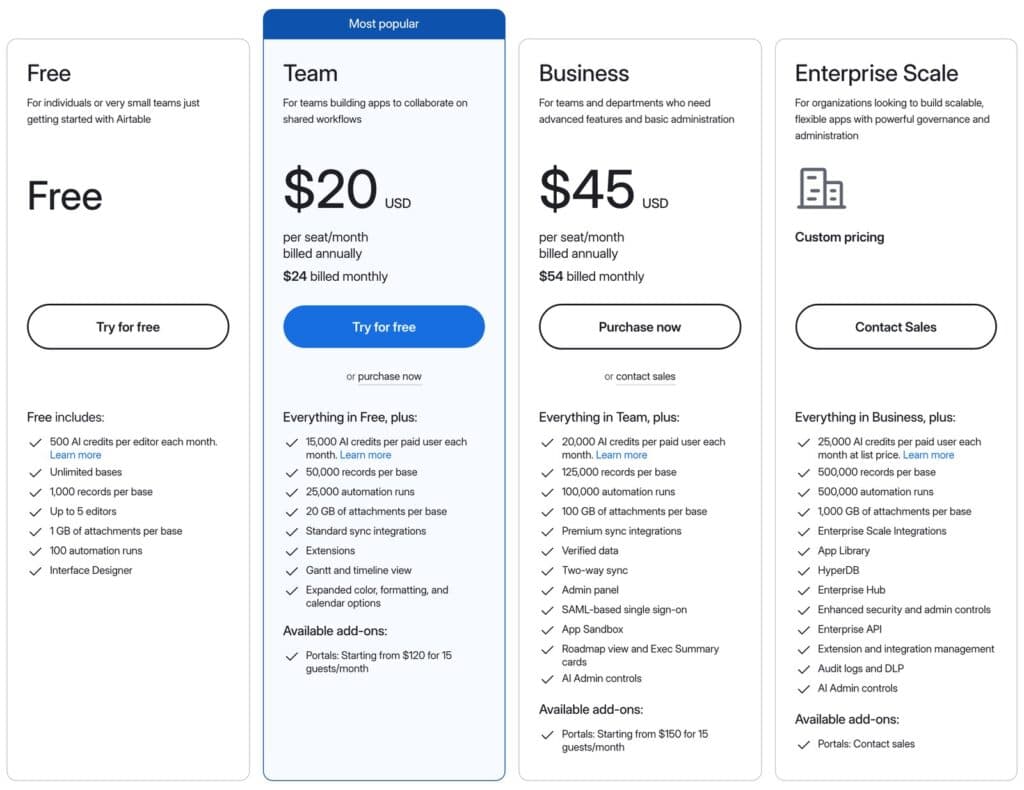
The two numbers that catch service businesses most often are records and automation runs. A thousand records sounds like a lot until you’re logging every task, every hour or every payment. And 100 automation runs a month on Free disappears fast once automations fire on every status change. Most of the businesses I build for need the Team plan. Airtable bills for every user with edit permission (on the Team plan, commenters count too), while read-only collaborators aren’t charged, which matters if you want contractors or assistants to see data without changing it.
How to decide if Airtable belongs in your stack
Ask these questions in order.
- Does information in my business need to connect across clients, projects, people and money? If yes, Airtable is a strong candidate.
- Do clients need to sign, pay or book inside the system? If yes, Airtable shouldn’t be the only tool.
- Am I rebuilding the same spreadsheet every month or every project? That’s the clearest sign Airtable will save time.
- Will someone own the base after it’s built? An Airtable base needs a person who updates it as the business changes.
That last one matters more than people expect. A simple base can be maintained by the owner. A complex one, with many tables, automations and integrations, usually needs someone keeping an eye on it after the build, whether that’s a team member or a few support hours a month.
Template or custom build?
Templates are fine when your process matches the template. Most service businesses don’t match closely enough, and adapting a template someone else designed often takes longer than building the right structure from the start. If you want help deciding what Airtable should own in your business, start with my Airtable setup services. If you already know what you need built, the done-for-you Airtable setup covers mapping, building and handoff.
Frequently asked questions
Is Airtable good for service businesses?
Yes, for operations that depend on connected data: projects, tasks, team capacity, intake and reporting. It’s a weaker fit for client-facing steps like contracts, payments and booking.
Can Airtable replace my CRM?
It can replace a contact and pipeline tracker. It can’t send contracts or invoices or take payments, so most service businesses keep a client management tool for those.
Is the Airtable free plan enough?
For a small test base, yes. The Free plan allows 1,000 records per base and 100 automation runs a month, which most working service businesses outgrow quickly.
Do contractors need a paid Airtable seat?
Only if they need to edit, or comment on the Team plan. Read-only collaborators aren’t charged on paid plans.
Ongoing COO-level support to maintain and refine your systems as the business grows so operations stay steady and decisions stop piling up on your plate.

Support
Custom Dubsado, Airtable, and Moxie systems designed for capacity, not survival. Built around how your business actually runs so growth does not create more chaos.

Systems
Map, audit, or optimize the system that is slowing your business down. Workflows, offers, tech stacks, or the process that keeps living in your head instead of your business.

Strategy
services
These are.
Busy isn't a business plan.


In this power-packed session, I show you how to connect Airtable + your CRM for smarter tracking, simplified workflows, and insights that actually move your business forward.
From Guesswork to Growth with Airtable


A step-by-step guide to setting up your new Dubsado account, area by area, so your trial ends with a system you can actually use.
21 Ways to Max Out Your Dubsado Free Trial

Hot Seat, Hot Takes, Hot Damn.

Free masterclasses that show you exactly how scalable businesses are built.




© 0000 Cait Potter Creative, LLC
Privacy Statement and Terms & Conditions


