














Volunteer management in Airtable usually starts as a single table of names, emails and a notes field that says things like “available Tuesdays, prefers kitchen.” That works for twenty volunteers. Once you have regular shifts, multiple programs and a funder asking how many volunteer hours you logged last year, a list stops being enough.
I’ve worked in and with nonprofits since 2014, and I’m Airtable Builder Certified. This post covers how I’d structure a volunteer system in Airtable for a small nonprofit: the tables, the sign-up forms, how to handle duplicate volunteers, reminders, giving volunteers access, and pulling hours for reports.
The tables you need
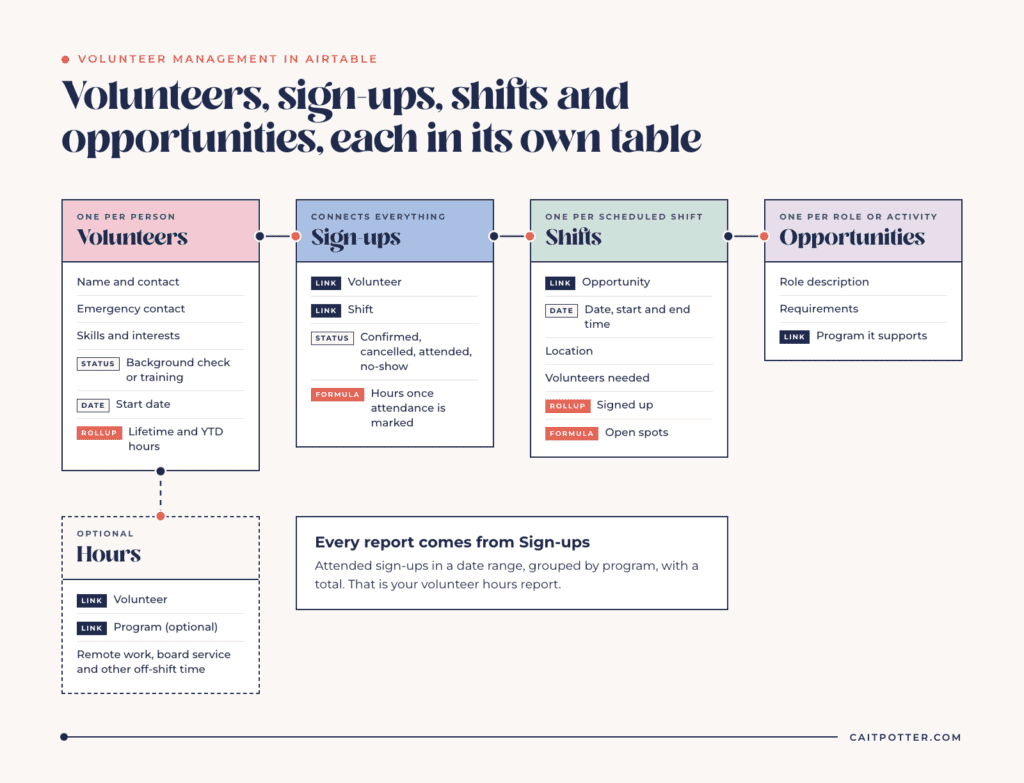
The mistake I see most often is putting everything about a volunteer in one row. Shifts, hours and sign-ups each need their own table, because each one happens many times per volunteer.
Volunteers
One record per person: name, contact information, emergency contact, skills, interests, background check or training status, and the date they started. Activity like shifts and hours belongs in the tables below.
Opportunities
One record per type of role or recurring activity, like food pantry intake, tutoring or event setup. Store the description, requirements and the program it supports.
Shifts
One record per scheduled shift, linked to its opportunity, with a date, start and end time, location and the number of volunteers needed. A rollup counts how many people are signed up, and a formula shows how many spots are still open.
Sign-ups
One record each time a volunteer signs up for a shift, linked to both the volunteer and the shift, with a status: confirmed, cancelled, attended or no-show. This is the table that connects everything. Every report you’ll want comes from here.
Hours
If your hours always match shift length, you can calculate hours directly on the sign-up record once attendance is marked. If volunteers also log hours outside scheduled shifts, like remote work or board service, add an Hours table where each entry links to the volunteer and, optionally, a program.
Sign-up forms and duplicate volunteers
Airtable forms write directly into a table, and form submissions don’t count as paid users on paid plans. The catch is duplicates. If a returning volunteer fills out your application form again, you get a second record for the same person, and their history splits in two.
A few ways to handle it:
- Use a separate form for new volunteer applications and a separate, simpler process for shift sign-ups, so returning volunteers aren’t re-applying.
- Treat email address as the identifier, and build a view that groups or flags records with the same email so a staff member can merge them weekly.
- For shift sign-ups, consider prefilled form links sent to known volunteers, or a portal where they sign in, so the volunteer is already identified.
Duplicates are one of the most common questions about volunteer bases in the Airtable Community, so plan for them before you launch the form.
Scheduling and filling shifts
A calendar view of the Shifts table shows what’s coming up. A filtered view of shifts with open spots in the next two weeks gives your coordinator a single list of what needs filling. Grouping sign-ups by volunteer shows who is carrying too much and who hasn’t been asked in a while.
For recurring shifts, create them in batches, a month or a quarter at a time, rather than one by one. A simple automation or a duplicated set of records works for most small programs.
Mark attendance on each sign-up within a day or two of the shift. It takes a coordinator a few minutes, and it’s the step that makes hours reporting accurate. It also shows you no-show patterns early, so you can follow up with a volunteer before they quietly drift away.
Reminders and follow-up
Automations can send shift reminders, thank-you notes after a shift, and alerts when a shift is short-staffed. Plan limits matter here. On the Free plan, the “Send email” automation action can only email collaborators on the base, so it can’t remind volunteers directly, and Free workspaces get 100 automation runs a month. The Team plan allows 25,000 runs a month, which covers reminders for most small volunteer programs. Many nonprofits also connect Airtable to the email tool they already use.
Giving volunteers access
Volunteers often want to see their upcoming shifts, sign up for new ones and update their own contact information. There are a few ways to do this.
Shared forms and shared views don’t require an account and work for simple needs. For a real login where volunteers see only their own information, Airtable sells Portals, an add-on for Team, Business and Enterprise Scale plans that lets outside users access your interfaces at a lower price per seat than a full collaborator. Eligible nonprofits can receive a 50% discount on Portals after their nonprofit plan is approved. Third-party portal tools that sit on top of Airtable are another option, each with its own pricing.
Whatever you choose, don’t add volunteers as editors on your base. Editors are billable on paid plans, and they’d see far more data than they need.
Reporting volunteer hours
Funders, annual reports and some grant matches ask for volunteer hours. When attendance is marked on each sign-up, the report is a filter: attended sign-ups in a date range, grouped by program, with a total. Rollups on the Volunteers table give lifetime and year-to-date hours per person, which also makes recognition easy.
If volunteer hours are part of a grant’s reporting, link programs to the grants that fund them so hours can be pulled per grant. My post on building a grant tracking system covers that structure.
When a dedicated volunteer tool makes more sense
Airtable is a strong fit when volunteer management is one part of a connected operations base alongside programs, grants and donors. A dedicated volunteer management product may fit better if you manage hundreds of volunteers across many sites, need built-in text messaging and check-in kiosks, or want a ready-made volunteer portal without designing one. The tradeoff is another separate system to keep in sync.
Volunteers are rarely the only thing coming in. At First Fruits Farm, volunteer sign-ups run alongside tours, harvest requests, speaking and sponsorships in 9 workflows, and volunteers sign the waiver as part of signing up. That build is in Dubsado, and you can see more examples in my nonprofit case studies.
What it costs
Eligible nonprofits get 50% off Airtable’s Team plan, which brings it to $12 per user a month. The discount applies to Team plans only, and Airtable AI isn’t included. My post on the Airtable nonprofit discount covers eligibility and the application process.
If you want a volunteer system built around how your programs actually run, that’s part of my nonprofit systems work. If you’d like the whole base designed and built for you, see done-for-you Airtable setup.
Frequently asked questions
Can Airtable be used for volunteer management?
Yes. With linked tables for volunteers, shifts and sign-ups, Airtable handles scheduling, attendance and hours reporting well for small and midsize programs.
How do I stop duplicate volunteer records in Airtable?
Separate new-volunteer applications from shift sign-ups, use email as the identifier, and keep a view that flags matching emails so staff can merge duplicates regularly.
Can volunteers log in to see their shifts?
Yes, through Airtable Portals, a paid add-on for Team, Business and Enterprise Scale plans, or through a third-party portal tool. Eligible nonprofits can get 50% off Portals.
Can Airtable email shift reminders to volunteers?
On paid plans, yes, through automations. On the Free plan, the Send email action can only email collaborators on the base.
Ongoing COO-level support to maintain and refine your systems as the business grows so operations stay steady and decisions stop piling up on your plate.

Support
Custom Dubsado, Airtable, and Moxie systems designed for capacity, not survival. Built around how your business actually runs so growth does not create more chaos.

Systems
Map, audit, or optimize the system that is slowing your business down. Workflows, offers, tech stacks, or the process that keeps living in your head instead of your business.

Strategy
services
These are.
Busy isn't a business plan.


In this power-packed session, I show you how to connect Airtable + your CRM for smarter tracking, simplified workflows, and insights that actually move your business forward.
From Guesswork to Growth with Airtable


A step-by-step guide to setting up your new Dubsado account, area by area, so your trial ends with a system you can actually use.
21 Ways to Max Out Your Dubsado Free Trial

Hot Seat, Hot Takes, Hot Damn.

Free masterclasses that show you exactly how scalable businesses are built.




© 0000 Cait Potter Creative, LLC
Privacy Statement and Terms & Conditions


