













Most service businesses should start with an off-the-shelf CRM. Dubsado, HoneyBook, and GoHighLevel exist because the basic client journey (inquiry, proposal, contract, invoice, onboarding) looks roughly the same across a huge number of businesses. But some businesses spend years forcing their process into software that was built for someone else’s. If that’s you, a custom CRM, or a custom system built around the CRM you already have, may be the better call.
I’ve been a Dubsado Certified Specialist since 2020, I’m Airtable Builder Certified, and I’ve worked with 200+ organizations across 75+ industries in more than a dozen platforms. Here’s how I decide when buying the software is enough and when it’s time to build something around how a business actually works.
Start with the process, then pick the software
The question “should I buy a CRM or build one?” skips a step. Before either answer makes sense, you need to know what your process is: which steps happen for every client, which ones are exceptions, where information gets typed twice, and who needs to see what.
When I map a business, the build-or-buy answer usually shows up on its own. If the map looks like a standard client service flow, a CRM will handle it. If the map has three kinds of clients moving through four programs, with data that has to roll up into reports, that’s a different conversation.
When an off-the-shelf CRM is the right call
Buy the software when:
- Your client journey is fairly standard. A lead comes in, you send a proposal, they sign and pay, you onboard them, do the work, and offboard them. Dubsado and HoneyBook are built for exactly this.
- You’re a solo business or a small team. A CRM gives you forms, contracts, invoices, scheduling, and automated workflows for a few hundred dollars a year. Dubsado’s Premier plan is $525 a year as of October 2026 (I break down the plans in my Dubsado pricing guide).
- Nobody on your team wants to maintain a system. A CRM vendor handles updates, hosting, payment processing, and security. That counts for a lot.
- You haven’t used your current CRM to its full extent. A lot of businesses that think they’ve outgrown Dubsado actually have a partial setup. Before you build something new, make sure the tool you already pay for is set up properly.
Signs it’s time to go custom
A custom system starts to make sense when the workarounds cost more than the build would. These are the signs I look for.
You’re copying the same information between tools
If a client’s details go into your CRM, then into a spreadsheet for reporting, then into a project tool for your team, you’re doing data entry three times. Every copy is another chance for a typo and another version that’s out of date. A custom system connects those tools so information gets entered once.
Your data has relationships a CRM can’t show
CRMs are built around one client and their projects. Many businesses track more than that: students in cohorts, donors with gifts across several campaigns, vendors tied to events, team members assigned to several programs. When records need to link to other records, a relational database like Airtable handles it far better than a pile of custom fields in a CRM.
That was the problem for an artist career management agency I worked with. They had 23 separate client bases, which I consolidated into one base with 13 linked tables, so a change to the system gets made once instead of 23 times.
You need reporting your CRM doesn’t offer
If you export to a spreadsheet every month just to see your numbers, the system isn’t doing its job. For Live Wilder Studio, I built an Airtable dashboard with 28 datapoints, fed by 10 Zaps, that needs only 2 manual entries a month.
Your business runs on a platform most specialists don’t touch
Industry-specific software, a course platform plus a CRM plus an email tool, or a set of Google Sheets and Forms that grew over the years. None of that is wrong, but it needs someone to design how the pieces connect, and most setup specialists only work in one or two tools.
No tool does what you need out of the box
Sometimes the honest answer is that nothing on the market fits. In that case a custom build, from an Airtable base to something built from scratch, can cost less over time than paying for three tools that each do part of the job.
The middle path most businesses take
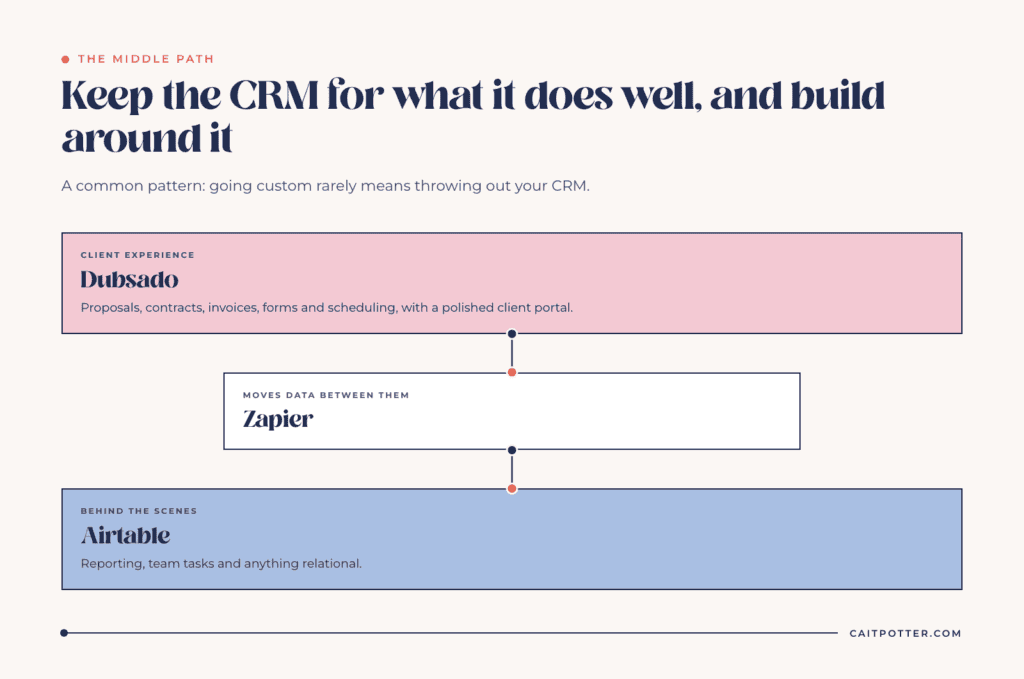
Going custom rarely means throwing out your CRM. More often it means keeping the CRM for what it does well and building around it.
A common pattern: Dubsado runs the client experience (proposals, contracts, invoices, forms, and scheduling), Airtable sits behind it for reporting, team tasks, and anything relational, and Zapier moves data between them. I wrote more about that pairing in Dubsado and Airtable. Your clients get a polished client portal, and you get the reporting and structure your CRM can’t give you.
That’s what I mean by custom systems. The platform is whatever fits the job. Sometimes that’s the tool you already pay for, set up properly. Sometimes it’s several tools connected so information only gets entered once.
What a custom build actually takes
Custom is a real commitment, and it’s worth being clear-eyed about the cost before you start.
Money. My Custom System Build starts at $3,397. Multi-tool systems and builds with heavier automation are quoted after mapping, because the scope can’t be known before then.
Time. Most custom builds take 6 to 8 weeks from mapping to launch. You’ll need to be in the mapping session, review the build plan, and test before launch. A system built without your input ends up built around my best guess about your business.
Decisions. A system has to be built around decisions that stick. If your offers, pricing, or team roles are changing every month, settle those first.
An owner. A custom system needs someone keeping an eye on it after launch. Tools update, automations break, and the business keeps changing. If that won’t be you or someone on your team, plan for ongoing support from the start.
How to decide
If you’re still unsure, try this. Write down every tool you pay for and the job each one does. Then mark every place where you move information between tools by hand. If the list is short and the hand-offs are few, set up your CRM properly and stop there. If the list is long and you spend hours a week acting as the connection between your own tools, it’s time to look at a custom system.
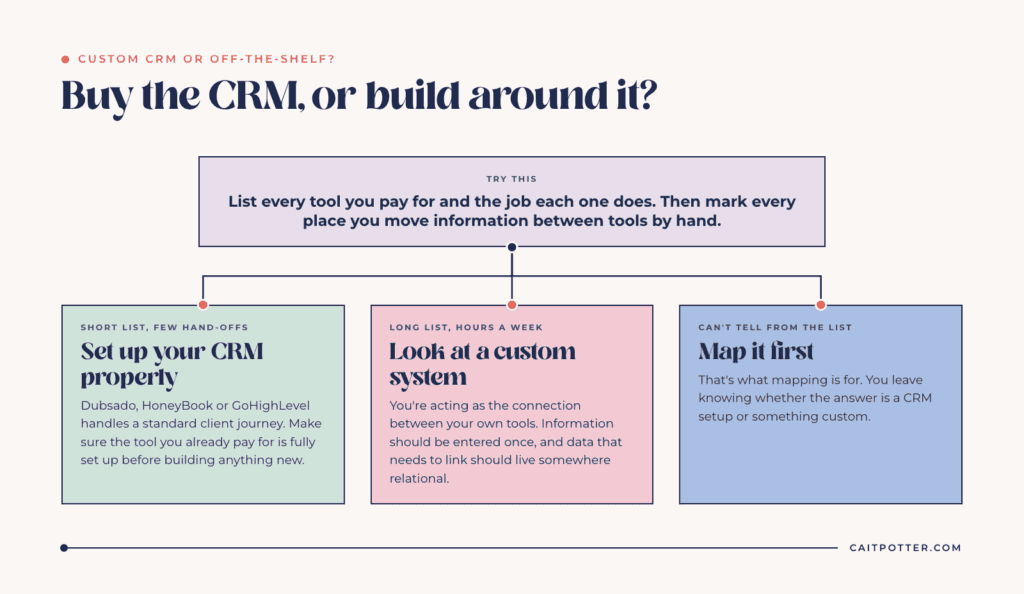
If you can’t tell from the list, that’s what mapping is for. A Systems Blueprint Intensive maps your full client journey in a 2-hour working session, and you leave knowing what to build, whether that turns out to be a CRM setup or something custom. For more on why the patchwork approach costs more than it looks, read why Post-it notes and random fixes hold your business back.
Frequently asked questions
Is a custom CRM more expensive than buying one?
Up front, yes. My custom builds start at $3,397, while a CRM subscription can cost a few hundred dollars a year. The math changes when you pay for several overlapping tools and spend hours a week moving data between them. Compare the build cost to what the workarounds cost you in time and subscriptions over a year or two.
Can I keep Dubsado and still have a custom system?
Yes, and that’s one of the most common setups I build. Dubsado handles the client-facing work, and a custom layer in Airtable or Google Workspace handles reporting, team tasks, and anything relational, connected with Zapier.
How long does a custom system take to build?
Most custom builds take 6 to 8 weeks from mapping to launch. Larger multi-tool systems are scheduled during planning.
Which platforms can a custom system be built in?
Just about anything: Airtable, Notion, ClickUp, Google Workspace and Apps Script, GoHighLevel, Kajabi, MemberVault, or a build from scratch. The mapping and system design work the same way whatever the platform.
Ongoing COO-level support to maintain and refine your systems as the business grows so operations stay steady and decisions stop piling up on your plate.

Support
Custom Dubsado, Airtable, and Moxie systems designed for capacity, not survival. Built around how your business actually runs so growth does not create more chaos.

Systems
Map, audit, or optimize the system that is slowing your business down. Workflows, offers, tech stacks, or the process that keeps living in your head instead of your business.

Strategy
services
These are.
Busy isn't a business plan.


In this power-packed session, I show you how to connect Airtable + your CRM for smarter tracking, simplified workflows, and insights that actually move your business forward.
From Guesswork to Growth with Airtable


A step-by-step guide to setting up your new Dubsado account, area by area, so your trial ends with a system you can actually use.
21 Ways to Max Out Your Dubsado Free Trial

Hot Seat, Hot Takes, Hot Damn.

Free masterclasses that show you exactly how scalable businesses are built.




© 0000 Cait Potter Creative, LLC
Privacy Statement and Terms & Conditions


