

















A process mapping session is a working meeting where you walk through how your business actually runs, step by step, so you can see what’s working, what’s breaking, and what to build next. If someone has told you to map your process before a system build and you aren’t sure what that involves, this post covers what happens in a process mapping session, how to get ready for one, and exactly what my Systems Blueprint Intensive includes.
Why mapping comes before building
You can’t automate a process you don’t understand. When a system fails, the cause is usually upstream of the software: nobody designed how everything should work, so the tool got set up around guesses.
Spending time on mapping can feel slow when you just want the thing built. Every decision you make during mapping, though, is one you don’t have to make mid-build, when you’re moving fast and clients are waiting. The effort doesn’t disappear. It moves to the cheapest place to pay it.
Signs you’re ready for one
A process mapping session is most useful at a turning point. You might be ready for one if:
- Your team asks you the same questions every week, because the answers are only in your head
- Clients regularly email to ask what happens next
- You bought software that was supposed to fix things, and it didn’t
- You’re about to hire, launch a new offer, or invest in a system build
- You know something is off in your backend, but you can’t say exactly where
If two or more of those sound familiar, mapping before you build or buy anything will save you from paying to automate the wrong process.
What happens in a process mapping session
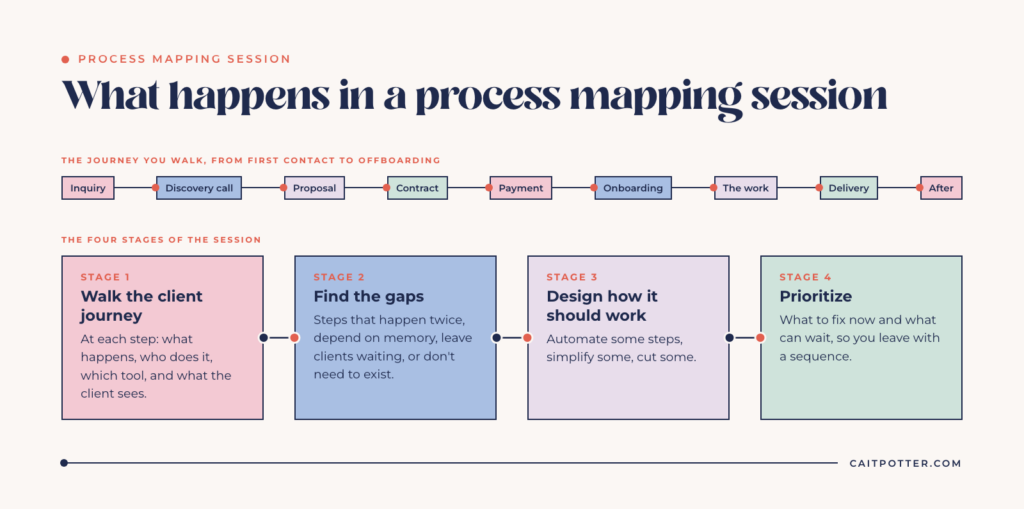
Every business is different, but a good session moves through the same four stages.
Walking the client journey
We start at the very beginning, when someone first finds you, and walk forward to offboarding: inquiry, discovery call, proposal, contract, payment, onboarding, the work itself, delivery, and what happens after. At each step we note what happens, who does it, which tool it happens in, and what the client sees.
This part tends to surface things you didn’t realize you were doing. The follow-up email you write from scratch every time. The spreadsheet only you know how to update. The step you quietly skip when you’re busy.
Finding the gaps
Once the journey is laid out, the problems are much easier to spot: steps that happen twice, steps that depend on you remembering, places where clients wait on you with no idea what’s next, and steps that don’t need to exist at all.
Designing how it should work
Next comes the redesign. Some steps get automated, some get simplified, and some get cut. This is where the decisions happen, like which form goes out when, what triggers a reminder, and what the client sees at each stage. The goal is a workflow that supports how you actually run your business.
Prioritizing
Not everything needs fixing this month. The last stage sorts what to fix now and what can wait, so you leave with a sequence instead of a wish list.
What the Systems Blueprint Intensive includes
The Systems Blueprint Intensive is my version of this session: one focused 2-hour working session for $497. In it, we:
- Map your full client journey, from lead to offboarding
- Find the inefficiencies and the steps that don’t need to exist
- Design workflows that support how you actually run your business
- Prioritize what to fix now and what can wait
You leave with:
- A fully mapped workflow built around your business
- Clear recommendations for what to automate, simplify, or remove
- A prioritized action plan
- A step-by-step system blueprint you can implement with confidence
- A recording of our session
It works with whatever tools you use, whether that’s Dubsado, Airtable, HoneyBook, Notion, Google Workspace, or your own combination. The tool comes second. The process comes first.
How to get ready
Plan for 2 to 3 hours of prep on your side before the Intensive. The more prepared you are, the more we get through in the session.
For any mapping session, with me or anyone else, the most useful preparation is simple. Know which tools you currently use and what each one does. Think through what happens for a typical client from first contact to the end of the project. Note the places where things get stuck or where you keep doing the same task by hand. And think about what you want your clients to experience, because that decision shapes everything else.
What the session doesn’t cover
The Intensive is about strategy: what your system should do and why. It won’t teach you how to use your software. You leave with the plan, and building it is the next step.
If your business is complex and you think 2 hours won’t be enough, get in touch before booking and we’ll scope it together.
What happens after the session
You leave knowing what to build, what to automate, and what to do first. Then you choose how to move forward. You can implement the plan yourself, get support while you build with a done-with-you setup, or have it built for you with Dubsado setup services or a custom Airtable system.
If you already have a Dubsado setup, that’s a good starting point. We map what you have, keep what works, and fix what doesn’t. Plenty of people come in with a setup that technically works but doesn’t match how they run their business.
What it looks like in practice
For the Sewing + Fitting Mentor Summer Camp, a live workflow mapping session planned how a one-woman sewing studio could handle summer camp registrations, payments, and parent communication in Dubsado while keeping control of class sizes. The result: 13 of 16 summer camp admin steps automated and 100+ hours saved a year. The case study walks through what was planned and why.
Hobart & Haven is another example. In her Process Mapping Session, Amy and I mapped 146 steps across Save the Dates, invitations and day-of materials, and 128 of them are now automated.
Is it a good fit?
The Intensive is right for you if you:
- Know your systems could be working better but aren’t sure what to fix
- Have a Dubsado setup (or any setup) that feels messy, manual, or disconnected
- Are ready to make decisions and move forward with a clear plan
It’s not the right fit if you want a quick fix without understanding the full system, aren’t ready to implement or follow through on the plan, or want someone to jump straight into building without a strategy.
If you’re still working out whether you need outside help at all, read what a systems strategist does and when you need one.
Frequently asked questions
How long is a process mapping session?
The Systems Blueprint Intensive is a 2-hour working session, plus 2 to 3 hours of prep on your side beforehand. Complex businesses sometimes need more time. If that’s you, get in touch before booking and we’ll scope it together.
How much does the Systems Blueprint Intensive cost?
The Systems Blueprint Intensive is $497.
What do I get at the end?
A fully mapped workflow, clear recommendations for what to automate, simplify, or remove, a prioritized action plan, a step-by-step system blueprint, and a recording of the session.
Will the session teach me how to use my software?
No. The session is about strategy: what your system should do and why. You leave with the plan, and you can build it yourself or have me build it.
What if I already have a Dubsado setup?
Good. We map what you have, keep what works, and fix what doesn’t.
Ongoing COO-level support to maintain and refine your systems as the business grows so operations stay steady and decisions stop piling up on your plate.

Support
Custom Dubsado, Airtable, and Moxie systems designed for capacity, not survival. Built around how your business actually runs so growth does not create more chaos.

Systems
Map, audit, or optimize the system that is slowing your business down. Workflows, offers, tech stacks, or the process that keeps living in your head instead of your business.

Strategy
services
These are.
Busy isn't a business plan.


In this power-packed session, I show you how to connect Airtable + your CRM for smarter tracking, simplified workflows, and insights that actually move your business forward.
From Guesswork to Growth with Airtable


A step-by-step guide to setting up your new Dubsado account, area by area, so your trial ends with a system you can actually use.
21 Ways to Max Out Your Dubsado Free Trial

Hot Seat, Hot Takes, Hot Damn.

Free masterclasses that show you exactly how scalable businesses are built.




© 0000 Cait Potter Creative, LLC
Privacy Statement and Terms & Conditions


