














The Airtable nonprofit discount is one of the reasons I recommend Airtable to so many small nonprofits. It takes half off the price of the Team plan. It also comes with conditions that a lot of organizations don’t find out about until after they’ve applied, or until they try to turn on a feature that isn’t included. I’ve worked in nonprofits since 2014, I hold a master’s in nonprofit management, and I’m Airtable Builder Certified, so I spend a lot of time explaining exactly what this discount covers. Here’s the full picture, taken from Airtable’s own support documentation.
The Airtable nonprofit discount at a glance
| Nonprofit Team plan | |
|---|---|
| Discount | 50% off |
| Plans it applies to | Team only |
| Price | $12 per billable user per month ($144 per user per year) |
| Annual billing discount | Does not stack |
| Payment method | Credit card only |
| Airtable AI | Not available |
| Portals | 50% off, on request after approval |
| Renewal | Automatic, no annual reapplication |
What you get
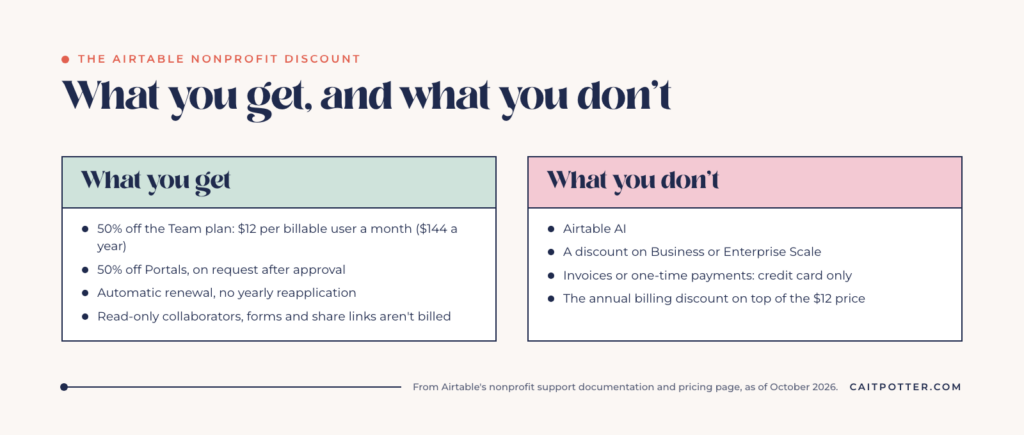
50% off the Team plan
Airtable’s support page describes the nonprofit discount as a 50% monthly discount per user on Team plans. It’s calculated from the monthly Team rate of $24 per user, which brings the price to $12 per user per month, or $144 per user per year.
For context, Airtable’s pricing page lists Team at $20 per user per month when you pay annually. The nonprofit price is lower than either, but the annual billing discount doesn’t apply on top of it. You pay $12 per user whether you’re billed monthly or annually.
A discount on Portals
If you’re approved, you can also ask Airtable Support for 50% off Airtable Portals. Portals are how you give people outside your team, like volunteers or partner organizations, a login to see or submit specific information. This one isn’t automatic. You have to request it after your nonprofit plan is approved.
A discount that renews on its own
You don’t have to reapply every year. Nonprofit plans renew automatically with the discount applied. The only time you’d need to reactivate is if your workspace drops back to the Free plan and then upgrades to Team again, whether you downgraded on purpose or a failed payment did it for you.
What you don’t get
No Airtable AI
Airtable AI isn’t available on nonprofit or educational plans. If someone has pitched you a system that leans on AI fields or Airtable’s AI assistant, ask whether they know you’ll be on a nonprofit plan. You can still build a very capable system without it. Linked records, views, interfaces, and automations are where most of the value in a nonprofit base comes from anyway. But plan around the plan you’ll actually have.
No discount on Business or Enterprise Scale
The self-serve discount applies to Team only. Business and Enterprise Scale plans are excluded, and Airtable directs those organizations to its Sales team. Most small nonprofits don’t need Business. If you think you might, that’s a conversation to have before you build, because the features you design around depend on the plan.
No invoices or one-time payments
Discounted Team plans have to be paid by credit card, and one-time payments aren’t supported. For organizations where every expense goes through a purchase order or a check run, this is the detail that causes the most internal friction. Sort out who holds the card before you apply.
Who qualifies, and who doesn’t
To qualify, your organization has to be legally registered or accredited. Most US organizations need an IRS determination letter showing 501(c)(3) status. Unregistered organizations can’t apply. International organizations are eligible too.
Airtable excludes these organization types from nonprofit pricing:
- Organizations that engage in political or legislative activity
- Government offices or departments
- Churches and religious or evangelical organizations, and organizations that promote a specific religious affiliation or doctrine
- Organizations that attempt to influence public opinion
- Hospitals, care providers, and health insurance-related organizations
- Private grant-making, independent, or operating foundations
- Organizations that discriminate on protected bases
That list catches more organizations than people expect. Faith-based nonprofits, advocacy groups, and health-related organizations should read it carefully before planning a budget around the $12 price.
Who you’ll pay for
On nonprofit plans, Airtable bills Owners, Creators, Editors, and Commenters at $12 per collaborator per month. Read-only collaborators aren’t billed, and Airtable’s pricing page says form submissions and share links aren’t charged either.
That matters for design. A volunteer who only needs to submit hours can use a form and never needs a seat. A board member who only needs to see a dashboard may be able to use a read-only view or interface. When I build for nonprofits, deciding who actually needs edit access is part of the mapping, because every seat is a recurring cost.
What it costs, worked out
| Billable collaborators | Nonprofit price per month | Per year |
|---|---|---|
| 3 | $36 | $432 |
| 5 | $60 | $720 |
| 10 | $120 | $1,440 |
You can add collaborators later without contacting Support. They’re billed at the same $12 rate.
How to apply
Airtable’s process has a specific order, and getting it out of order slows things down.
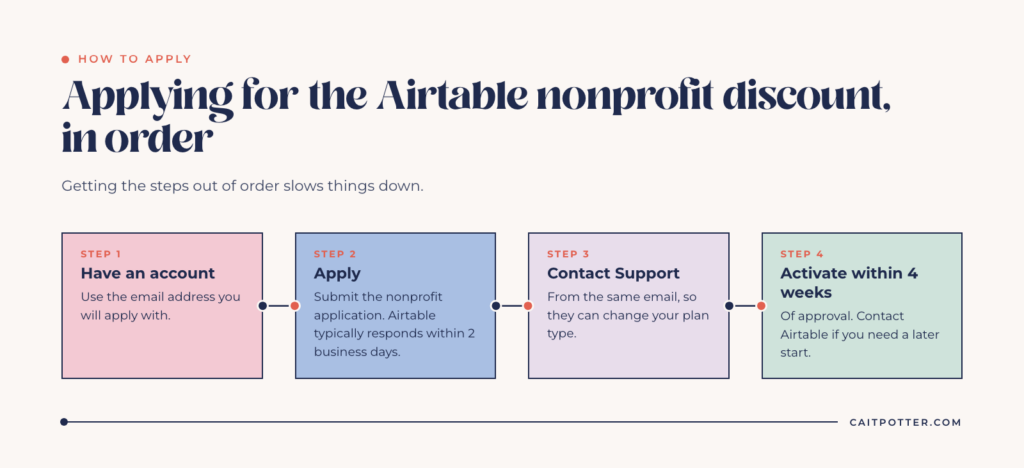
- Make sure you have an Airtable account under the email address you’ll apply with. If you don’t, create one first.
- Submit the nonprofit application through Airtable’s support page. Airtable says it typically responds within 2 business days.
- After approval, contact Airtable Support from that same email address so they can change your plan type.
- Activate within 4 weeks. You have 4 weeks from approval to activate the discounted plan. If you need a later start date, contact Airtable.
If you’re also tax-exempt, Airtable handles tax exemption separately for paid plans through its own form, which asks for your workspace ID.
Do you need a paid plan at all?
Maybe not on day one. Airtable’s Free plan is meant for individuals, very small teams, or lightweight needs, and it has limits on records, automations, and collaborators. A two-person nonprofit testing whether Airtable fits can absolutely start on Free. Once your donor records, volunteer hours, and grant history are all in one base, you’ll likely hit those limits, and $12 per seat is a reasonable price for a system that replaces several spreadsheets.
The bigger cost is usually the time it takes to design a base your staff will actually keep up with. If you’re at the point where spreadsheets aren’t cutting it anymore, my post on what Airtable is and how it works is a good starting place.
Getting the build right
The discount makes Airtable affordable, but a base still has to be designed well to be worth paying for. Most of the nonprofit bases I see that aren’t working have the same problems: tables that should be linked aren’t, everyone has edit access, and nobody owns the system after the person who built it leaves.
When the links are right, a base can run a whole program. A survivor career readiness program I support runs on one base with 14 connected tables and 12 staff workspaces, each built for a specific job. There are more examples in my nonprofit case studies.
I build nonprofit systems for donors, grants, volunteers, and programs, most often in Airtable, designed around the nonprofit plan from the start: no AI dependencies, seats only where they’re needed, and interfaces your staff can use without learning a database. If you’re outside the nonprofit world and want a custom base built, see my Airtable setup services.
Keep reading: signs your nonprofit has outgrown its spreadsheets and how to build a grant tracking system.
Airtable nonprofit discount FAQ
Is Airtable free for nonprofits?
No. Airtable has a Free plan anyone can use, and nonprofits get 50% off the Team plan, which comes to $12 per billable user per month.
Does the Airtable nonprofit discount apply to the Business plan?
No. The self-serve nonprofit discount applies to Team plans only. Business and Enterprise Scale go through Airtable’s Sales team.
Can churches get the Airtable nonprofit discount?
No. Airtable excludes churches and religious or evangelical organizations from nonprofit pricing.
Is Airtable AI included on nonprofit plans?
No. Airtable AI isn’t available on nonprofit or educational plans.
Ongoing COO-level support to maintain and refine your systems as the business grows so operations stay steady and decisions stop piling up on your plate.

Support
Custom Dubsado, Airtable, and Moxie systems designed for capacity, not survival. Built around how your business actually runs so growth does not create more chaos.

Systems
Map, audit, or optimize the system that is slowing your business down. Workflows, offers, tech stacks, or the process that keeps living in your head instead of your business.

Strategy
services
These are.
Busy isn't a business plan.


In this power-packed session, I show you how to connect Airtable + your CRM for smarter tracking, simplified workflows, and insights that actually move your business forward.
From Guesswork to Growth with Airtable


A step-by-step guide to setting up your new Dubsado account, area by area, so your trial ends with a system you can actually use.
21 Ways to Max Out Your Dubsado Free Trial

Hot Seat, Hot Takes, Hot Damn.

Free masterclasses that show you exactly how scalable businesses are built.




© 0000 Cait Potter Creative, LLC
Privacy Statement and Terms & Conditions


