














The Scout Guide Phoenix & Scottsdale: Dubsado for Publishers With a Year-Long Member Journey
If you’re looking at Dubsado for publishers, this is what it looks like when one sale turns into a year of production work. The Scout Guide Phoenix & Scottsdale is the local edition of The Scout Guide for the Phoenix and Scottsdale area, owned and run by its own editor. It sells annual memberships to local businesses, and each member gets a creative meeting, a photo session, a designed spread in the print guide and digital promotion. I built a done-for-you Dubsado setup for this one edition that runs the whole path, from the first inquiry to spread approval to renewal.
Dubsado for publishers: results at a glance
- Service: Done-For-You Dubsado Setup for The Scout Guide Phoenix & Scottsdale
- 12 Dubsado workflows, from lead to renewal
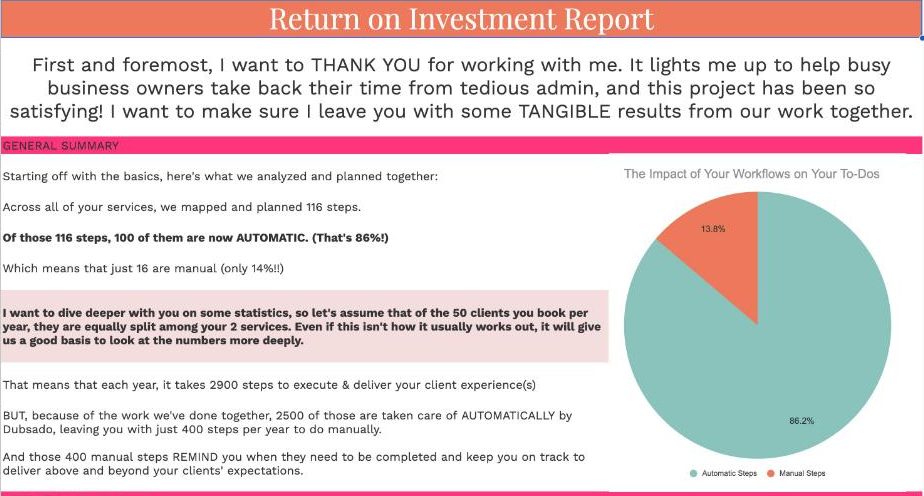
- 116 workflow steps, 100 of them automatic
- An estimated 703 hours a year back, worth about $17,575 in assistant time, from the project’s ROI report
- 9 questionnaires, 4 approval and request forms, 2 contracts and 2 proposals
- A Zapier connection that builds each member’s Google Drive folders automatically
Service Provided
Done-For-You Dubsado Setup for the Phoenix & Scottsdale edition, followed later by a strategy session
About the Client
The Scout Guide is a national network of local print guides that feature independent businesses. Each city’s guide is run locally by its own editor. This project was for one of those editions, The Scout Guide Phoenix & Scottsdale, and the system belongs to that edition only. The editor curates and produces the local guide each year. Members pay for a spot in the next volume, and the editor works with them, a small team of local photographers and the national design team to produce each member’s spread.
Beyond the printed pages, members can also send in a list of their own clients so that copies of the guide are mailed to them. Every one of those pieces has a deadline, and every member is at a different point in the process at any given time.
The Problem
Every member goes through the same long process: a discovery call, a proposal, a contract, payment, a member questionnaire, a creative meeting, a photo session, image review, image approval, spread review, spread approval, the launch and finally renewal. Before the setup, onboarding was handled by hand, contracts and invoices went out separately, scheduling took a string of back-and-forth emails, and client information lived in several different places.
Some steps were especially time consuming. To collect member mailing lists without letting members see each other’s lists, the team had been creating and sending a separate spreadsheet link to each member by hand. Multiply that by every member in a volume and it adds up fast. The whole process depended on someone remembering what came next for each member.
How We Mapped It
We mapped the membership as a journey with two halves. The first half is the sale: getting a good-fit business from inquiry to signed and paid. The second half is production: getting that member through the creative meeting, the photos and the spread approvals on time. Each half became its own set of workflows, so the sales process could keep running while members already in production moved along on their own track.
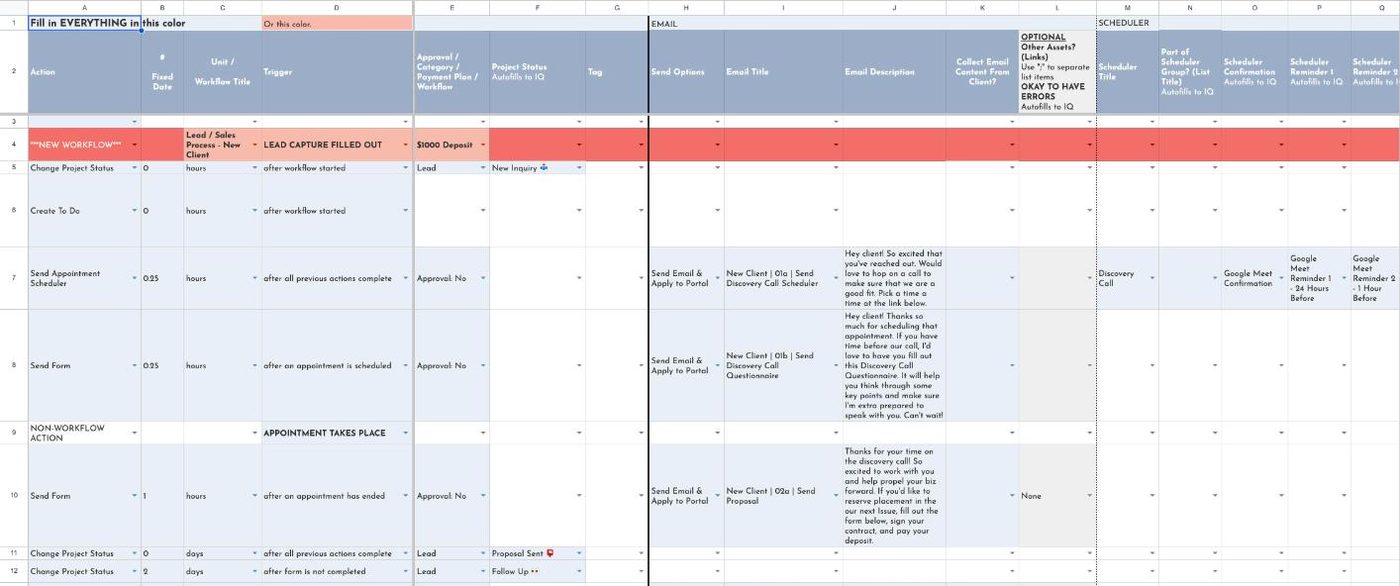
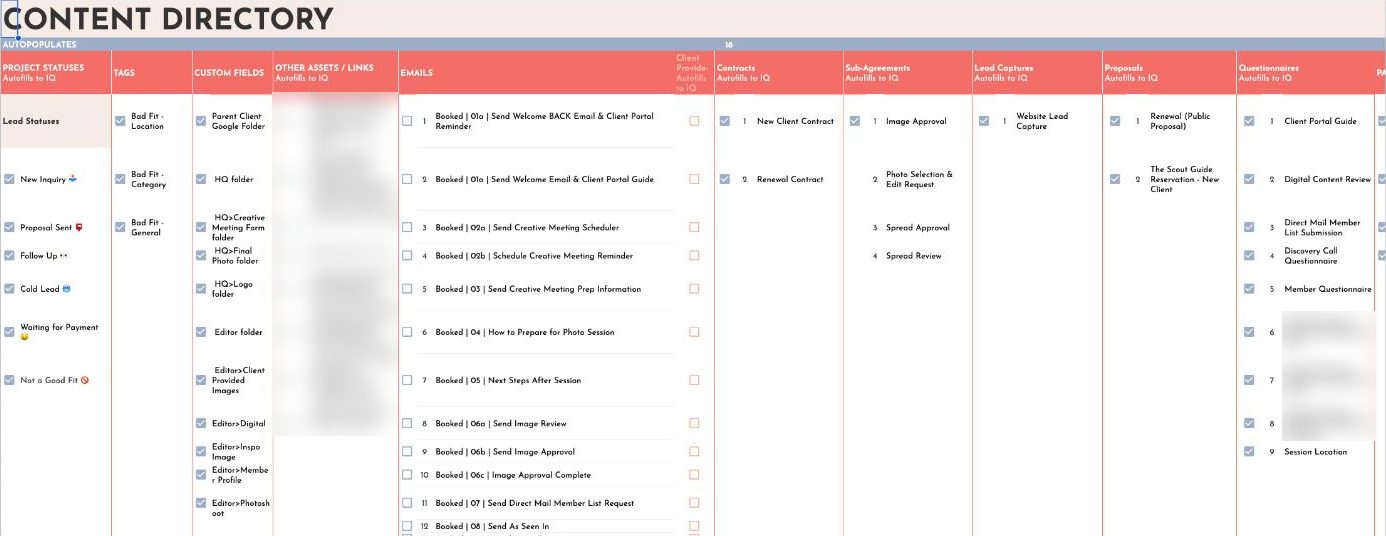
Payment needed the most care. The edition works with an outside bookkeeping team that sends every invoice from its own accounting software. Rather than make the bookkeepers change how they work, I built the workflows around them. After a member signs, their project waits in a “waiting for payment” status. As soon as the bookkeeper records the payment in Dubsado, the member moves to onboarding automatically and the next emails start. Nobody on the editor’s team has to remember to move a project forward by hand.
The Solution: One Dubsado Workflow for Each Stage of Membership
A sales process that follows up on its own
When a business fills out the application on the website, the lead workflow starts. The editor reviews each application, and good fits receive a link to book a discovery call, plus a short questionnaire to fill out before the call. After the call, the proposal goes out with the contract. If it sits unsigned, four follow-up emails go out on a schedule, and if there is still no answer, the project moves to a cold lead status. Applicants who are not a fit receive one of three polite replies based on location, category or general fit, each with a link to join the wait list.
Production steps with approvals built in
Once a member is paid, the welcome workflow sends a guide to their client portal, the private page where they find every form and document in one place. The onboarding workflow then sends the member questionnaire and the creative meeting scheduler, then photo session prep and next steps after the session. Image selection, image approval, spread review and spread approval each have their own form, with reminders when something is due and a confirmation when it is done. Each photographer has a scheduler for creative meetings, and later workflows cover the launch, the post-launch check-in, renewals and returning members.
Renewals were planned from the start. When a volume launches, members move to an “up for renewal” status, and returning members go through a shorter version of the sales process with a new project created for the new volume.
Mailing lists and folders handled for the team
For the member mailing lists, I replaced the one-by-one spreadsheet links with a single link in the workflow. When a member clicks it, Google makes them their own private copy of the template, so nobody sees anyone else’s list and the team never has to create a file by hand. The editor still merges the lists at the end, but collecting them now takes no setup at all.
A Zapier connection builds a Google Drive folder set for each new member, with separate folders for the creative meeting form, final photos, logos, client-provided images and the member profile, so the editor, the photographer and the designer always know where files go. During testing, a few subfolders landed in the wrong place, and the fix was to point the automation at the right parent folder.
The Results
- Every lead gets the same sales process, with follow-ups that send themselves
- 100 of the 116 steps are automatic, an estimated 703 hours a year the editor gets back
- Leads book their own discovery calls through a Dubsado scheduler
- Payments recorded by the bookkeepers move members into onboarding without anyone touching the project
- Member mailing lists and Drive folders set themselves up
- Each production step has a defined workflow, so nothing depends on memory
Frequently asked questions
Can Dubsado handle approvals for print ads?
Yes. In The Scout Guide Phoenix & Scottsdale setup, image selection, image approval, spread review and spread approval are each a Dubsado form. The workflow sends the form, reminds the member when it is due, and moves the project to the next status when it is complete.
Related case studies and reading
- Case study: The Party Bar: Dubsado for party rentals
- Case study: SugarPop Productions: Dubsado for photo booths
- Read: Create a “Not a Good Fit” Sequence in Dubsado
- Read: The Google Sheets copy link trick
Want a setup like this for your publication?
I build done-for-you Dubsado setups for businesses with long, multi-step client journeys, so every lead and every member gets the same process without you tracking it by hand.


In this power-packed session, I show you how to connect Airtable + your CRM for smarter tracking, simplified workflows, and insights that actually move your business forward.
From Guesswork to Growth with Airtable


A step-by-step guide to setting up your new Dubsado account, area by area, so your trial ends with a system you can actually use.
21 Ways to Max Out Your Dubsado Free Trial

Hot Seat, Hot Takes, Hot Damn.

Free masterclasses that show you exactly how scalable businesses are built.




© 0000 Cait Potter Creative, LLC
Privacy Statement and Terms & Conditions


