













TeenWorks: Running a Teen Summer Employment Program in Google Workspace
Before I ever opened Airtable, I spent my days keeping a teen summer employment program running out of Google Sheets. I was on staff at TeenWorks in Indianapolis as Operations Manager, and the program put teens into paid summer jobs alongside classroom training and community service. When I started, the whole organization was about five people. By the time I left, it had grown to fifteen. This is the story of how a small team handled hundreds of teens with nothing but spreadsheets, and what I would build for the same program today.
Teen summer employment program: results at a glance
- On staff as Operations Manager, building everything in Google Sheets, Google Drive and the rest of Google Workspace
- 732 teen applicants on one master roster in a single hiring season
- 309 teens hired for that summer, against 427 seats across the program
- 37 work site rosters that filled themselves in from the master roster
- A year-round dashboard for the school-year program, which took in 132 applications and started 73 teens in the year it covers
- A team that grew from about 5 people to 15 while running on these sheets
My Role
I was the Operations Manager. That meant I owned the systems behind the program: the spreadsheets, the reports leadership asked for, program evaluation, and getting new staff comfortable with the tools. I was also the person people came to when a number looked wrong, which taught me a lot about building sheets that other people can trust.
About TeenWorks
TeenWorks hires teens for a summer that mixes paid work, classroom training and civic engagement, then keeps supporting them through the school year. Teens are placed at partner work sites around the city, and many of them ride to work in vans with a supervisor. Every summer starts with a hiring rush, and every school year brings check-ins, professional development sessions, community service and special events.
It was a scrappy place. With five people on staff, nobody had a single job. The same handful of people interviewed teens, chased paperwork, lined up work sites, drove vans and wrote grant reports. Anything I built had to be simple enough for a busy coworker to update between two other tasks.
The Problem
Picture the weeks before the first day of work. Hundreds of teens have applied. Each one needs a status: hired, pending, incomplete, dropped, or waiting on the 8th grade list. Each hired teen needs a work site, a team, a supervisor, a van pickup spot, a work permit if they are under 18, an emergency contact and a pay rate. Each work site needs to know exactly who is showing up on Monday, and each van needs to know who it is picking up and where.
All of that information lived in one place for each teen, but it had to show up in dozens of other places. When a teen dropped or moved to a different site, every list that mentioned them had to change. If someone forgot to update one of them, a supervisor would be waiting for a teen who was never coming, or a van would skip a stop. During the school year the problem changed shape. Now the team had to track who came to which check-in, who finished their community service, and who was missing mandatory events, all on top of the next round of hiring.
What I Built
One master roster, many site rosters
I started with a rule: every teen lives in exactly one row, on one master roster. That roster held 732 applicants in the season these sheets cover. Each row carried the teen’s status, grade, program year, team, supervisor, van pickup choice, work permit and paperwork checkboxes, and pay rate.
Then I gave each work site its own tab, 37 in all, and wrote formulas that pulled in only the teens assigned to that site, along with their pay rate, pickup point and van supervisor. Nobody typed a name onto a site roster by hand. Staff updated the master roster, and every site roster changed with it. That one decision removed most of the “which list is right?” conversations.
A hiring dashboard the whole team could read
During hiring, the question everyone asked was “where are we?” So I built a dashboard that answered it at a glance. It counted teens by status and by program year, so the team could see how many first-year teens were hired, pending, incomplete or dropped, and how many seats were left. It broke the same numbers down by grade, and it showed how many applications each hiring specialist had processed on each hiring day, which helped us plan who worked which shift.
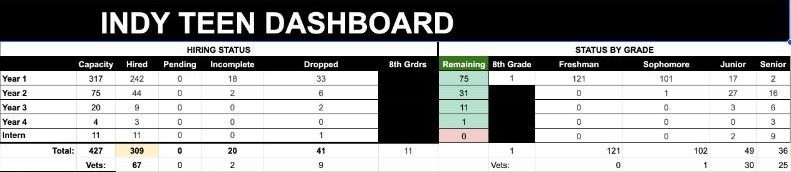
The same dashboard tracked van seats by pickup location, so we could see which vans were full before we promised a teen a ride. In the summer shown above, 309 teens were hired against 427 seats.
A year-round dashboard for the school year
When summer ended, the program kept going, so I built a separate workbook for the school year. It had tabs for fall check-ins, professional development sessions, staff assignments, an issue log for staff follow-up, missed mandatory events and a work site dashboard that compared each site’s capacity with the teens placed there. A summary tab pulled it together: applications, offers, teens who started, and counts by program year, grade, age and school.
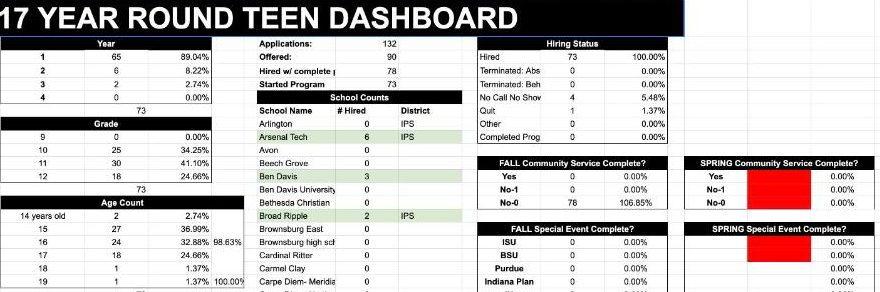
It also tracked whether each teen had finished community service and special events in the fall and spring, and it even totaled polo and t-shirt sizes so uniform orders came straight from the counts instead of a separate survey.
Schedules and an SOP
First-year teens followed master schedules by team, with tours and professional development sessions confirmed on a team dashboard. I also wrote a summer SOP that spelled out what the program team, supervisors, partners and teens were each responsible for, so a new staff member could find their part without asking three people.
What It Made Possible
- One source of truth for every applicant, with 37 site rosters that updated themselves
- A daily answer to “where are we?” during the busiest weeks of the year
- A school-year program the team could track without buying a separate system
- Tools that kept working while the staff tripled in size
Looking back, the sheets were pretty cool for what they were. They also showed me exactly where spreadsheets run out of room. Formulas that copy names between tabs break when someone sorts the wrong column. Sensitive details like emergency contacts sat in the same file as everything else. And every new report meant another tab.
What I’d Build in Airtable Today
The same program today would run on one Airtable base. Teens, work sites, placements, events and attendance would each be their own table, connected to each other, so a teen’s placement is a single record that every view can see instead of a name copied by formula. Each work site supervisor would get a simple screen showing only their own teens. Hiring status, attendance and site capacity would all come from the same records, so the dashboards stay accurate without anyone pasting numbers. Sensitive fields like emergency contacts would be visible only to the staff roles that need them. Read more about Airtable setup.
Related case studies and reading
- Read: Signs Your Nonprofit Has Outgrown Its Spreadsheets
- Read: Airtable: A database in a spreadsheet
- Read: The Airtable Nonprofit Discount: What You Get and What You Don’t
Is your program still running on spreadsheets?
Spreadsheets can carry a program a long way. When they start to break, I build nonprofit systems in Airtable that keep the same information in one place.


In this power-packed session, I show you how to connect Airtable + your CRM for smarter tracking, simplified workflows, and insights that actually move your business forward.
From Guesswork to Growth with Airtable


A step-by-step guide to setting up your new Dubsado account, area by area, so your trial ends with a system you can actually use.
21 Ways to Max Out Your Dubsado Free Trial

Hot Seat, Hot Takes, Hot Damn.

Free masterclasses that show you exactly how scalable businesses are built.




© 0000 Cait Potter Creative, LLC
Privacy Statement and Terms & Conditions


