













Most small nonprofits that need to track program outcomes already collect most of the information funders ask for. It exists in intake forms, attendance sheets, staff notes and a spreadsheet someone started three years ago, but none of it connects, so every funder report becomes a week of digging.
Case-management software is one answer, and for some organizations it’s the right one. For many small nonprofits it’s more system than they need and more cost than they can justify. I’ve worked in and with nonprofits since 2014 and hold an MPA in nonprofit management, and the approach below is how I’d structure outcome tracking for a small team using a flexible database. I’ll use Airtable for the examples, but the structure works in any tool that links records.
Outputs and outcomes are different data
Funders usually ask for two kinds of numbers. Outputs count what you did: how many people you served, how many sessions you held, how many meals you delivered. Outcomes describe what changed for the people you served: skills gained, housing secured, test scores improved, goals met.
Outputs are easy to count if you record each service. Outcomes are harder, because they require measuring the same thing at least twice, usually at intake and again later, and comparing the two. Most spreadsheet setups capture outputs and lose outcomes, because there’s nowhere to put the second measurement next to the first.
Start from the report, not the database
Before you build anything, collect the last two or three reports you submitted and the reporting requirements for each active grant. List every number you were asked for. Then, for each number, write down where it should come from and when it gets collected.
This step does two things. It shows you which data you actually need, so you don’t build fields nobody uses. And it shows you where funders overlap. Three funders asking slightly different questions about the same participants is common, and a good structure answers all three from the same records.
The structure: five linked tables
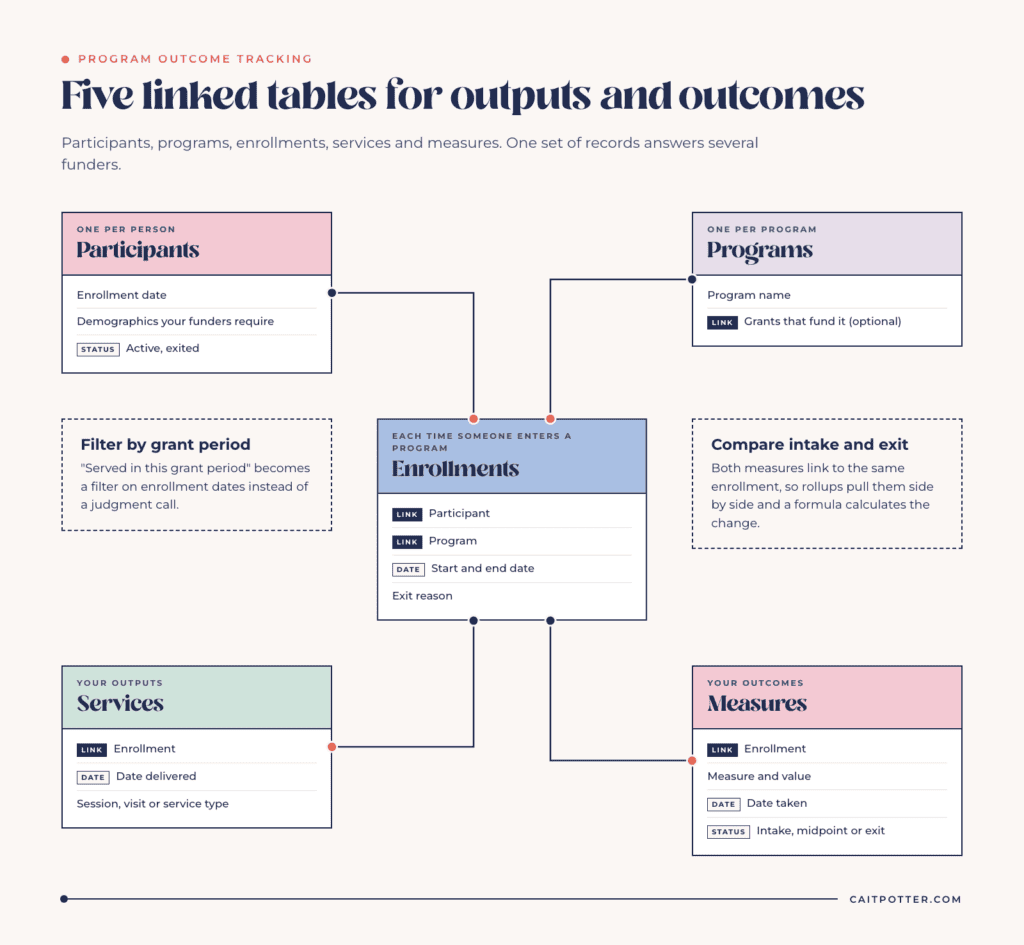
Participants
One record per person you serve, with the basics you need for reporting: enrollment date, demographic fields your funders require, and status. Keep sensitive details to what you actually need. Every field you collect is a field you have to protect.
Programs
One record per program. This is what everything else links to, and it lets you report by program without separate spreadsheets.
Enrollments
One record each time a participant enters a program, with a start date, end date and exit reason. A participant who joins two programs, or returns a year later, gets two enrollments. This is what makes “served in this grant period” a simple filter instead of a judgment call.
Services
One record per session, visit or service delivered, linked to the enrollment and dated. Your outputs come from here: count services by program and date range, and the numbers are there.
Measures
One record each time you measure an outcome: the enrollment it belongs to, the measure (for example, a pre and post assessment score, or whether a goal was met), the value, the date and whether it was taken at intake, midpoint or exit. Because intake and exit measures are both linked to the same enrollment, you can compare them with rollups and formulas, and see change per participant.
If you track grants in the same base, link programs to the grants that fund them. That’s how one set of participant data answers several funders. My post on building a grant tracking system covers that side.
Collecting data without burying your staff
Outcome tracking fails when it adds work at the wrong moment. Program staff will record what’s easy to record during the work, and skip what isn’t.
- Use forms for intake and assessments, so staff fill in one screen and the record is linked automatically.
- Build a simple interface page for each program where staff can see their participants, log a service and add a measure without opening the raw tables.
- Collect measures on a schedule, and build a view of enrollments that are due for a follow-up measure, so it doesn’t depend on memory.
- Keep required fields to what funders actually ask for.
In a survivor career readiness program I built and support, 15 live automations keep each participant’s status current, so staff don’t update it by hand.
Pulling the numbers for a report
When the structure is right, a report is a set of filtered views. Filter enrollments to the grant period and the funded program, and you have participants served. Count linked services for outputs. Compare intake and exit measures for outcomes. Save these as views named after the report they feed, and next year’s report starts from the same place.
Rollup fields can total services per enrollment and pull the intake and exit scores side by side. A formula field can then calculate change, or flag whether the participant met the goal. The reporting math happens once, in the base, instead of every time someone opens a spreadsheet.
The same idea works across a whole network. The YES Indy dashboard I built tracks 17 outcome measures, from application to 365-day job retention, across 11 providers.
Privacy and access
Participant data is often the most sensitive information a nonprofit keeps. Limit who can edit the base. Use interfaces to give staff access only to the pages they need, rather than every table. Store only what you’ll use.
If your work involves health records, minors, or data covered by specific regulations or funder data agreements, confirm what those require before choosing any tool. Some data needs a system built specifically for that compliance, and that’s a decision to make with your legal or compliance advisor, not a database consultant alone.
When you do need case-management software
A flexible database works well for most small programs. Case-management software is worth it when you have many caseworkers managing large caseloads, when a funder or government contract requires a specific system, when you need regulated handling of health or similar records, or when you’d rather adopt a fixed structure than design one. If none of those apply, a well-structured database will usually cover your reporting for far less.
Where Airtable fits and what it costs
Eligible nonprofits get 50% off Airtable’s Team plan, which brings it to $12 per user a month. The discount applies to Team plans only, and Airtable AI isn’t available on nonprofit plans. The details are in my post on the Airtable nonprofit discount.
If you want outcome tracking designed around your actual funders and programs, that’s part of my nonprofit systems work, and leadership dashboards that show outcomes at a glance fall under custom dashboard creation.
Frequently asked questions
What is the difference between outputs and outcomes?
Outputs count what your program did, like sessions held or people served. Outcomes measure what changed for participants, which usually means comparing a measure taken at intake with one taken later.
Can a small nonprofit track outcomes in a spreadsheet?
For one small program, sometimes. Once you have multiple programs, repeat participants or several funders, a spreadsheet makes it hard to link intake and follow-up measures to the right person and period.
Is Airtable secure enough for participant data?
Airtable offers permissions and interfaces that limit who sees what. Whether it meets your requirements depends on your data and any regulations or agreements you’re bound by, so confirm those first.
How often should we collect outcome data?
At minimum at intake and at exit. Add a midpoint measure for longer programs, and follow your funders’ reporting schedules.
Ongoing COO-level support to maintain and refine your systems as the business grows so operations stay steady and decisions stop piling up on your plate.

Support
Custom Dubsado, Airtable, and Moxie systems designed for capacity, not survival. Built around how your business actually runs so growth does not create more chaos.

Systems
Map, audit, or optimize the system that is slowing your business down. Workflows, offers, tech stacks, or the process that keeps living in your head instead of your business.

Strategy
services
These are.
Busy isn't a business plan.


In this power-packed session, I show you how to connect Airtable + your CRM for smarter tracking, simplified workflows, and insights that actually move your business forward.
From Guesswork to Growth with Airtable


A step-by-step guide to setting up your new Dubsado account, area by area, so your trial ends with a system you can actually use.
21 Ways to Max Out Your Dubsado Free Trial

Hot Seat, Hot Takes, Hot Damn.

Free masterclasses that show you exactly how scalable businesses are built.




© 0000 Cait Potter Creative, LLC
Privacy Statement and Terms & Conditions


