













Small nonprofits weighing Airtable vs a nonprofit CRM are usually stuck between two kinds of advice. Donor CRM vendors say you need a donor CRM. Airtable fans say Airtable can do anything. Both are partly right, and the deciding question is simpler than either side makes it sound: is your biggest problem raising money, or running everything else?
I’ve worked in and with nonprofits since 2014, I hold an MPA in nonprofit management, and I’m Airtable Builder Certified. I’ve seen small teams thrive on a donor CRM, on Airtable, and on both together. This post lays out what each one does well, what it costs, and how to choose.
What a nonprofit CRM is built to do
A nonprofit CRM, often called donor management software, is built around fundraising. It tracks donors and their giving history, records gifts, and supports the communication that keeps donors giving. Depending on the product, that can include online donation forms, email tools and fundraising reports.
Two common options for small nonprofits show how these are priced. According to its pricing page, Little Green Light starts at $45 a month for up to 2,500 constituents, with pricing based on how many constituent records you have and unlimited users on every account. Bloomerang’s CRM starts at $125 a month billed annually, also priced by record count with unlimited users. Bloomerang sells online giving and volunteer management as separate products: its pricing page lists Bloomerang Fundraising from $40 a month and Bloomerang Volunteer from $119 a month billed annually.
The strength of a donor CRM is that the fundraising workflow is already designed. You don’t decide how gifts should be recorded. Someone already did.
What Airtable is built to do
Airtable is a flexible database. You decide what the tables are and how they link. For a nonprofit, that might mean donors, but also grants, programs, participants, volunteers, events, partners and board tasks, all connected in one base.
That flexibility is the strength and the risk. Airtable can match how your organization actually runs, including the parts no donor CRM covers. It also means someone has to design it well, because nothing is decided for you.
Side by side
| Nonprofit CRM | Airtable | |
|---|---|---|
| Built for | Donors and fundraising | Whatever you design it to track |
| Gift records and donor history | Built in | You build it |
| Online donation forms | Often built in or a paid add-on | Not built in; connect a giving platform |
| Grants, programs, volunteers | Varies by product, sometimes add-ons | Built to your process |
| Pricing model | Usually by number of records, unlimited users | By editor; nonprofit Team plan is $12 per user a month |
| Setup effort | Lower; structure is decided | Higher; structure is yours to design |
When a donor CRM is the right call
Choose a donor CRM if individual giving is your main revenue source and your biggest pain is donor stewardship: knowing who gave, thanking them on time, and asking again at the right moment. If you need online giving connected directly to donor records with little setup, a donor CRM gets you there faster.
A donor CRM also fits when your team has no one who wants to own a database. The structure is fixed, which means fewer decisions and less to maintain.
When Airtable is the right call
Choose Airtable if your pain is operations, not donors. That usually looks like grants tracked in one spreadsheet, volunteers in another, program data in a third, and no way to answer a funder’s question without an afternoon of copying and pasting. Airtable fits when you need those things connected, and when your funding comes more from grants and contracts than from individual donors.
That’s how a survivor career readiness program I support runs: one Airtable base with 14 connected tables, where 15 automations keep each participant’s status current without anyone updating it by hand.
I covered the warning signs in more detail in signs your nonprofit has outgrown its spreadsheets.
When you need both
Many of the nonprofits I’d build for end up here. The donor CRM or giving platform owns donations and receipts. Airtable owns grants, programs, volunteers and reporting. Donation data can flow into Airtable through an integration so leadership sees fundraising next to everything else, while gift records stay in the system designed for them.
The rule that keeps this clean is that each kind of data has one home. Donations are entered in the donor CRM, never edited in Airtable. Grant deadlines are entered in Airtable, never in the CRM. Two systems with clear ownership are easier to run than one system forced to do a job it wasn’t designed for.
What the cost looks like for a small team
Eligible nonprofits get 50% off Airtable’s Team plan, which brings it to $12 per user a month ($144 per user a year). The discount applies to Team plans only, and Airtable AI isn’t available on nonprofit plans. My post on the Airtable nonprofit discount covers eligibility and what you give up.
As an example, a nonprofit with four staff who edit the base would pay about $48 a month on the discounted Team plan. Read-only collaborators, like board members who only view a dashboard, aren’t charged. The same nonprofit on Little Green Light with fewer than 2,500 constituents would pay $45 a month with unlimited users. The software prices are close. The real difference is setup: a donor CRM’s structure is ready to use, and an Airtable base has to be designed and built.
Questions to ask before you buy either
Whichever direction you lean, get answers to these before you sign up for anything.
- Who will own this system day to day, and how many hours a month do they actually have for it?
- How many records will we have in two years, counting past donors and contacts we want to keep?
- Which reports do funders and the board ask for, and can this tool produce them without exporting to a spreadsheet?
- How does data get out if we switch later? Exports should be simple and complete.
- What does it cost once we add the pieces we need, not just the base plan?
The last question matters most with donor CRMs that sell giving, volunteers or email as separate products, and with Airtable when you add integrations or Portals for outside users.
How to decide
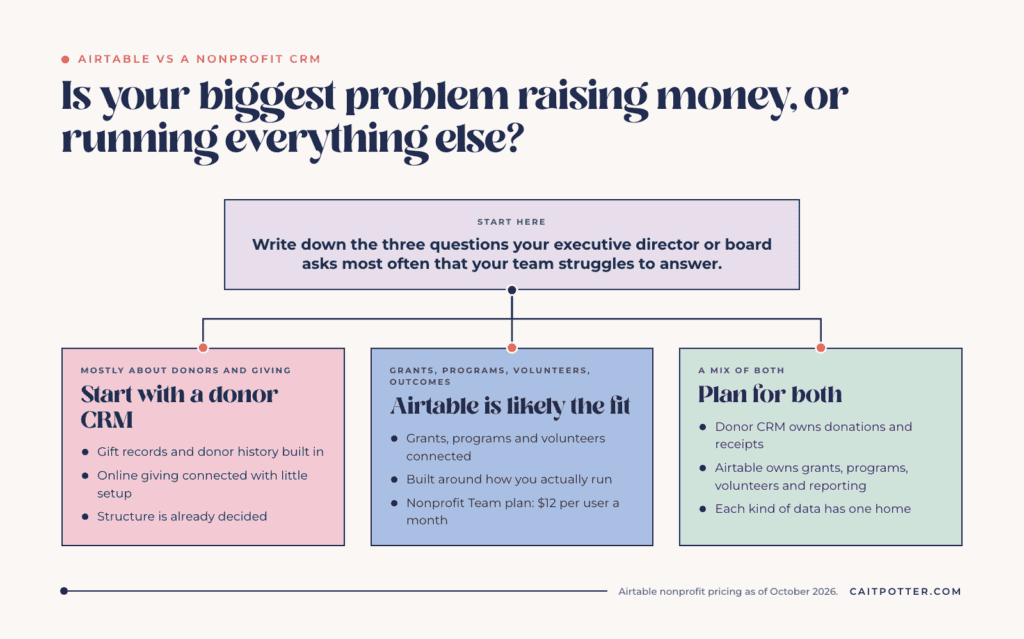
Write down the three questions your executive director or board asks most often that your team struggles to answer. If they’re mostly about donors and giving, start with a donor CRM. If they’re about grants, programs, volunteers or outcomes, Airtable is likely the better fit. If it’s a mix, plan for both, and decide which system owns which data before you buy anything.
If you want help working that out, my nonprofit systems work starts with mapping how your organization actually runs. For organizations that already know Airtable is the answer, a Systems Blueprint Intensive maps the base before anything gets built.
Frequently asked questions
Is Airtable a donor CRM?
Not out of the box. Airtable is a flexible database you can build donor tracking in, but it doesn’t include donation forms or a predesigned fundraising workflow the way a donor CRM does.
What is the cheapest nonprofit CRM for a small nonprofit?
Prices change often, so check vendor sites. As of October 2026, Little Green Light starts at $45 a month for up to 2,500 constituents with unlimited users.
Can Airtable connect to our giving platform?
Usually, through an integration tool like Zapier or an API connection, so donation data flows into Airtable for reporting while gift records stay in the giving platform.
Does the Airtable nonprofit plan include AI?
No. Airtable states that Airtable AI isn’t available on nonprofit and educational plans.
Ongoing COO-level support to maintain and refine your systems as the business grows so operations stay steady and decisions stop piling up on your plate.

Support
Custom Dubsado, Airtable, and Moxie systems designed for capacity, not survival. Built around how your business actually runs so growth does not create more chaos.

Systems
Map, audit, or optimize the system that is slowing your business down. Workflows, offers, tech stacks, or the process that keeps living in your head instead of your business.

Strategy
services
These are.
Busy isn't a business plan.


In this power-packed session, I show you how to connect Airtable + your CRM for smarter tracking, simplified workflows, and insights that actually move your business forward.
From Guesswork to Growth with Airtable


A step-by-step guide to setting up your new Dubsado account, area by area, so your trial ends with a system you can actually use.
21 Ways to Max Out Your Dubsado Free Trial

Hot Seat, Hot Takes, Hot Damn.

Free masterclasses that show you exactly how scalable businesses are built.




© 0000 Cait Potter Creative, LLC
Privacy Statement and Terms & Conditions


