













If you’re comparing Airtable vs Dubsado, you’re usually trying to answer one question: where should my client process run? Inquiries, proposals, contracts, payments, onboarding, the emails that go out in between. Both tools can store a list of clients, so they end up in the same comparison, but they were built for very different jobs.
I’ve been a Dubsado Certified Specialist since 2020 and I’m Airtable Builder Certified, so I build in both. Most of the time the right answer is obvious once you know what each one is actually for. This post is the decision guide. If you already know you want both and want to see how they work together, my Dubsado and Airtable webinar post walks through that setup.
The short answer
- Choose Dubsado if your client process runs on proposals, contracts, invoices, scheduling and automated emails, and you want clients to book, sign and pay in one place.
- Choose Airtable if your work depends on data that has to connect, like projects with many moving parts, team capacity, inventory or content, and clients rarely need to sign or pay inside the system.
- Use both if Dubsado runs your client side well, but you need reporting or team operations it was never designed to give you.
What each one is built for
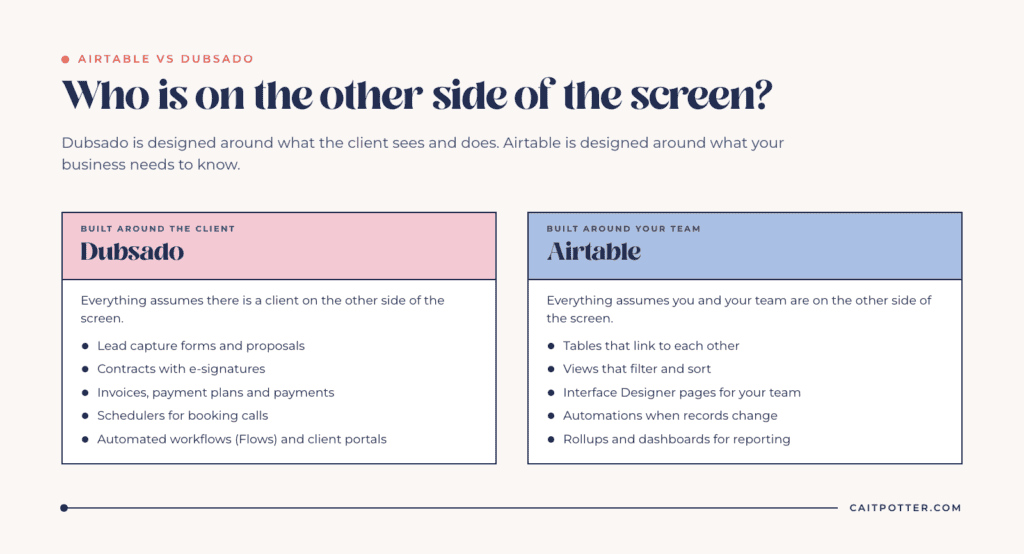
Dubsado is a client management system for service businesses. Its pricing page lists invoicing and payment plans, client portals, form and email templates, lead capture forms and legally binding contracts. The Premier plan adds scheduling, automated workflows, public proposals, a bookkeeping integration and the Zapier integration. Everything in Dubsado assumes there’s a client on the other side of the screen.
Airtable is a relational database with an app layer on top. Tables link to each other, views filter and sort them, Interface Designer turns them into pages your team can work from, and automations act when records change. Everything in Airtable assumes YOU and your team are the ones on the other side of the screen.
That difference is the whole decision. Dubsado is designed around what the client sees and does. Airtable is designed around what your business needs to know.
What Dubsado does that Airtable doesn’t
Airtable has no built-in contract signing, invoicing or payment processing, and no client-facing scheduler tied to your process. Dubsado has all of them, and its workflows connect them: when a client signs, the invoice goes out; when they pay, the onboarding questionnaire follows; when they book, the reminder is already queued.
You can approximate some of this in Airtable by adding a form tool, a signing tool, a payment tool and Zapier to glue them together. I’ve seen people try. You end up maintaining four tools to replace one, and every connection between them is another place for a client to fall through. For a service business where the client process IS the business, that trade is rarely worth it.
What Airtable does that Dubsado doesn’t
Airtable lets you link anything to anything. A project can link to its client, the team members assigned to it, the tasks inside it, the hours logged against it and the invoices paid toward it, and you can roll all of that up into totals. Dubsado tracks clients, projects and payments well, but its structure is fixed around the client relationship.
That’s why Airtable is where I build reporting and team operations. A good example is the dashboard I built for Live Wilder Studio: 28 datapoints in one Airtable dashboard, fed by Zaps from Dubsado and other tools, with only two things entered by hand each month. Dubsado kept running the client process. Airtable gave the owner the financial view she couldn’t get from Dubsado alone.
Can Airtable run your client process instead?
Sometimes, and the deciding factor is how much of your process the client touches. Airtable can be the right home when contracts are signed once (for example, a retainer client signs an annual agreement), payments run through your accounting software, and most of the work is internal: production steps, approvals, assignments and deadlines.
For example, a content agency with five writers, fifty pieces in production and a handful of retainer clients needs to see who is writing what and when it’s due far more than it needs a booking calendar. Airtable fits that shape. A photographer booking forty weddings a year with a proposal, contract, deposit and questionnaire for each one fits Dubsado’s shape.
Two plan details matter if you’re considering Airtable for client-facing work. On the Free plan, the automation “Send email” action can only email collaborators on the base, not clients. The Team plan allows 25,000 automation runs per month per workspace, which is plenty for most small businesses but worth knowing before you automate every status change.
Using both without making a mess
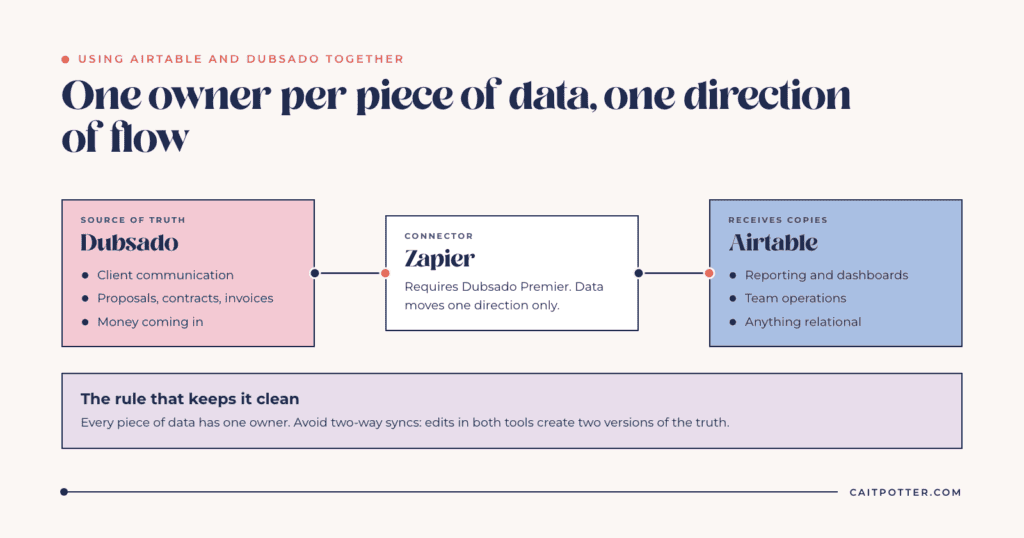
When I build both, one rule keeps it clean: every piece of data has one owner. Dubsado owns client communication and money coming in. Airtable receives copies of that data for reporting and operations. Data flows one direction, from Dubsado to Airtable, through Zapier.
The Party Bar is a good example of splitting ownership: Dubsado runs the client side across 12 workflows, and Airtable tracks 226 rental variations and turns balloon designs into an exact balloon order.
The most common mistake I see is syncing in both directions so that edits can happen in either tool. That creates two versions of the truth, and you’ll spend more time reconciling them than you saved. Also note that Dubsado’s Zapier integration is on the Premier plan, not Starter.
What each one costs
Prices below are from each vendor’s pricing page as of October 2026.
| Plan | Price | Notes |
|---|---|---|
| Dubsado Starter | $335 a year | Invoicing, payment plans, client portals, 1 active lead capture form |
| Dubsado Premier | $525 a year | Adds scheduling, automated workflows, public proposals, Zapier |
| Airtable Free | $0 | 1,000 records per base, up to 5 editors, 100 automation runs a month |
| Airtable Team | $20 per user a month billed annually ($24 monthly) | 50,000 records per base, 25,000 automation runs a month |
| Airtable Business | $45 per user a month billed annually ($54 monthly) | 125,000 records per base, 100,000 automation runs a month |
Dubsado charges per account and Airtable charges per editor, so the math shifts as your team grows. Dubsado includes 21 days of free Premier access with no card required. If you sign up, my specialist code XOCAIT gives you 30% off your first payment and stacks with Dubsado’s own sales. Each account can use one specialist code. For the full breakdown of Dubsado plans and add-ons, see my post on Dubsado pricing.
Where to start
If your client process is the bottleneck, start with Dubsado. My Dubsado setup services cover the full client journey from inquiry to offboarding. If you need connected data, team operations or reporting, look at Airtable setup. And if you honestly aren’t sure which tool fits, that’s exactly what tech stack consulting is for, because choosing wrong costs more than the hour it takes to decide.
Frequently asked questions
Can Airtable be used as a CRM?
Yes, for tracking contacts, deals and projects. It isn’t built to send contracts, take payments or run client-facing scheduling, so service businesses that rely on those usually pair it with a tool like Dubsado.
Can Airtable send contracts or invoices?
Not on its own. Airtable has no built-in e-signature or payment processing. You would need to connect separate tools, which is the main reason Dubsado tends to win for client-heavy processes.
Do I need both Airtable and Dubsado?
Only if you need something Dubsado can’t give you, usually reporting across tools or team operations. Many service businesses run well on Dubsado alone.
How do I connect Dubsado to Airtable?
Through Zapier, which requires Dubsado’s Premier plan. Send data one direction, from Dubsado to Airtable, so Dubsado stays the source of truth for clients and payments.
Ongoing COO-level support to maintain and refine your systems as the business grows so operations stay steady and decisions stop piling up on your plate.

Support
Custom Dubsado, Airtable, and Moxie systems designed for capacity, not survival. Built around how your business actually runs so growth does not create more chaos.

Systems
Map, audit, or optimize the system that is slowing your business down. Workflows, offers, tech stacks, or the process that keeps living in your head instead of your business.

Strategy
services
These are.
Busy isn't a business plan.


In this power-packed session, I show you how to connect Airtable + your CRM for smarter tracking, simplified workflows, and insights that actually move your business forward.
From Guesswork to Growth with Airtable


A step-by-step guide to setting up your new Dubsado account, area by area, so your trial ends with a system you can actually use.
21 Ways to Max Out Your Dubsado Free Trial

Hot Seat, Hot Takes, Hot Damn.

Free masterclasses that show you exactly how scalable businesses are built.




© 0000 Cait Potter Creative, LLC
Privacy Statement and Terms & Conditions


