












Dubsado for photographers comes down to one question: can it run the admin around your sessions so you spend your time shooting and editing? It can. Inquiries, proposals, contracts, payments, session booking, reminders and gallery delivery can all live in one system. I was a wedding photographer before I became a Dubsado Certified Specialist, so I’ve run this setup as a photographer and built it for photographers since.
This is the hub for everything I’ve written about Dubsado for photographers. It covers the client journey, packages, schedulers for sessions and minis, how weddings and portraits need different workflows, and where galleries fit. Each section links to the deeper posts. Everything is current for Dubsado 3.0, where workflows are now called Flows.
Why photographers use Dubsado
Photography has a lot of small, repeatable admin. Every client needs a contract, a payment plan, a session date, a location, a prep email, a reminder and a gallery link. None of it is hard, but all of it is easy to forget in the middle of wedding season.
Dubsado handles that admin in one place, with your branding on the forms your clients see. The part that saves the most time is Flows: once a client books, the next steps send on their own, timed around what the client does and the dates of their session.
The tradeoff is setup. Dubsado does a lot, and a few things photographers want need a strategic workaround. Sunset times are the classic example, which I cover below.
The photography client journey
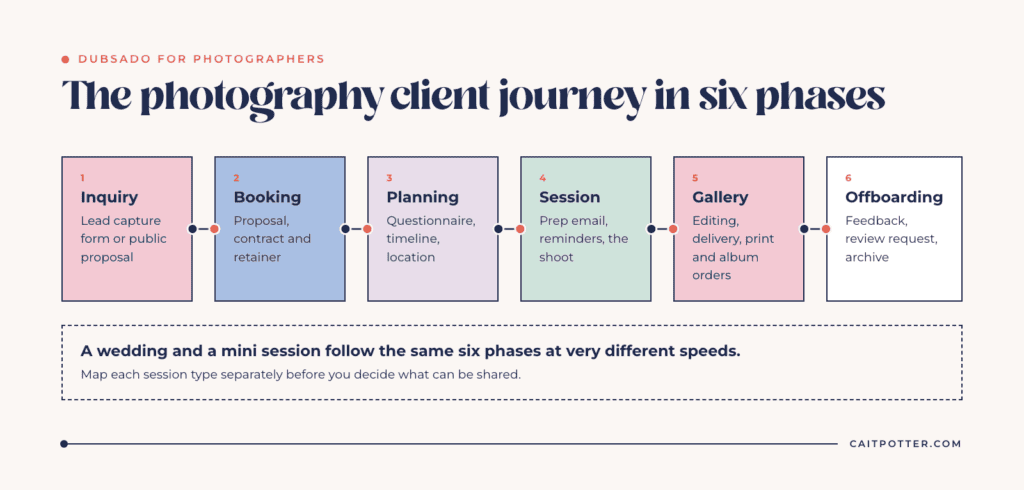
Before you build anything, map the journey for each type of session you offer. For most photographers, it looks like this:
- Inquiry: a lead capture form or a public proposal on your website.
- Booking: proposal, contract and retainer.
- Planning: questionnaire, session or timeline planning, location.
- Session: prep email, reminders and the shoot itself.
- Gallery: editing, delivery and any print or album orders.
- Offboarding: feedback, review request and archiving the project.
A wedding and a mini session follow the same six phases at very different speeds. That’s why it’s worth mapping each one separately before you decide what can be shared.
Packages and proposals
In Dubsado, your collections become packages. Build them under Invoicing, then Packages, and drop them into a proposal. Clients select what they want and see the subtotal update as they go. When they submit, Dubsado creates the invoice from their selections automatically, and you can attach your contract and invoice so they can sign and pay in the same sitting.
On the Premier plan, a proposal can be public, so a client can choose a package, sign and pay straight from your website. Submitting it creates the contact and project and can start a Flow.
I standardized my packages as much as I could when I was shooting weddings. The more standard your packages are, the more of your process you can automate. If you have a lot of collections, group them by session type so each proposal only shows what that client is booking.
Schedulers for sessions, minis and paid bookings
Schedulers are where photographers get the most out of Dubsado, and also where most of the questions come from. These are the posts I’d start with:
- How to use the Dubsado scheduler as a photographer: handling sunset times without managing availability day by day, and using a session planner form to choose locations.
- Using Dubsado for mini sessions: booking, contracts and reminders for minis from start to finish.
- Using Dubsado for engagement sessions: tracking the engagement session as its own project, separate from the wedding.
- A guide to using paid Dubsado schedulers: the nuances of requiring payment to book.
A few 3.0 scheduler settings matter most for photographers, all under the scheduler’s Advanced tab:
- Payment: require payment to confirm the booking. Clients pay the scheduler invoice in full before the appointment is confirmed, and you can let them apply discount codes at checkout.
- Form: require a form before the booking is finalized. Attach a lead capture form so a new client’s booking creates a project and starts a Flow.
- Limits: set max bookings per day, or total max bookings for a mini session day with a fixed number of slots.
- Reminders: add as many reminder emails before the session as you need.
If you offer several session types, a scheduler group puts them on one booking page so the client picks the type first. Confirmation and reminder emails still come from each individual scheduler.
Workflows for weddings vs portraits
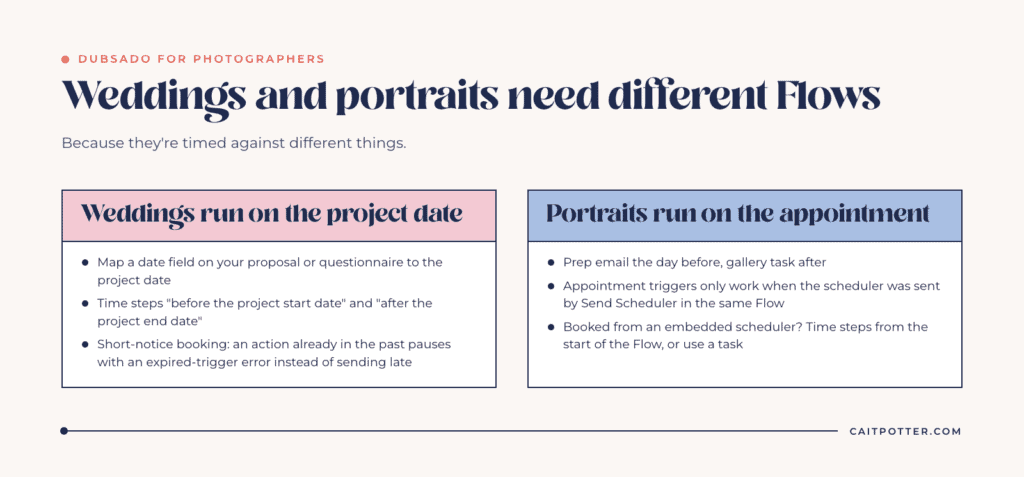
Weddings and portraits need different Flows because they’re timed against different things.
Weddings run on the project date
A wedding Flow is mostly timed around the wedding date: the timeline questionnaire goes out a set number of weeks before, the final payment reminder before that, and the thank-you email after. For that to work, the project needs a date. Put a date field on your proposal or questionnaire and map it to the project date. Then use triggers like “before the project start date” and “after the project end date.”
Watch the short-notice booking. If your Flow sends something 40 weeks before the date and a couple books six months out, that action is already in the past when the Flow is applied. Dubsado pauses it with an expired-trigger error instead of sending it late. You choose to change the timing or force it to send now. Dubsado’s own help uses almost exactly this wedding example.
Portraits run on the appointment
Portrait sessions are usually timed around the appointment itself: a prep email the day before, a gallery task after. Appointment triggers like “before an appointment starts” only work when the scheduler was sent by a Send Scheduler action in the same Flow. If clients book from a scheduler embedded on your website, the Flow starts from the lead capture attached to it, so time those steps from the start of the Flow or use a task instead.
A scheduler booking doesn’t set the project date either. If you need date-based steps for a portrait client, map a date field.
Galleries in the client portal
Your gallery lives in your gallery platform, not in Dubsado. You can still put the link where your client will find it later. Add it to the project as an external link and apply it to the client portal, and it stays in that project’s documents. Since each client has one portal across all their projects, a returning family can find every gallery you’ve delivered in one place.
Dubsado vs HoneyBook for photographers
This is the comparison I get asked about most. I’ve written up why I chose Dubsado over HoneyBook, with 2026 pricing and when HoneyBook fits better. The short version: Dubsado gives you deeper automation and more control over how every client touchpoint looks, and HoneyBook is quicker to start with less setup.
A real photography setup
Mathilda Louise Photography offers weddings, portraits and boudoir, with 24 collections. She built her setup with me as a done-with-you project. We mapped 150 steps across her client experience and automated 130 of them in 13 workflows. She finished building in four weeks and saves an estimated 613 hours of admin a year. You can read the full Mathilda Louise case study, including how we set up a repeatable system for her mini sessions.
For a team, Love + Water Photography is the done-for-you version: 10 workflows covering six session types plus associate photographers, with 157 of 175 client steps running automatically.
Setup options for photographers
If you’d rather hand the whole thing off, a done-for-you Dubsado setup means I map, build and test every Flow, form and scheduler for your business. If you want to build it yourself the way Mattie did, the done-with-you setup gives you the mapping session, a step-by-step course and my support. You can compare everything on my Dubsado setup services page.
Frequently asked questions
Is Dubsado good for photographers?
Yes, especially if you want one system for inquiries, proposals, contracts, payments, session booking and follow-up. It takes more setup than simpler tools, so map your client journey before you build.
Can Dubsado handle mini sessions?
Yes. Use a paid scheduler with a required form, set a total max bookings limit for the day, and let a Flow send the contract and reminders. My mini sessions post walks through the full setup.
Can Dubsado schedule sessions around sunset?
Not automatically. Setting availability day by day around sunset is more admin than it’s worth. Use a wide availability window and tell clients how to choose a time, which I explain in using the Dubsado scheduler as a photographer.
Can I deliver galleries through Dubsado?
You can’t host galleries in Dubsado, but you can add your gallery link to the project as an external link and apply it to the client portal so it’s always easy to find.
Which Dubsado plan do photographers need?
Premier, if you want Flows, public proposals or public schedulers. Starter doesn’t include them. If you’re new to Dubsado, code XOCAIT takes 30% off your first payment.
Ongoing COO-level support to maintain and refine your systems as the business grows so operations stay steady and decisions stop piling up on your plate.

Support
Custom Dubsado, Airtable, and Moxie systems designed for capacity, not survival. Built around how your business actually runs so growth does not create more chaos.

Systems
Map, audit, or optimize the system that is slowing your business down. Workflows, offers, tech stacks, or the process that keeps living in your head instead of your business.

Strategy
services
These are.
Busy isn't a business plan.


In this power-packed session, I show you how to connect Airtable + your CRM for smarter tracking, simplified workflows, and insights that actually move your business forward.
From Guesswork to Growth with Airtable


A step-by-step guide to setting up your new Dubsado account, area by area, so your trial ends with a system you can actually use.
21 Ways to Max Out Your Dubsado Free Trial

Hot Seat, Hot Takes, Hot Damn.

Free masterclasses that show you exactly how scalable businesses are built.




© 0000 Cait Potter Creative, LLC
Privacy Statement and Terms & Conditions