















Most service businesses run their client process across five or six disconnected places: an inquiry form on the website, contracts in one app, invoices in another, a separate booking link, and a long trail of copy-and-paste emails holding it all together. Every handoff between those tools is a place where something gets missed. Dubsado puts that whole client journey in one system, and once it’s set up well, most of it runs without you touching it.
I’ve been building Dubsado systems for service businesses since 2020, and I’m a Dubsado Certified Specialist. This is a current overview of what Dubsado is, who it’s built for, what it does, what it costs, and where its limits are, so you can decide whether it’s the right fit before you spend a weekend inside it.
What is Dubsado?
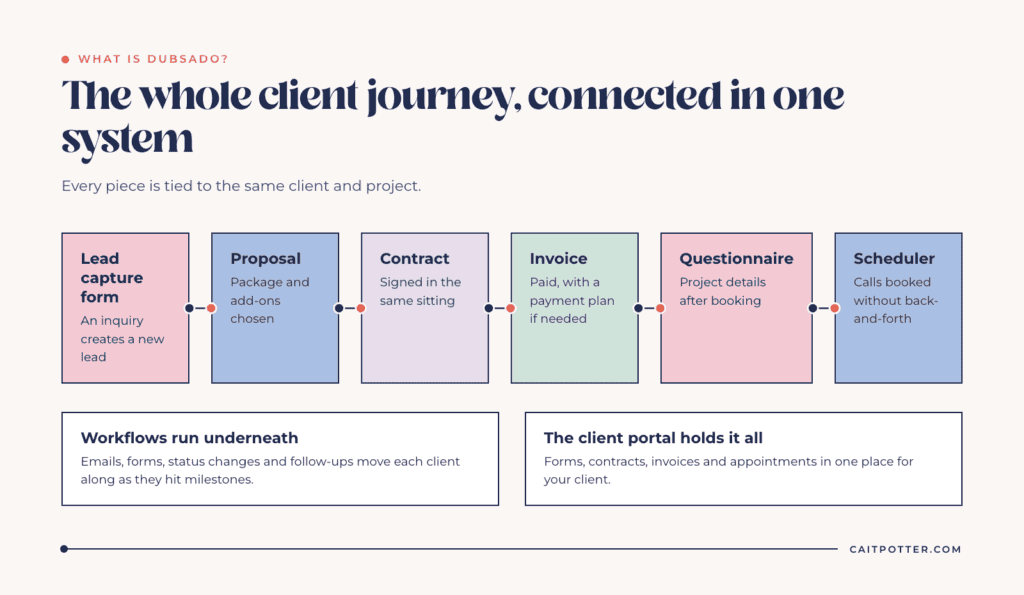
Dubsado is an all-in-one client management system (a CRM) for service-based businesses. It handles the full client lifecycle in one place: capturing leads, sending proposals, collecting signatures on contracts, invoicing and payment plans, booking appointments, sending questionnaires, and giving each client a branded portal where everything about their project is in one spot.
What makes Dubsado an all-in-one CRM, and not just a contract or invoicing app, is that every one of those pieces is connected to the same client and project. A lead fills out your inquiry form, and they’re in the system. They accept a proposal, sign the contract, and pay the first invoice in one sitting. Then automated workflows take over and move them through the rest of your process on a schedule you decide once.
Who is Dubsado for?
Dubsado fits service providers who work with clients on projects or packages and have a repeatable process from inquiry to offboarding. That includes photographers, designers, wedding and event planners, coaches, consultants, bookkeepers, virtual assistants, and licensed or specialized service providers. Dubsado markets directly to creatives, licensed and specialized services, and management, events, and coordination businesses.
It’s a strong fit if you want your client experience to look and feel consistent every single time, and you’re willing to put real thought into mapping that experience before you build it. It’s a weaker fit if you sell physical products, need deep team project management, or want a tool you can set up in an afternoon and never think about again.
Dubsado’s core features
Forms: lead captures, questionnaires, proposals, and contracts
Nearly everything a client interacts with in Dubsado is a form. Lead capture forms go on your website and create a new lead automatically when someone inquires. I have at least one on every website I run, because it means I start every conversation with the information I actually need, and I never retype a lead into the system by hand. Questionnaires collect project details after booking. Proposals let clients choose a package and add-ons, then move straight into the contract and invoice, so a client can accept, sign, and pay in one sitting. Contracts are legally binding e-signature documents.
Forms are also where most of a Dubsado account’s look and feel comes from. I coined the term “code-free forms” for building polished, branded Dubsado forms without custom code, and the native builder can do far more than most people realize.
Invoices, payment plans, and payments
Dubsado creates invoices from your packages and supports payment plans with automated payment reminders. Clients can store a card for recurring payments, which saves you from chasing every installment. For card processing you connect Dubsado Payments (built on Stripe) or Square, and PayPal can be added alongside either one or used on its own. Some features are exclusive to Dubsado Payments, including ACH bank transfers (for US businesses accepting payments from US bank accounts) and Tap to Pay for in-person card payments through the mobile app. If you use QuickBooks Online or Xero, Dubsado’s bookkeeping integration syncs with both.
Schedulers
Dubsado’s scheduler replaces the back-and-forth of booking calls. You set your availability, add buffer time between meetings, connect your calendar, and send the link. You can require payment to book, and meetings can connect to Zoom, Google Meet, or Microsoft Teams. Booked times disappear for everyone else, so you never double book.
Workflows and automations
Workflows are why most people choose Dubsado, and they are still my FAVORITE feature. A workflow is a sequence of actions that runs automatically as a client hits milestones: an inquiry comes in, a contract is signed, a payment clears. From there it can send emails, send forms, change project status, and schedule follow-ups. For a typical photography booking I ran through Dubsado, I didn’t lift a SINGLE FINGER between the inquiry and the consultation, and because the emails were written carefully, clients had no idea any of it was automated.
Automation done this way means EVERY client gets your best day, not just the clients who book during a slow week. Dubsado also lets you hold specific steps for approval, so you can review an important email or proposal before it goes out.
Client portal
Every project can have a branded client portal where clients sign in to see their forms, contracts, invoices, and appointments. It cuts down on “can you resend that?” emails and gives clients one place to go.
Canned emails and smart fields
Canned emails are saved email templates. Add smart fields and Dubsado fills in the client’s name, dates, amounts, and links automatically, so you stop digging through your sent folder to copy an old email and stop sending one with the last client’s name still in it. Canned emails are also the building blocks your workflows send.
Everything else
Dubsado connects to Gmail, Microsoft 365, or any SMTP email account, so client emails send from your own address. It also includes time tracking and reporting, a Zapier integration, multiple brands under one account (an add-on), and a mobile app for approving payments, confirming appointments, and answering inquiries on the go.
Dubsado pricing and the free trial
Dubsado has two plans, Starter and Premier, and a 21-day free trial of Premier with no credit card required. If automated workflows are the reason you want Dubsado, you need Premier. For current prices, what each plan includes, and the best Dubsado discount, see my full breakdown of Dubsado pricing for 2026.
Save on your first payment
When you’re ready to subscribe, use my code XOCAIT for 30% off your first payment. If you pay monthly, that’s 30% off your first month. If you pay annually, it’s 30% off your entire first year, which is why I always recommend the annual plan.
Pros and limits of Dubsado
The biggest strength of Dubsado is how much of the client process it can run on its own once it’s built well. Proposals, contracts, and invoices are tied together, workflows handle the follow-up you would otherwise forget, and clients get the same experience no matter how busy your week is. It’s also flexible enough to fit very different service businesses, and pricing does not climb as your client count grows.
The limits are real, and it’s better to know them going in. Dubsado has a learning curve, and the setup takes genuine time, because the tool can only automate a process you’ve already decided on. If you don’t know what you want your client to experience at each step, there is nothing to build yet. It’s also built around client management, so it’s not a replacement for an email marketing platform or a full team project management tool. And the most useful features, including workflows and schedulers, require the Premier plan.
When to get help with Dubsado
If you’re a do-it-yourselfer with time to learn, start with my guide to getting started in Dubsado. Set up your forms, templates, and payment settings before you touch workflows, because a workflow can only send what already exists.
If you’d rather not spend months figuring it out, that’s where a systems strategist comes in. A strategist maps how your business actually runs before anything gets built, which is the step most DIY setups skip. Here’s more on what a systems strategist does and when you need one.
You can see what that looks like in my done-for-you Dubsado case studies. SugarPop Productions, a photo booth company, runs 11 workflows with 91 of 107 steps automated.
I honestly can’t get enough of form design, process mapping, and finding creative workarounds for a business’s pain points. Want your entire Dubsado account built this way, start to finish? Take a look at my done-for-you Dubsado setup.
Frequently asked questions
What is Dubsado used for?
Dubsado is used by service-based businesses to manage the full client process in one system: lead capture, proposals, contracts, invoices and payment plans, scheduling, questionnaires, client portals, and automated workflows.
Is Dubsado free?
There is no free plan, but Dubsado offers a 21-day free trial with full Premier access, and no credit card is required. After that, you choose Starter or Premier.
Is Dubsado an all-in-one CRM?
Yes. Dubsado combines a CRM with forms, e-signature contracts, invoicing, payment processing, scheduling, and automation, so the client journey from inquiry to offboarding can run in one place.
Does Dubsado have automations on every plan?
No. Automated workflows, schedulers, public proposals, and the Zapier and bookkeeping integrations are part of the Premier plan. The Starter plan covers forms, contracts, invoices, payment plans, and client portals.
Ongoing COO-level support to maintain and refine your systems as the business grows so operations stay steady and decisions stop piling up on your plate.

Support
Custom Dubsado, Airtable, and Moxie systems designed for capacity, not survival. Built around how your business actually runs so growth does not create more chaos.

Systems
Map, audit, or optimize the system that is slowing your business down. Workflows, offers, tech stacks, or the process that keeps living in your head instead of your business.

Strategy
services
These are.
Busy isn't a business plan.


In this power-packed session, I show you how to connect Airtable + your CRM for smarter tracking, simplified workflows, and insights that actually move your business forward.
From Guesswork to Growth with Airtable


A step-by-step guide to setting up your new Dubsado account, area by area, so your trial ends with a system you can actually use.
21 Ways to Max Out Your Dubsado Free Trial

Hot Seat, Hot Takes, Hot Damn.

Free masterclasses that show you exactly how scalable businesses are built.




© 0000 Cait Potter Creative, LLC
Privacy Statement and Terms & Conditions


