













Most small business tech stacks get collected one tool at a time: a scheduler because a friend recommended it, a CRM from a webinar, a project tool your last VA liked, and a spreadsheet to tie it all together. If you want to choose your tech stack on purpose, the process is simpler than the software market makes it look, and it starts nowhere near a pricing page.
In my work as a systems strategist, I’ve helped 200+ organizations across 75+ industries sort out their systems, and the businesses that end up with a stack they like all do the same thing first. They figure out what the business needs before they look at a single tool.
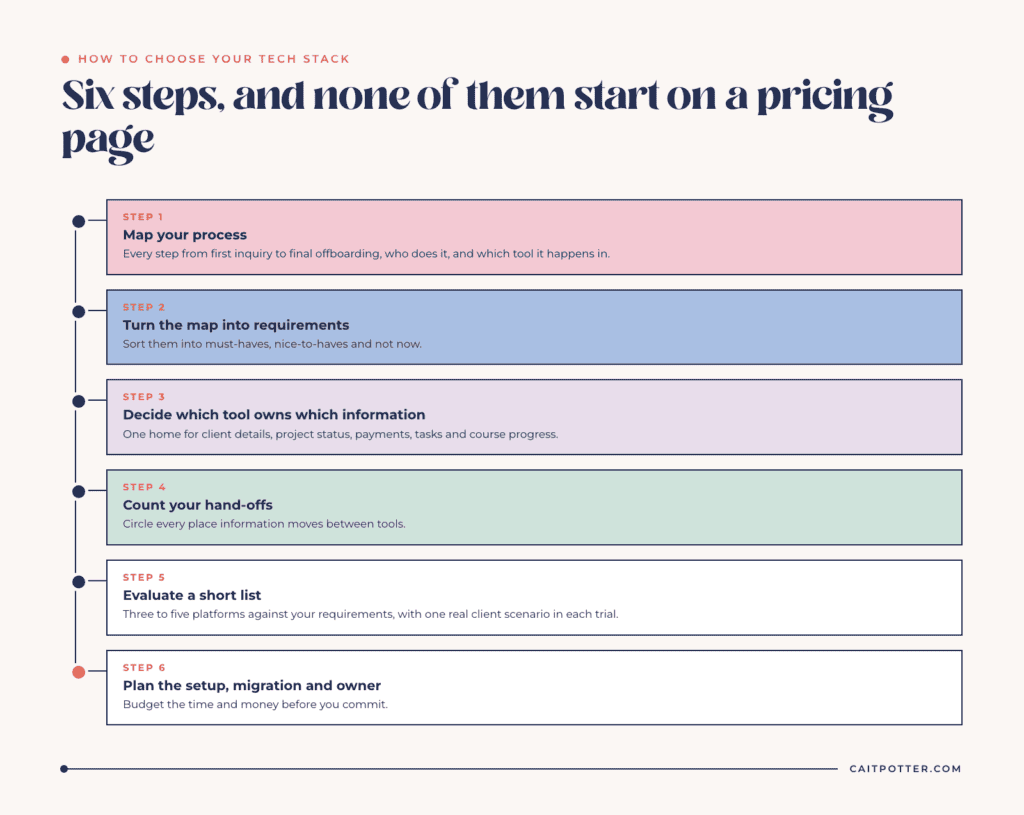
Step 1: Map your process before you look at software
Write down how work moves through your business from first inquiry to final offboarding: every step, who does it, and which tool it happens in today. Include the messy parts, like the reminder you send from your personal email or the form you rebuild for every client.
This map is the foundation for every decision after it. Without one, you’re comparing feature lists against a business you haven’t defined yet. If you’d rather not do it alone, a Systems Blueprint Intensive is a 2-hour working session where we map your full client journey together and decide what your system needs.
Step 2: Turn the map into a requirements list
Go through your map and note what each step needs a tool to do. “Send a contract that clients sign online.” “Let clients book a call without emailing back and forth.” “Show me revenue by service each month.” These become your requirements.
Then sort them into three groups:
- Must-haves. The business doesn’t run without these.
- Nice-to-haves. Useful, but you’d still pick a tool that lacked them.
- Not now. Features you may want in a year, and shouldn’t pay for today.
A lot of bad tool decisions come from shopping by the nice-to-haves.
Step 3: Decide which tool owns which information
Every piece of information in your business should have one home: client contact details, project status, payments, tasks, course progress. Pick the tool that’s the source of truth for each one, and let everything else pull from it.
When two tools both think they own the client record, you end up with two versions of the client and no way to know which one is current. Settling this early prevents more mess than any single feature will.
Step 4: Count your hand-offs
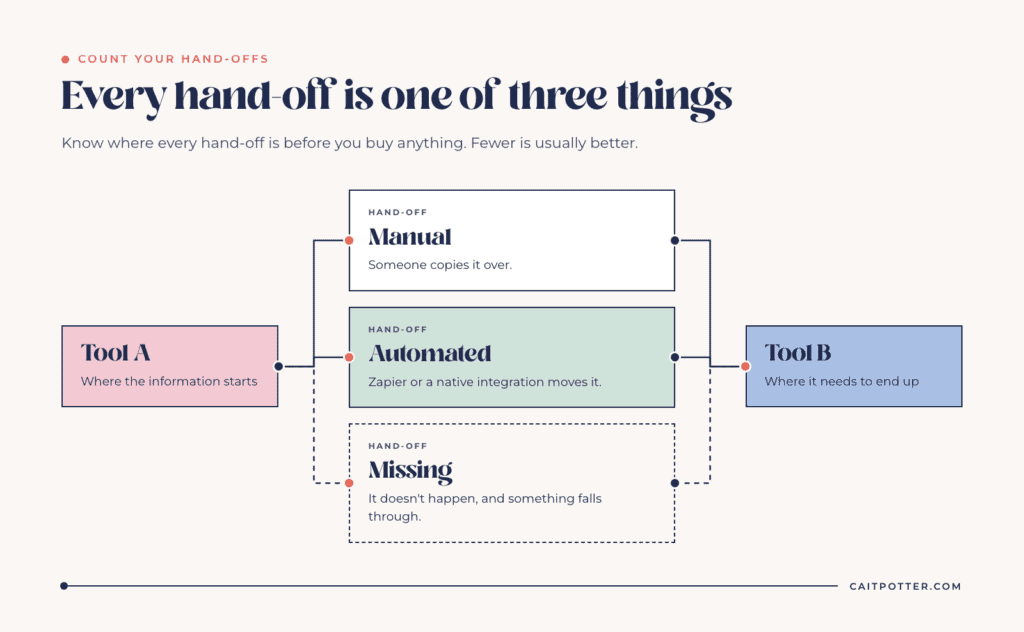
Look at your map again and circle every place information moves from one tool to another. Each hand-off is one of three things:
- Manual. Someone copies it over.
- Automated. Zapier or a native integration moves it.
- Missing. It doesn’t happen, and something falls through.
Fewer hand-offs is usually better. Sometimes moving two jobs into one all-in-one platform removes more work than any automation could. Other times a specialized tool is worth the extra connection. Either way, you should know where every hand-off is before you buy anything.
Step 5: Evaluate a short list against your requirements
Pick three to five platforms. More than that and you’ll spend weeks in free trials without deciding. For each one, check:
- Does it cover your must-haves without workarounds?
- Does it connect to the tools you’re keeping, natively or through Zapier?
- What does it cost with the number of users and brands you actually need? Add-on pricing changes the math quickly.
- Is it available where you and your clients are? Some platforms only operate in certain countries.
- Who will set it up, and who will maintain it?
Use your requirements list as a scorecard, and run one real client scenario through each tool during the trial. Clicking around a demo account tells you very little about how a tool handles your actual work.
Step 6: Plan the setup, the migration, and the owner
Whatever you pick will need to be set up, your data moved, your team trained, and someone assigned to keep it running. Budget time and money for that before you commit. A great platform with a partial setup will perform worse than an average platform set up properly.
Questions to ask before you commit
Sales pages are written to answer the questions a vendor wants you to ask. Before you sign up for anything, get answers to these:
- Can I get my data out? Check whether you can export clients, projects, files, and history in a usable format. Switching later is much harder if your records are stuck.
- What triggers the next price tier? Contacts, users, brands, and features all push plans up. Know which limit you’ll hit first and what it costs when you do.
- What does support look like? Find out whether you get live help, a help center, or a community forum, and whether that matches how you like to solve problems.
- Is the feature available today? Buy for what the platform does now. A roadmap item you’re counting on may arrive late or work differently than you expected.
If a platform passes your requirements list and these four questions, it’s a serious contender.
Common mistakes when choosing a tech stack
- Buying for the business you want in five years. Choose for the next year or two. You can migrate later, and you’ll know far more about what you need by then.
- Choosing by what’s popular. A tool that works for a course creator with a huge email list may be wrong for a photographer booking 30 weddings a year.
- Keeping a tool because you already paid for it. Money already spent shouldn’t decide what you use next year.
- Skipping the map. Every other mistake on this list is easier to avoid once your process is written down.
What this looks like with help
My Tech Stack Consulting service follows these same steps. We start with a process mapping session that covers your full workflow from lead to offboarding. I turn that into a list of business needs and functionality requirements, evaluate up to five platforms against them, and deliver a Tech Stack Recommendation Report, plus an implementation quote if you want one. It takes three weeks and costs $1,297.
For Impact Actual, that process produced two complete tech stack recommendations and a 1033% return on the research. In their words: “We saved $11,000 just by skipping trial-and-error and letting Cait design our stack.”
I used the same order on staff at EmployIndy, an organization of about 75 people: first a system inventory of every tool in use, then Asana rolled out across the organization.
If your decision is mostly between client management tools, my Dubsado vs HoneyBook comparison covers that in detail. And if you already know the stack and need it built and connected, that’s what my custom systems work is for.
Frequently asked questions
How many tools should a small business use?
There’s no right number. What matters is that every tool has a clear job, every piece of information has one home, and the hand-offs between tools are automated or intentional. Some businesses run well on one all-in-one platform, and others need four connected tools.
Should I choose an all-in-one platform or separate tools?
An all-in-one platform cuts down on hand-offs and subscriptions. Separate tools can each do their one job better. Map your process and count the hand-offs first, and the answer is usually clear.
How long does tech stack consulting take?
My Tech Stack Consulting service delivers a complete recommendation in three weeks, including the process mapping session, the requirements list, an evaluation of up to five platforms, and an implementation quote if you want one.
What if I already have tools I like?
Keep them in the running. A tech stack review often confirms that a tool you already pay for is the right one and only needs a proper setup.
Ongoing COO-level support to maintain and refine your systems as the business grows so operations stay steady and decisions stop piling up on your plate.

Support
Custom Dubsado, Airtable, and Moxie systems designed for capacity, not survival. Built around how your business actually runs so growth does not create more chaos.

Systems
Map, audit, or optimize the system that is slowing your business down. Workflows, offers, tech stacks, or the process that keeps living in your head instead of your business.

Strategy
services
These are.
Busy isn't a business plan.


In this power-packed session, I show you how to connect Airtable + your CRM for smarter tracking, simplified workflows, and insights that actually move your business forward.
From Guesswork to Growth with Airtable


A step-by-step guide to setting up your new Dubsado account, area by area, so your trial ends with a system you can actually use.
21 Ways to Max Out Your Dubsado Free Trial

Hot Seat, Hot Takes, Hot Damn.

Free masterclasses that show you exactly how scalable businesses are built.




© 0000 Cait Potter Creative, LLC
Privacy Statement and Terms & Conditions


