
















Spreadsheets are how almost every nonprofit starts, and there’s nothing wrong with that. They’re free, everyone knows how to use them, and when you’re a team of three running one program, a spreadsheet for donors and another for volunteers is plenty. The trouble is that nobody announces the day a nonprofit has outgrown its spreadsheets. It happens gradually, one extra tab and one extra file at a time, until your team is spending more time maintaining the data than using it.
I’ve worked inside nonprofits since 2014, on staff. I joined a five-person organization and helped it grow to fifteen, and later served as Director of Systems Integration at a 75-person organization. I also hold a master’s in nonprofit management. I’ve been the person rebuilding the grant report from scratch at 9pm, so I know these signs from the inside. Here’s what to watch for, and what to do first when you recognize them.
1. Reports take days, and you rebuild them every time
The clearest sign is reporting. Your board wants numbers for the quarterly meeting, a funder wants outcomes for the year, and each time someone opens six files, copies figures into a new sheet, and checks them twice because they don’t trust the formulas.
If a report has to be rebuilt every cycle, the data behind it isn’t structured to answer the question. A system built for reporting answers the same question the same way every time, because the numbers come from records your team already keeps.
2. The same donor lives in four places
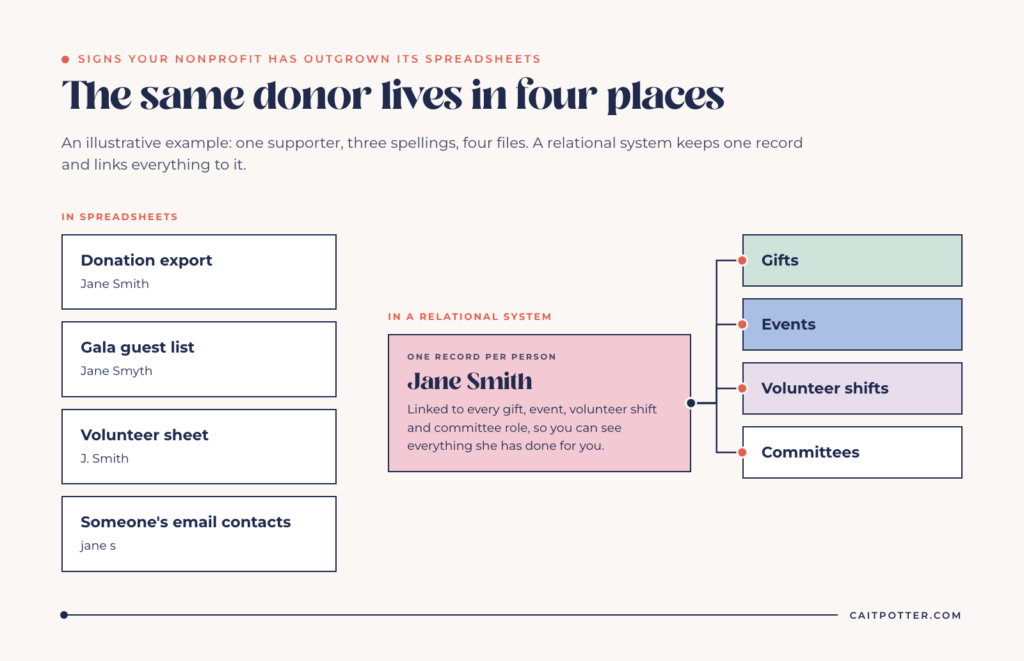
A donor gives online, comes to the gala, volunteers twice, and serves on a committee. In a spreadsheet setup, that person often exists in the donation export, the event list, the volunteer sheet, and someone’s email contacts, with three spellings of their name.
This is the point where spreadsheets start costing you relationships, not just time. You can’t thank someone well if you can’t see everything they’ve done for you. One record per person, linked to their gifts, hours, and events, is the fix.
3. One person is the system
Ask yourself what would happen if your development coordinator, or your longest-tenured volunteer, left next week. If the honest answer is that nobody else knows which file is current, what the color coding means, or how the formulas work, then your system is that person.
Institutional knowledge walking out the door is one of the most expensive things that happens to a small nonprofit. A real system writes the structure down, so the knowledge stays with the organization.
4. Version control is a weekly conversation
“Is this the latest one?” “Who changed the totals?” “I thought you were updating the shared one.” If your team has these conversations regularly, you have too many copies of the truth. Spreadsheets get emailed, downloaded, and duplicated, and every copy drifts.
5. Grant deadlines live in someone’s head
Grant tracking is where spreadsheets fail quietly. The application deadline is in the sheet, but the interim report, the final report, the renewal date, and the specific outcomes you promised are spread across calendars, emails, and memory.
Missing a report deadline can cost you a funder. If you’re relying on one person to remember every reporting date, you need a grant system with deadlines that surface on their own. The short version: every deadline, including every report, should be its own record with a date, an owner, and a reminder.
6. Volunteers are managed by group text
Sign-ups come through a form, shift changes come through texts, and hours get logged when someone remembers. Then a grant asks for total volunteer hours by program and nobody can produce the number with confidence.
Volunteer data is some of the most useful information a nonprofit has for funders, and it’s usually the least organized.
Keep reading: how to build a grant tracking system and the Airtable nonprofit discount.
7. Your data can’t answer simple questions
Try these: How many people did each program serve last year? Which donors gave last year but not this year? Which volunteers have worked more than ten shifts? If answering any of them means manual counting, your data is stored but not structured.
A spreadsheet stores rows, while a relational system connects people, gifts, programs, and outcomes, so questions that cross those categories have answers.
8. You’re copying data between tools by hand
Your giving platform exports a CSV. Someone pastes it into the master donor sheet. Someone else copies new names into the newsletter list. Every manual transfer is time spent and a chance for an error, and the more tools you add, the more transfers there are.
9. People are afraid to touch the file
If staff avoid editing the main spreadsheet because they’re worried about breaking a formula, or there’s a tab labeled “DO NOT TOUCH,” the file has become fragile. Fragile systems don’t get used, and data that doesn’t get entered doesn’t exist when you need it.
What to set up first
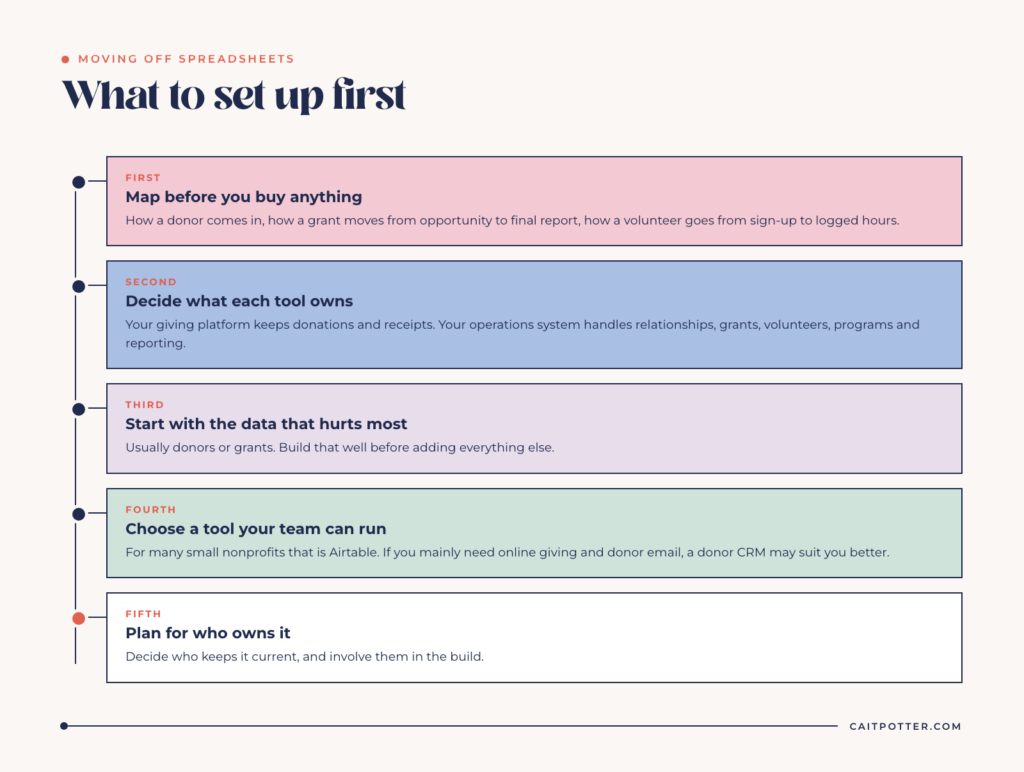
If you recognized three or more of these, it’s time to move off spreadsheets. That doesn’t mean buying the biggest nonprofit CRM you can find. For most small nonprofits, the right sequence looks like this.
Map before you buy anything
Write down what actually happens: how a donor comes in, how a grant moves from opportunity to final report, how a volunteer goes from sign-up to logged hours. You can’t automate a process you don’t understand, and new software doesn’t fix a process nobody has defined. If you’d rather do this with someone who has mapped a lot of nonprofit operations, that’s what a Systems Blueprint Intensive is for.
Decide what each tool owns
If you use a giving platform, it should probably keep handling donations and receipts. Your operations system should handle what’s falling through the cracks: relationships, grants, volunteers, programs, and reporting. Overlap between tools is where duplicate data comes from.
Start with the data that hurts most
Pick the area causing the most pain, usually donors or grants, and build that well before adding everything else. A system your team actually uses for one job beats a complete system nobody trusts.
Choose a tool your team can run
For many small nonprofits, Airtable is a strong fit. It’s relational, so one donor record can link to every gift, event, and volunteer shift. It has interfaces that staff and volunteers can use without seeing the database behind them. And eligible nonprofits get 50% off the Team plan, which comes to $12 per billable user per month according to Airtable’s nonprofit support page. That discount has real limits, including no Airtable AI and credit card billing only. If you mainly need online giving, receipting, and donor email, a dedicated donor CRM may suit you better, and Airtable can work alongside it.
Plan for who owns it
Systems need an owner after launch. Decide now who on your team will keep it current, and make sure they’re part of building it. A system that depends on the outside person who built it has the same problem as a spreadsheet that depends on one staff member.
How I help nonprofits make the move
I build nonprofit systems for donors, grants, volunteers, programs, and board reporting, most often in Airtable and connected to the tools you already use. Every build starts by mapping how your organization actually runs, then designing a system your staff can keep up with, with training and documentation so it belongs to your organization. If you want the background on what a role like mine involves, here’s what a systems strategist does. And if your team is worried about what happens when key people are out, my post on contingency planning covers that side of it.
I’ve worked the spreadsheet side of this too. At TeenWorks, I ran a teen summer employment program out of Google Sheets, with 732 applicants on one master roster in a single hiring season. You can see more in my nonprofit case studies.
FAQ
When should a nonprofit stop using spreadsheets?
When reporting takes days, the same people exist in multiple files, or one staff member is the only one who understands the data. Any one of those is worth fixing. Three or more means the spreadsheets are costing you more than they save.
What should a small nonprofit use instead of spreadsheets?
It depends on what’s breaking. Many small nonprofits pair a giving platform for donations with a flexible operations system like Airtable for donors, grants, volunteers, and programs. Organizations that mainly need fundraising tools may be better served by a dedicated donor CRM.
Is Airtable free for nonprofits?
Airtable has a Free plan with limits on records, automations, and collaborators. Eligible nonprofits get 50% off the Team plan, which is $12 per billable user per month.
How long does it take to move a nonprofit off spreadsheets?
It depends on how much data you have and how many areas you’re moving at once. Starting with one area, like donors or grants, and building it well is faster and more reliable than moving everything at the same time.
Ongoing COO-level support to maintain and refine your systems as the business grows so operations stay steady and decisions stop piling up on your plate.

Support
Custom Dubsado, Airtable, and Moxie systems designed for capacity, not survival. Built around how your business actually runs so growth does not create more chaos.

Systems
Map, audit, or optimize the system that is slowing your business down. Workflows, offers, tech stacks, or the process that keeps living in your head instead of your business.

Strategy
services
These are.
Busy isn't a business plan.


In this power-packed session, I show you how to connect Airtable + your CRM for smarter tracking, simplified workflows, and insights that actually move your business forward.
From Guesswork to Growth with Airtable


A step-by-step guide to setting up your new Dubsado account, area by area, so your trial ends with a system you can actually use.
21 Ways to Max Out Your Dubsado Free Trial

Hot Seat, Hot Takes, Hot Damn.

Free masterclasses that show you exactly how scalable businesses are built.




© 0000 Cait Potter Creative, LLC
Privacy Statement and Terms & Conditions


