
















Most small nonprofits track grants in a spreadsheet with a row per grant and a status column: researching, applied, awarded, declined. That’s a list, and a list tells you where each application stands. A grant tracking system has a bigger job. It has to tell you what’s due next, who’s responsible for it, what you promised each funder, and what data you’ll need when the report comes due.
I’ve managed grant-funded programs and funding streams from inside nonprofits since 2014, and I hold a master’s in nonprofit management, so I’ve been on the receiving end of a missed report reminder. This guide walks through how I’d build a grant tracking system for a small nonprofit, the structure, the views, and the reminders, so that no deadline depends on someone’s memory. I’ll use Airtable for the examples because it’s what I build most nonprofit systems in, but the structure works in any tool that can link records.
Why a status column isn’t enough
A grant has one application deadline and, if you’re awarded, a series of obligations after it: interim reports, a final report, budget reports, site visits, renewal applications. Each one has its own date and its own owner. In a one-row-per-grant spreadsheet, those dates end up crammed into a notes column or living on someone’s calendar, which is exactly where they get missed.
The fix is to treat every deadline as its own record. Once each report is a record with a date and an owner, you can sort, filter, and set reminders on it, and nothing lives only in a notes field.
The structure: five connected tables
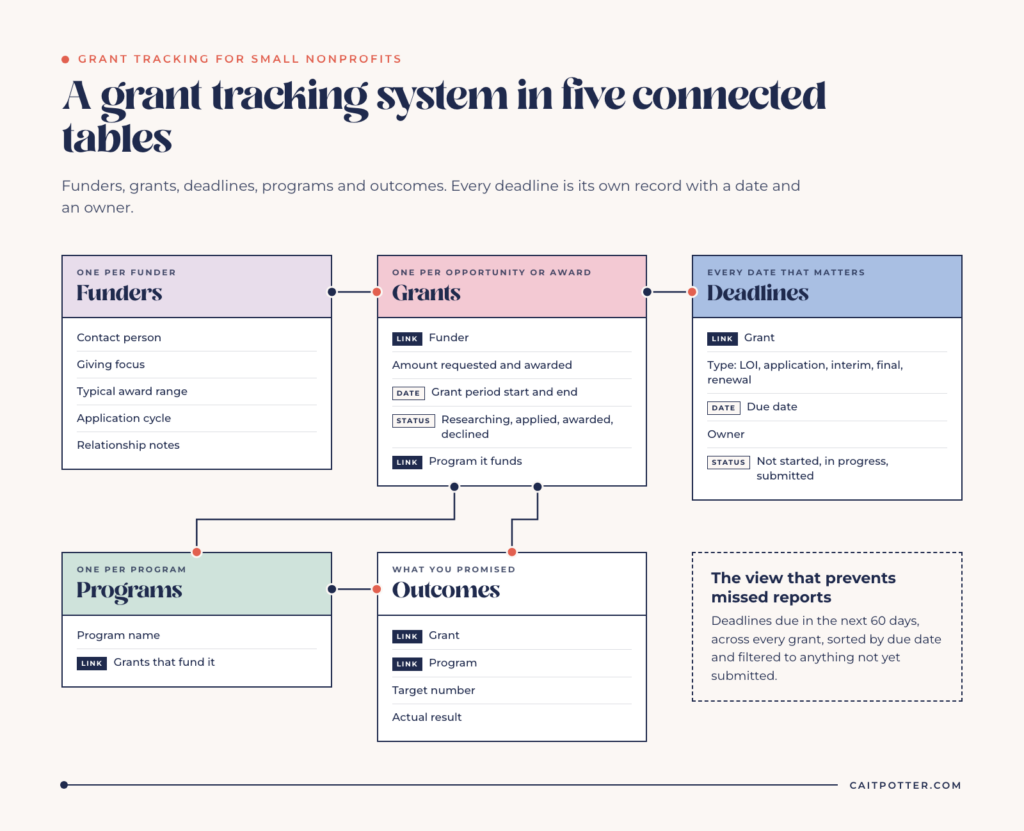
Here’s the base I’d build. Each table holds one kind of thing, and the tables link to each other.
1. Funders
One record per foundation, corporation, or government funder. Track the contact person, giving focus, typical award range, application cycle, and relationship notes. This is your funder history. When a program officer changes, the next person on your team can see every conversation and every grant without asking around.
2. Grants
One record per opportunity or award, linked to its funder. Track the amount requested, amount awarded, grant period start and end dates, status, and the program it funds. A single funder might link to five grants over ten years, and that history is valuable when you’re deciding how to approach them next.
3. Deadlines
This is the table most grant trackers are missing. Every date that matters gets a record: the letter of inquiry, the full application, each interim report, the final report, the renewal. Each deadline links to its grant, and has a type, a due date, an owner, and a status (not started, in progress, submitted).
With deadlines as records, you can see everything due in the next 60 days across all grants in one view. That’s the view that prevents missed reports.
4. Programs
One record per program your grants fund. Linking grants to programs lets you see how each program is funded, which matters for budgeting and for spotting a program that depends on a single grant.
5. Outcomes or deliverables
The specific things you promised in each application: serve 200 participants, hold 12 workshops, distribute 1,000 meals. Each deliverable links to its grant and its program, with a target number and a field for the actual result. When a report is due, your outcomes are already in one place instead of scattered across program staff inboxes.
The views that run your grant calendar
A good structure is only useful if people can see what they need without digging. These are the views I’d set up first.
- Due in the next 60 days. All deadlines, sorted by due date, filtered to anything not yet submitted. This is the one your executive director checks every Monday.
- My deadlines. Filtered by owner, so each person sees only what’s theirs.
- Grant calendar. A calendar view of every deadline, so you can spot crowded months before they arrive.
- Pipeline by status. A Kanban view of grants moving from researching to applied to awarded or declined.
- Renewals coming up. Awarded grants with a period ending in the next six months, so renewal work starts early.
In Airtable, you can turn these into an interface so staff and board members see clean dashboards instead of the tables behind them.
Reminders that don’t depend on memory
Automations are where a grant tracking system starts doing work for you. A few I’d set up:
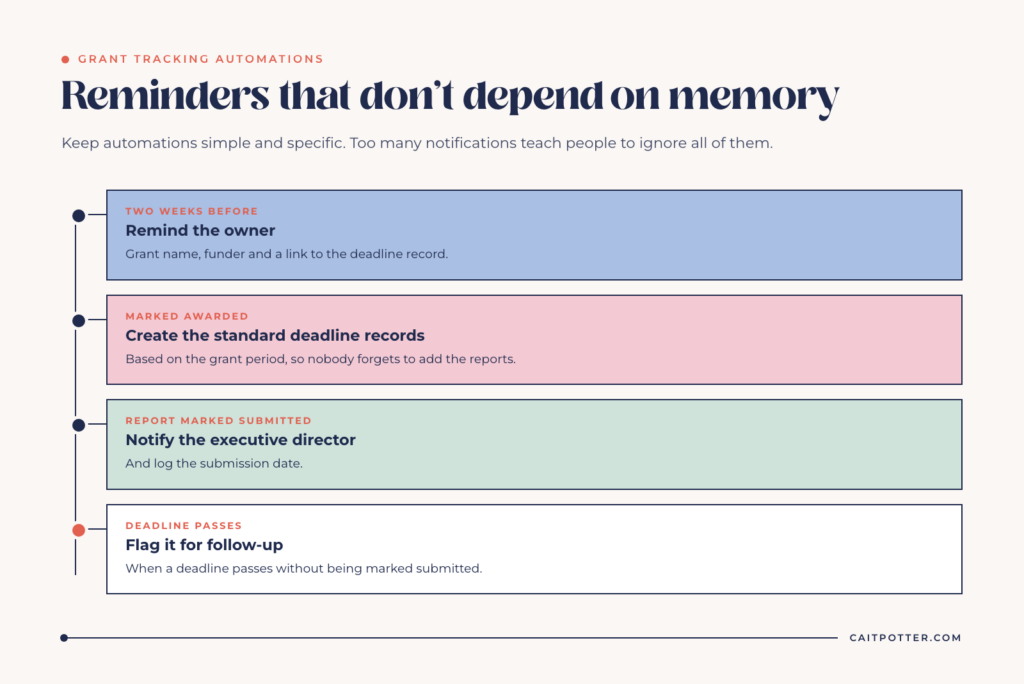
- Two weeks before a deadline, send the owner a reminder with the grant name, the funder, and a link to the record.
- When a grant is marked awarded, create a checklist of standard deadline records based on the grant period, so nobody forgets to add the reports.
- When a report is marked submitted, notify the executive director and log the date.
- When a deadline passes without being marked submitted, flag it for follow-up.
Keep automations simple and specific. A system that sends too many notifications teaches people to ignore all of them.
Reporting to funders and your board
Once outcomes link to grants and programs, reporting stops being a scavenger hunt. A funder report pulls the deliverables for that grant, with targets next to actual results. A board report rolls up awarded amounts by program and by year, and shows what’s pending.
The YES Indy dashboard I built works the same way at a bigger scale: about $2 million in provider budgets across 6 funding streams, with remaining funds and percentage spent calculated automatically for each of 11 providers.
This is where the time savings show up. Reports that used to take days of gathering numbers from five people start from data your team already keeps.
What it costs to run in Airtable
A very small team can start on Airtable’s Free plan, which has limits on records, automations, and collaborators. Most organizations that track grants alongside donors and programs end up on the Team plan. Eligible nonprofits get 50% off Team, which is $12 per billable user per month according to Airtable’s nonprofit support page. Two things to know before you plan around it: Airtable AI isn’t available on nonprofit plans, and discounted plans have to be paid by credit card.
Only people who edit or comment need a paid seat. Board members who only need to view a dashboard can often use a read-only view or interface, which keeps the cost down.
Common mistakes to avoid
- Building the tracker before agreeing on the process. Decide who owns applications, who owns reports, and who approves submissions before you build anything.
- Putting everything in one table. One giant table with forty columns has the same problems as the spreadsheet you’re replacing. Separate tables for separate things are what make the views work.
- Skipping the outcomes table. If you only track dates, reporting is still a manual scramble.
- Not naming an owner. A system without an owner drifts. Pick the person who will keep it current, and involve them in the build.
- Forgetting about declined grants. Declines are part of your funder history and tell you when to try again.
When to get help
If your nonprofit is still running grants out of a spreadsheet and a shared calendar, a grant tracking system is one of the highest-value things you can build. If you’d rather not build it yourself, I design nonprofit systems for grants, donors, volunteers, and programs, built around the nonprofit plan’s limits and handed off with training so your team owns it. Every build starts with a Systems Blueprint Intensive to map how your organization actually runs. If you’re newer to Airtable itself, start with what Airtable is and how it works, or read about the automation mistakes small organizations make most often.
Keep reading: signs your nonprofit has outgrown its spreadsheets and the Airtable nonprofit discount.
Grant tracking FAQ
What should a grant tracking system include?
At minimum: funders, grants, every deadline as its own record, the programs each grant funds, and the outcomes you promised. Add views for upcoming deadlines and automations for reminders.
Can I use a spreadsheet for grant tracking?
You can for a handful of grants. Once you have multiple reports per grant, several funders, and more than one person responsible, a spreadsheet makes deadlines easy to miss.
Is Airtable good for grant tracking?
Yes, for most small nonprofits. It links funders, grants, deadlines, and outcomes, and supports calendar views and automated reminders. Eligible nonprofits get 50% off the Team plan, though Airtable AI isn’t included.
Ongoing COO-level support to maintain and refine your systems as the business grows so operations stay steady and decisions stop piling up on your plate.

Support
Custom Dubsado, Airtable, and Moxie systems designed for capacity, not survival. Built around how your business actually runs so growth does not create more chaos.

Systems
Map, audit, or optimize the system that is slowing your business down. Workflows, offers, tech stacks, or the process that keeps living in your head instead of your business.

Strategy
services
These are.
Busy isn't a business plan.


In this power-packed session, I show you how to connect Airtable + your CRM for smarter tracking, simplified workflows, and insights that actually move your business forward.
From Guesswork to Growth with Airtable


A step-by-step guide to setting up your new Dubsado account, area by area, so your trial ends with a system you can actually use.
21 Ways to Max Out Your Dubsado Free Trial

Hot Seat, Hot Takes, Hot Damn.

Free masterclasses that show you exactly how scalable businesses are built.




© 0000 Cait Potter Creative, LLC
Privacy Statement and Terms & Conditions


