













A new system feels finished on launch day. The automations fire, the forms look right, and your team knows where everything is. Then the business keeps moving. That’s why every system needs ongoing system support after launch: someone whose job is to keep it working as your tools and your business change.
I’ve been a systems strategist since 2020, building in Dubsado, Airtable, and a long list of other platforms, and the builds that hold up over time are the ones somebody keeps an eye on.
Your business changes, so your system has to
Your offers change. Your pricing changes. You hire someone, someone leaves, you launch a new program. Each of those touches your system: a new form, a new workflow, a new field, a new view for a new team member.
A system built around how you ran your business last spring won’t match how you run it next spring unless someone keeps it current. When nobody does, the gap fills with workarounds, and workarounds are how a good system slowly turns back into a patchwork.
Your tools change on their own
Your system depends on platforms you don’t control. Software updates move buttons, change how features work, and retire old ones. Dubsado’s move to 3.0 is a recent example, and I covered what changed and what to rebuild in a separate post.
Integrations are usually the most fragile part. A Zap that has run without a problem for a year can stop when one app changes a field or an account needs to be reconnected. Nobody notices until a client asks why they never got their onboarding email.
What breaks when nobody owns the system
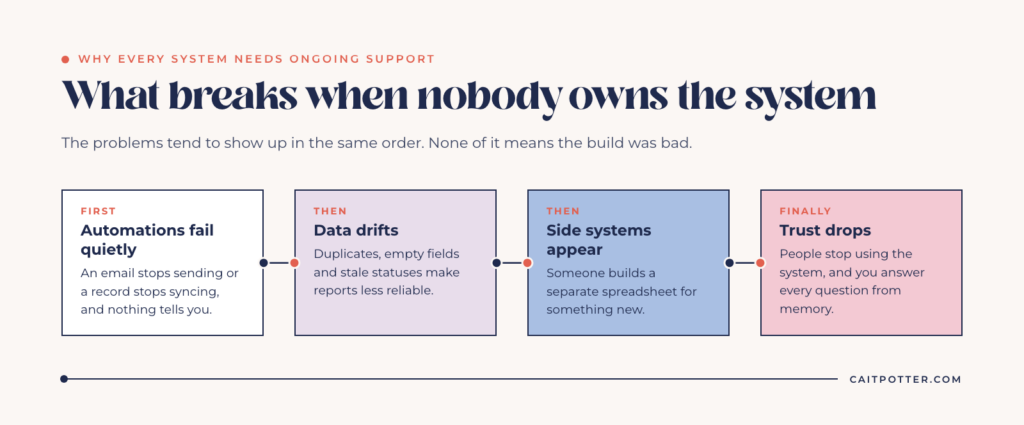
When a system has no owner, the problems tend to show up in the same order:
- Automations fail quietly. An email stops sending or a record stops syncing, and nothing tells you.
- Data drifts. Duplicate records, empty fields, and statuses nobody updates make your reports less reliable every month.
- Side systems appear. Someone on your team builds a separate spreadsheet because the system doesn’t handle something new they need.
- Trust drops. Once people stop trusting the system, they stop using it, and you’re back to answering every question from memory.
None of this means the build was bad. Any system that nobody maintains ends up here eventually. Structure is the antidote to resentment, but only if the structure keeps up with the business.
What ongoing support should cover
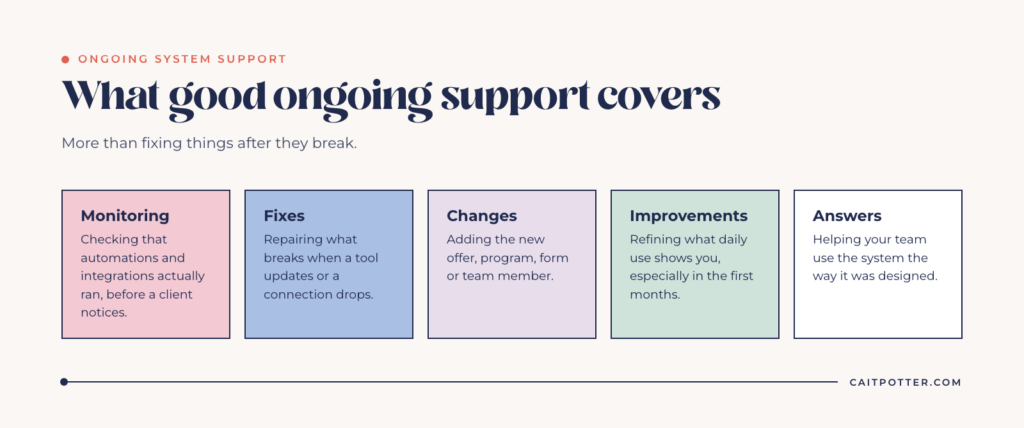
Good ongoing support is more than fixing things after they break. It covers:
- Monitoring. Checking that automations and integrations actually ran, before a client notices they didn’t.
- Fixes. Repairing what breaks when a tool updates or a connection drops.
- Changes. Adding the new offer, program, form, or team member to the system as the business grows.
- Improvements. Once a system is in daily use, you see what to refine. A system can’t improve until it’s in use, which is why the first few months after launch matter so much.
- Answers. Helping your team use the system the way it was designed, so nobody invents their own version.
Who should own your system
Every system needs an owner. That person needs time set aside for it, access to every connected tool, an understanding of how the system was built, and the authority to make changes.
For a standard setup, like a well-documented Dubsado build, many business owners handle this themselves or hand it to a team member. A good handoff, with training and written documentation, makes that realistic.
What a good handoff includes
Whoever owns the system after launch needs more than a login. A good handoff includes written documentation of what each automation does and what triggers it, a list of every connected tool and who has access, training for the people who use the system daily, and notes on anything that was built as a temporary fix. Without that, the owner is maintaining something they have to reverse-engineer first.
When to plan for outside support
Complex builds are different. A custom Airtable base, a system that spans several platforms, or anything with a lot of automation needs someone dedicated to monitoring it, catching what breaks, and iterating as the business changes. Unless someone on your team already has that as part of their job, plan for outside support from the start.
How I handle support after a build
Every build I do includes a support window after launch. A Custom System Build includes 30 days of support, and a full Airtable setup includes 30 days of support (2 weeks with a custom dashboard).
After that, I offer monthly retainer support to maintain your system, fix what breaks, and keep improving it as your business grows. You can read more in the ongoing support sections of my custom systems and Airtable setup pages. We talk through what level of support makes sense on your discovery call.
A survivor career readiness program is one example. I built the Airtable system it runs on and still support it as the program changes, including 15 live automations that keep each participant’s status current.
What skipping support actually costs
Skipping support can look like savings. In practice, the cost shows up somewhere else.
Time. Every workaround takes a few minutes, and a few minutes a day adds up to hours a month spent doing by hand what the system was built to do.
Client experience. A broken automation usually means a client didn’t get something: a reminder, a form, a welcome email. From their side, it looks like you forgot about them, and they have no way of knowing a Zap failed.
A rebuild. Small problems left alone pile up. A system that drifts for a year or two often needs a much bigger cleanup, or a full rebuild, than one that got regular attention. Fixing things while they’re small is almost always cheaper.
If you want to see how the value of a well-run system adds up, my post on return on investment with a system strategist walks through it.
Signs your system needs attention now
If any of these sound familiar, your system is overdue for some care:
- You’ve stopped trusting at least one report or dashboard
- Your team has workarounds for things the system “should” do
- Nobody has checked your automations since they were built
- You’ve added offers, programs, or team members since launch
- Only one person knows how the system works
That last one is also a business continuity problem. If you haven’t thought about what happens when that person is out, read my post on business continuity plans for small businesses.
Frequently asked questions
Isn’t a good system supposed to run on its own?
Day to day, yes. A well-built system handles routine work without you touching it. But your tools update and your business changes, and the system needs someone to keep it in step with both.
How much maintenance does a system need?
It depends on the build. A standard CRM setup may only need attention when you change an offer or a tool updates. A custom system with several connected platforms and many automations needs regular monitoring and someone ready to fix things quickly.
What support is included after a build?
A Custom System Build includes 30 days of support after launch, and a full Airtable setup includes 30 days of support. After that, I offer monthly retainer support for clients who want ongoing help.
Can I maintain my system myself?
For simpler builds, often yes, especially with good documentation and training at handoff. For complex, multi-platform builds, most businesses are better off with a dedicated owner or ongoing outside support.
Ongoing COO-level support to maintain and refine your systems as the business grows so operations stay steady and decisions stop piling up on your plate.

Support
Custom Dubsado, Airtable, and Moxie systems designed for capacity, not survival. Built around how your business actually runs so growth does not create more chaos.

Systems
Map, audit, or optimize the system that is slowing your business down. Workflows, offers, tech stacks, or the process that keeps living in your head instead of your business.

Strategy
services
These are.
Busy isn't a business plan.


In this power-packed session, I show you how to connect Airtable + your CRM for smarter tracking, simplified workflows, and insights that actually move your business forward.
From Guesswork to Growth with Airtable


A step-by-step guide to setting up your new Dubsado account, area by area, so your trial ends with a system you can actually use.
21 Ways to Max Out Your Dubsado Free Trial

Hot Seat, Hot Takes, Hot Damn.

Free masterclasses that show you exactly how scalable businesses are built.




© 0000 Cait Potter Creative, LLC
Privacy Statement and Terms & Conditions


