
















A Dubsado offboarding workflow is the part of your system that ends a project on purpose, so it doesn’t just trail off. Most businesses automate inquiries and onboarding, then handle the last week of a project by memory. Final files go out late, the feedback request never gets sent, the project sits in an “active” status for six months, and a client who was happy to refer you never hears from you again.
Offboarding is where you get repeat work and referrals, and it’s the easiest phase to automate because it looks almost the same for every client. Here’s what I build into it in Dubsado 3.0, where workflows are now called Flows.
What offboarding needs to do
Before you build, decide what a finished project looks like in your business. For most service providers, offboarding covers five jobs:
- Deliver the final work, and confirm the client has it.
- Collect the final payment, if there’s a balance.
- Ask for feedback while the project is fresh.
- Close the project in Dubsado so your project list stays accurate.
- Leave the door open for the next project or a referral.
Each of those is a step in the Flow. Some are automatic, some are tasks for you, and the order matters more than it looks, especially around archiving.
What starts the offboarding Flow
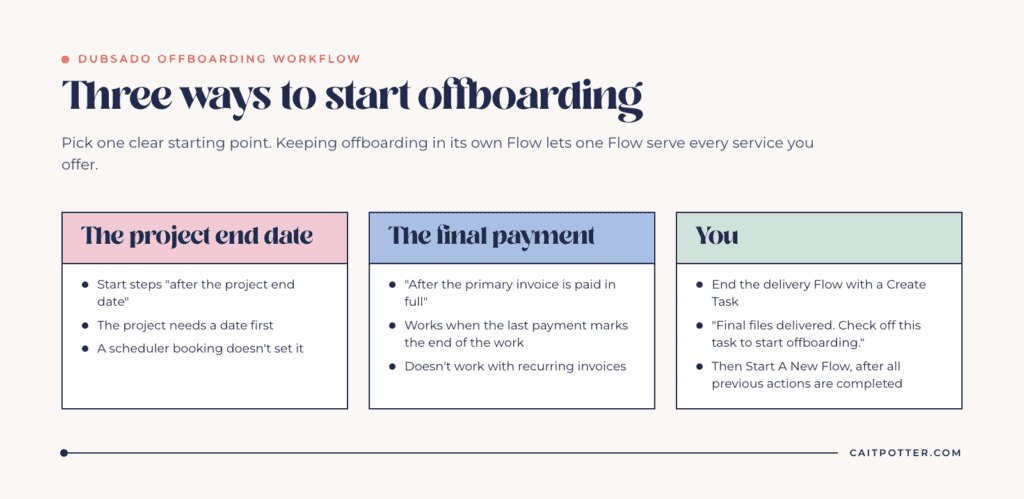
Pick one clear starting point. These are the three I use most:
- The project end date. If every project has an end date, start offboarding steps “after the project end date.” The project needs a date for this to work. A scheduler booking doesn’t set it, so set the date by hand or through a date field on a form mapped to the project date.
- The final payment. “After the primary invoice is paid in full” works when the last payment marks the end of the work. It doesn’t work with recurring invoices.
- You. For work that ends when you say it’s done, end your delivery Flow with a Create Task like “Final files delivered. Check off this task to start offboarding,” followed by a Start A New Flow action that uses “after all previous actions are completed.”
I keep offboarding in its own Flow and start it from the delivery Flow. That way one offboarding Flow can serve every service you offer.
The offboarding steps worth automating
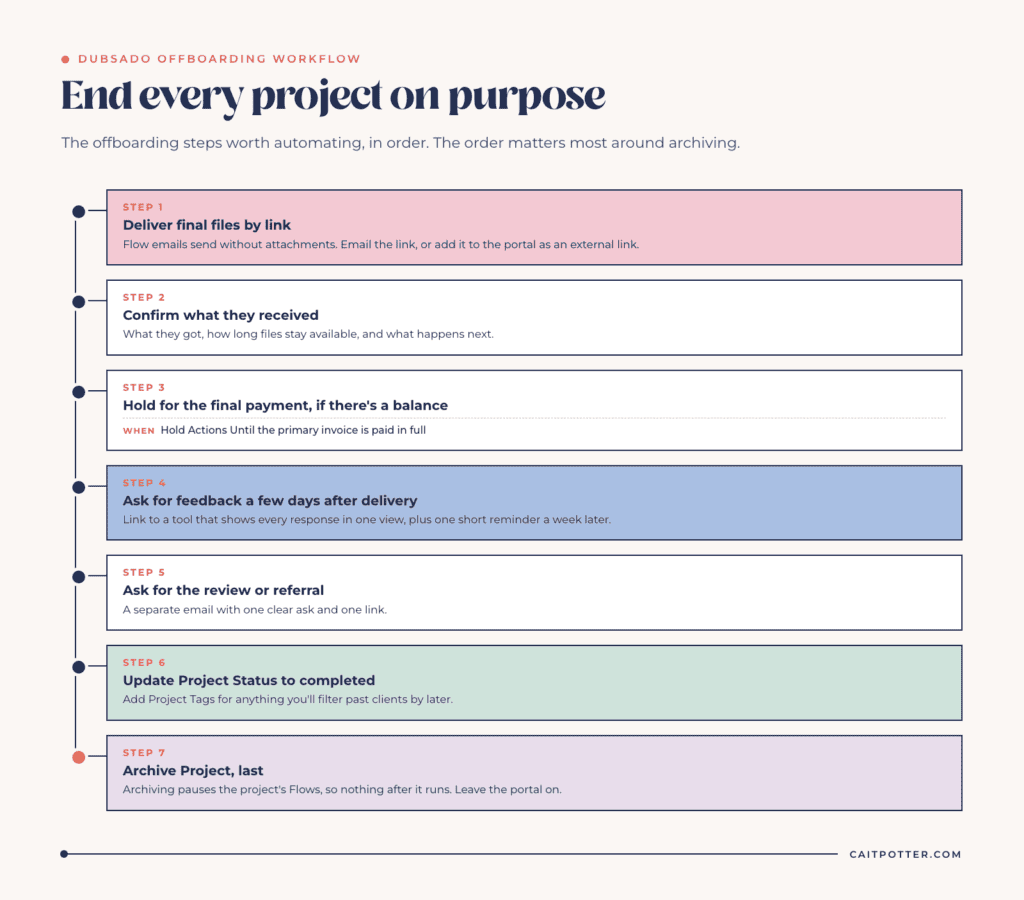
1. Deliver, then confirm
Flow emails send without file attachments, so deliver final files by link. Send an email with the link, or add the link to the client portal as an external link so it stays in the project. External links show up in the project’s documents section of the portal, and they stay there until you delete them.
Follow delivery with a Send Email that explains what they received, how long their files will be available, and what happens next.
2. Collect the balance
If you use payment plans, the final installment reminder comes from the payment plan, not the Flow. Dubsado’s own help says not to use Send Primary Invoice for payment reminders. If you want the Flow to wait for that last payment before closing anything, add a Hold Actions Until step triggered after the primary invoice is paid in full.
3. Ask for feedback
Send the feedback request a few days after delivery, not the same day. I don’t collect feedback with a Dubsado form, because Dubsado can’t show you all your answers side by side. Use a tool that lets you read every response in one view, and link to it from your Flow email. I explained the full setup in collecting feedback with Dubsado.
Add a reminder with a second Send Email a week later. Since the feedback form lives outside Dubsado, the Flow can’t know whether they filled it out, so keep that reminder short and send only one.
4. Ask for the review or referral
If you collect public reviews, ask for them in a separate email after the feedback request, so each email has one job. Keep it to one clear ask with one link.
5. Update the status
Use Update Project Status to move the project to a completed status, and Add Project Tags if you track anything like “Testimonial received.” Statuses tell you where a project is right now. Tags let you filter past clients later. Here’s how I use project statuses vs tags.
6. Archive the project last
Archive Project moves the project to archived and pauses its Flows. Any step after it won’t run until you unarchive the project and resume the Flow by hand. So archiving has to be the final action in the Flow, after every email and task.
Archiving a project with a job status leaves its invoices alone. Archiving a lead-status project closes its open invoices and deletes any with no line items, so don’t use the same archive step for leads and paid clients without checking what’s in that project.
7. Leave the portal on
You usually don’t need to deactivate a client’s portal. Portals can stay active indefinitely, and leaving it on means the client can find their contract, invoices and files later without emailing you. Use Deactivate Portal only when you want to remove access on purpose.
Keep past clients close without a manual calendar
A follow-up email months after the project ends needs a Flow that’s still running. Because archiving pauses Flows, you have two options. You can leave the project unarchived in a completed status and add check-in emails timed from the project end date. Or you can put the check-in steps before the archive step. Pick one approach and use it on every project, so you always know which projects are still sending.
For sleep consulting clients at Harmony Baby Concierge, check-ins go out at one week, two weeks and two months after the work is done, without anyone putting them on a calendar.
Mistakes I see in offboarding
- Archiving too early. Every action after Archive Project waits until someone resumes the Flow, which usually means it never sends.
- Using a Dubsado form for testimonials. You’ll end up opening every project one at a time to read the answers.
- Sending everything on the last day. The thank-you, the feedback request and the review request all stacked at “0 days after all previous actions are completed” arrive as three emails in one minute.
- Relying on a project date that was never set. Project date triggers wait until there’s a date. Nothing fires, and nothing tells you.
Test your offboarding Flow
Run a test project with your own email address. Set a project end date in the past and use Force now to push actions through. Check that the delivery link works, the status changes, every email arrives in the right order, and the archive step runs last. If any action turns red, fix it, click Retry, and resume the Flow.
Get help with your offboarding
If offboarding is the part of your system that never got finished, it’s usually a sign the rest needs a second look too. In a done-with-you Dubsado setup, we map your whole client journey together, offboarding included, and you build it with a step-by-step course and my support. Every option is on my Dubsado setup services page. If your account came over from 2.0, check what changed in Dubsado 3.0 before you build anything new.
Frequently asked questions
What should a Dubsado offboarding workflow include?
Final delivery, a confirmation email, the final payment if there’s a balance, a feedback request, a review or referral ask, a status update and, last, archiving the project.
Does archiving a project stop its workflow?
Yes. Archive Project pauses the project’s Flows. Unarchiving doesn’t resume them on its own, so you’d need to unpause the Flow by hand. Make archiving the final step.
Should I deactivate my client’s portal when the project ends?
Usually not. Portals can stay active indefinitely, which lets past clients find their documents and files. Deactivate only when you want to remove access.
Can my offboarding workflow wait for the final payment?
Yes. Add a Hold Actions Until step triggered after the primary invoice is paid in full. That trigger doesn’t work with recurring invoices.
Can I send final files through a Dubsado workflow?
Not as attachments. Flow emails send without file attachments, so include a link in the email or add an external link to the project in the client portal.
Ongoing COO-level support to maintain and refine your systems as the business grows so operations stay steady and decisions stop piling up on your plate.

Support
Custom Dubsado, Airtable, and Moxie systems designed for capacity, not survival. Built around how your business actually runs so growth does not create more chaos.

Systems
Map, audit, or optimize the system that is slowing your business down. Workflows, offers, tech stacks, or the process that keeps living in your head instead of your business.

Strategy
services
These are.
Busy isn't a business plan.


In this power-packed session, I show you how to connect Airtable + your CRM for smarter tracking, simplified workflows, and insights that actually move your business forward.
From Guesswork to Growth with Airtable


A step-by-step guide to setting up your new Dubsado account, area by area, so your trial ends with a system you can actually use.
21 Ways to Max Out Your Dubsado Free Trial

Hot Seat, Hot Takes, Hot Damn.

Free masterclasses that show you exactly how scalable businesses are built.




© 0000 Cait Potter Creative, LLC
Privacy Statement and Terms & Conditions


