











As a childcare CRM, Dubsado works best when you set it up around the fact that you serve two groups of people at once: the families who book you and the caregivers you send to them. Nanny agencies, overnight newborn care, postpartum support and sleep consulting all run on trust, and most owners I talk to are holding that trust together with an inbox, a stack of text threads and a pricing spreadsheet only they understand. It works, mostly, until a tired new parent never hears back or a great nanny candidate takes another job while her application sits unread.
Family care is harder to systemize than most service businesses, and Dubsado covers most of it once it’s set up for both families and caregivers, with a few jobs that belong in other tools. I’ve been a Dubsado Certified Specialist since 2020, everything here is current for Dubsado 3.0 (where workflows are now called Flows), and the example throughout is a real build: Harmony Baby Concierge, a nanny agency that also offers newborn care and sleep consulting.
Why family care is harder to systemize than most service businesses
A photographer books one kind of client for one kind of session. A family care business usually does neither, and four things make it different:
- You have two pipelines. Families move from inquiry to booked care. Caregivers move from application to interview, background check, onboarding and placement. Both need follow-up, and both fall apart when follow-up depends on you remembering.
- Each service books differently. A family who wants overnight care needs to talk through a due date, nights per week and how many weeks. A family looking for a nanny needs an intake call, a search fee and a run of candidate profiles. A sleep consulting client needs a discovery call, a consultation and support afterward.
- Pricing has a lot of moving parts. Shift length, nights per week, number of weeks and hourly rate multiply fast. Building every quote by hand eats hours a small admin team doesn’t have.
- Silence costs more here. A parent with a newborn is not going to chase you. Neither is a caregiver with three other offers. If your reply waits until you have a free afternoon, both of them have booked someone else by then.
Map each service before you build
Before anything gets built, write out what happens for each service, from the first inquiry to the last check-in. Do it separately for every service, and do it separately for hiring. If you skip this and start clicking around in Dubsado, you end up with one giant Flow trying to serve three kinds of families, and your team can’t tell what it is supposed to do.
For each path, answer the same questions: what starts it, what the family (or candidate) needs at each step, where someone on your team has to make a call, and what “done” looks like. Those decision points matter most, because that’s where things stall today.
How I set up Dubsado for a family care business
One brand for families, one brand for caregivers
This is my strongest opinion for this industry: keep families and caregivers apart, every time. Dubsado lets one account run more than one brand, and each brand gets its own name, sending email address, forms and templates. Dubsado’s pricing page lists each additional brand at $10 a month. Putting hiring in its own brand means a nanny applicant never gets an email written for a paying family, and your team can look at the hiring pipeline without scrolling past every family booking.
Inside the caregiver brand, every candidate is a project, and project statuses show where each one stands. At Harmony we used nine stages, from New Application through Upcoming Interviews and Doing Background Check to Placed, so the admin team could see the whole pipeline at a glance. The full hiring side is its own case study: Dubsado for hiring at Harmony Baby Concierge.
A separate path for each service
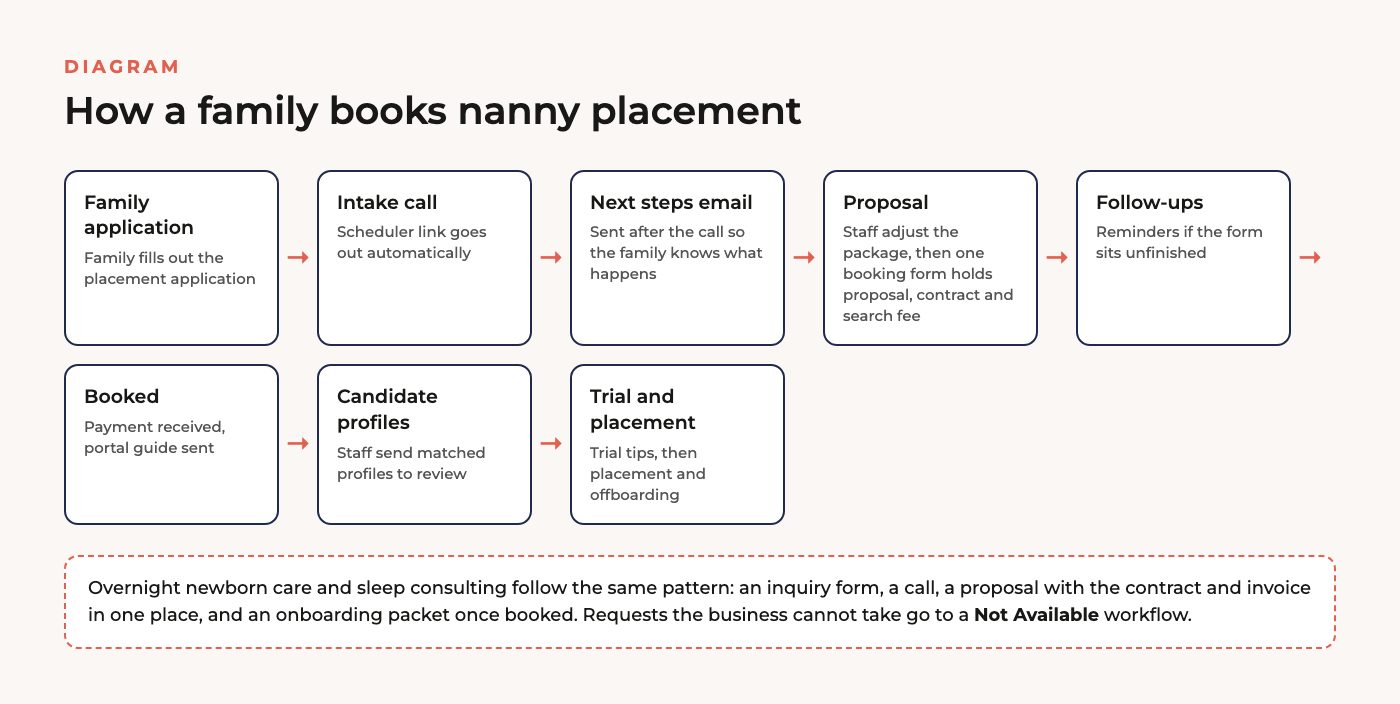
Give each service its own way in. A nanny placement starts with a family application, newborn care starts with an inquiry form, and sleep consulting starts when a parent books a discovery call. Each entry point starts the Flow written for that service, so the family gets the next step that actually fits what they asked for.
I also number the Flows in the order a family moves through them. That way a new admin can open the account and follow it without a walkthrough from you.
Packages instead of quotes built from scratch
If your team builds a quote line by line for every family, stop. Load your packages and rates into Dubsado once and let the team pick the one that fits. For Harmony’s newborn care I set up more than 100 package and rate combinations. That’s a one-time job, and it replaced a quote built by hand for every single family.
I also combine the proposal, contract and invoice into one booking form for each service, so a family can review, sign and pay in one place. Payment plans cover deposits and weekly payments, and Dubsado sends the payment reminders so your team doesn’t have to.
Tasks wherever a person has to decide
Some calls should never be automated, like whether a candidate is worth an interview or whether a proposal needs adjusting for this family’s schedule. In Dubsado 3.0, a Flow can create a task for someone on your team at exactly those points. The Flow waits, the person decides, and the automated steps pick back up from there.
In the nanny placement path, for example, half an hour after the intake call ends the family gets an email explaining what happens next, from candidate profiles to interviews to the placement fee. At the same time, a team member gets a task to adjust the proposal and package price, and checking it off sends the family their booking form.
Follow-ups that close the loop
Every form that matters gets a reminder if it sits unanswered. At Harmony, an unsigned booking form gets a friendly follow-up after 48 hours, and if it stays quiet, the project is marked cold so the team can stop wondering about it. Candidates who haven’t returned their background check authorization get a reminder at 48 hours too. Sleep consulting clients get check-ins at one week, two weeks and two months after the consultation, so support doesn’t stop the day the invoice is paid.
Dubsado’s active hours let you hold automated Flow actions to a daily window, so nothing goes out at a time your team can’t answer a reply.
A client portal so families stop digging through email
Once a family books, they get access to a client portal: one private page with their invoices, forms, appointments and project details. For sleep consulting at Harmony, the consultation booking link and the onboarding packet go straight into the portal. Portals are off by default in Dubsado and switched on per client, which a Flow can do for you when the family books.
What the finished build looked like
Harmony Baby Concierge ended up with 12 client workflows across overnight newborn care, nanny placements, sleep consulting and a “not available” reply, plus 7 workflows on the caregiver side, for 19 in total. Both brands came with workflow testing guides, so the team could practice on test projects before anything went live.
The biggest change for Harmony was that the next steps stopped depending on the owner remembering them. Before, the next step for each family and each candidate was in one person’s head and inbox. Now anyone on the admin team can see it in the project stage and the task list. Both Harmony case studies are on the childcare and family care results page.
Where Dubsado is the wrong tool
Dubsado runs your client process and your hiring pipeline very well. It is not a staffing platform. It isn’t built to roster caregivers across shifts, track their hours for payroll or pay them, so that work belongs in a scheduling or payroll tool. Dubsado also doesn’t run background checks itself. It sends the authorization form and reminds the candidate to complete it, and the check runs through whichever screening service you already use.
Plan matters too. Flows and the built-in scheduler are only on Dubsado’s Premier plan, and nearly everything in this post depends on them, so the Starter plan won’t get you there. My Dubsado pricing breakdown covers both plans and the add-ons.
Build it yourself or hire it out
If you run one service and handle hiring yourself, you can absolutely build this on your own. Map it first, then follow my guide to Dubsado workflows to turn the map into Flows. If you run several services, have an admin team and hire caregivers on a regular basis, mapping is the hardest step, and it’s where an outside set of eyes pays for itself.
My Dubsado setup services come in two shapes. With a done-for-you Dubsado setup, I map and build both brands and hand you a tested system. With done-with-you, we map your process together and you build it with a step-by-step course and support from me. Either way, you own it when it’s done, and I make sure your team knows how to run it before I hand it over.
FAQ
Can Dubsado handle hiring for a nanny agency?
Yes. Treat each candidate as a project in a separate brand, use project statuses for the hiring stages, and let Flows send the interview link, the background check authorization and the onboarding paperwork, with a task for your team wherever someone has to decide. The Harmony Baby Concierge hiring case study walks through a full example.
Do I need two Dubsado accounts for families and caregivers?
No. One account can run more than one brand, each with its own name, sending email address, forms and templates. Dubsado’s pricing page lists additional brands at $10 a month each.
Which Dubsado plan does a family care business need?
Premier. Flows and the built-in scheduler are only on the Premier plan, and the setup in this post depends on both. Starter covers forms, invoices, payment plans and client portals, but Flows, which send each next step on their own, are Premier only.
Can families pay a deposit and then weekly?
Yes. Dubsado payment plans can split a booking into a deposit and later payments, and Dubsado sends the payment reminders. Harmony’s setup covered deposits, weekly payments and a pay-in-full plan for shorter bookings.
Ongoing COO-level support to maintain and refine your systems as the business grows so operations stay steady and decisions stop piling up on your plate.

Support
Custom Dubsado, Airtable, and Moxie systems designed for capacity, not survival. Built around how your business actually runs so growth does not create more chaos.

Systems
Map, audit, or optimize the system that is slowing your business down. Workflows, offers, tech stacks, or the process that keeps living in your head instead of your business.

Strategy
services
These are.
Busy isn't a business plan.


In this power-packed session, I show you how to connect Airtable + your CRM for smarter tracking, simplified workflows, and insights that actually move your business forward.
From Guesswork to Growth with Airtable


A step-by-step guide to setting up your new Dubsado account, area by area, so your trial ends with a system you can actually use.
21 Ways to Max Out Your Dubsado Free Trial

Hot Seat, Hot Takes, Hot Damn.

Free masterclasses that show you exactly how scalable businesses are built.




© 0000 Cait Potter Creative, LLC
Privacy Statement and Terms & Conditions