










A Dubsado specialist is worth hiring when you know what you want your clients to experience and your time is worth more than the weeks a build takes. It is not worth hiring yet if you cannot describe your process, because there is nothing to build until you can. I have been a Dubsado Certified Specialist since 2020 and I have built Dubsado setups for more than 200 businesses, so yes, I have a bias, and in some businesses DIY or a VA is still the better call. I would decide between doing it yourself, hiring a VA, and hiring a specialist for a Done-For-You setup based on two things: how clearly you can describe your process and how many hours you have.
What a Dubsado specialist actually does
A specialist maps your client experience, builds it in Dubsado, tests it, and hands it back to you to run. When people picture a specialist, they picture the building: workflows, forms, canned emails, schedulers, payment plans, the portal. Whether the build works depends on the mapping that comes first, where the specialist asks what should happen at each step and who does it.
You can read exactly what that includes, step by step, in my Done-For-You Dubsado setup details, and what the mapping conversation looks like in what happens in a process mapping session. What a specialist does not do is run your business after the build. Someone has to own the system once it is live, and that is you or a person you pay to manage it.
Your three options
DIY
Doing it yourself saves the cash and costs your time and your patience. Dubsado is flexible enough that a motivated person can build a working system alone. The cost shows up as hours. When I started, one setup took me more than 50 hours, and I already knew the software. You will not be faster than that on your own account, and the hours come out of the same week you are supposed to be serving clients.
DIY works well when you have one or two simple offers, a process you can describe in a few sentences, and a slow month to spend on it. It goes badly when you build before you decide, because you end up rebuilding the same workflow three times as your answers change.
A VA or general assistant
I would hire a good VA to run your system after it is built: sending the proposals, checking the tasks, keeping the client list tidy. Designing the system is a different job. A VA who has used Dubsado has probably used it the way one other business set it up. They know the buttons, but they may not have mapped 200 different client experiences and seen which choices cause problems later.
My honest opinion is that a VA is the best person to run your system and an unreliable person to design it. If you already have one, have them test the build and own the day-to-day.
A Dubsado specialist: a Done-For-You setup
When you hire a specialist to build the whole system, that is a Done-For-You setup. In mine, we spend 120 minutes mapping your process together, then I build every workflow we mapped, write your canned emails in your voice, set up your forms, schedulers, payment plans and client portal, test everything, and walk you through it on a handoff call. You handle the onboarding questionnaire, real decisions in the mapping session, and reviewing the content I send back. The whole thing takes about four weeks.
It is the fastest route to a finished system and the one with the fewest mistakes baked in, because the decisions get made in the mapping session instead of mid-build. You pay for that. My Done-For-You setup starts at $4,497, and you can see how Dubsado plans and add-ons fit around it in my Dubsado pricing breakdown. Prices vary a lot between strategists, so compare what is included, not only the number. If this is the route you are leaning toward, what is included in a done-for-you Dubsado setup lists every piece, what you are responsible for, and what it costs.
The middle option: Done-With-You
There is a version between DIY and fully hired out. In a Done-With-You setup, we map your workflows together, then you build them yourself with a step-by-step course and support. It is $1,997, and it suits someone who wants to understand their own system and has the hours to build it.
Emily of Mamacita Margarita, a mobile bar, went this route. She won a free process mapping session in my Facebook group, then upgraded so she could finally finish the whole thing. We mapped 8 workflows with 121 steps, and 100 of those steps now run automatically. She built them herself and finished in 4 weeks. The case study estimates about 73 hours of admin a year handled automatically, roughly $1,800 a year in assistant time, and about 320 follow-ups, reminders and updates a year that happen without her. Done-With-You worked for her because we mapped first and she had the hours to build.
What a specialist decides that you might not think to
I would not rely on a template or a half-remembered tutorial, because they skip small decisions like this one: In Dubsado 3.0, I do not use workflow approvals to make sure someone checks a proposal before it goes out. I put a task right before the step that matters, with instructions on what to look for, and checking it off sends the proposal.
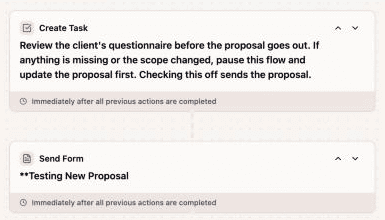
I explain the reasoning in why I never use Dubsado workflow approvals. It is a judgment call you make once, in the mapping session, and then it works the same way on every client. A specialist has made that call hundreds of times and knows what breaks when you choose the other way.
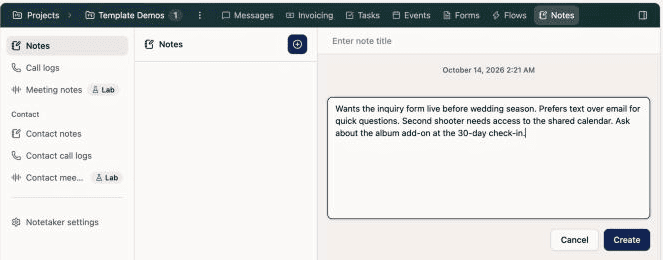
Another small one is where project details go. I keep notes on the project so whoever opens it next, you or a VA, sees what was decided and why.
Questions to ask before you hire anyone
Whether you hire me or someone else, these questions separate a person who will build you a system from one who will build you a pile of forms.
- Do you map my process before you build anything, and how long does that take?
- Do you build new, or work inside what I already have? (I always build new, because untangling an existing account takes longer than building from a mapped process.)
- How do you test the system before it goes live?
- Is the price per project, and does it include emails written in my voice?
- What happens at handoff? Do I get a walkthrough and a guide, or just a login?
- What is not included? A clear answer here is a good sign.
If a specialist offers a partial setup, such as only the lead form and the proposal, I would pass. There is no such thing as a partial setup. A workflow that stops at the signed contract leaves you sending every onboarding and offboarding message by hand.
How to decide
- Choose DIY if your offers are simple, you can describe your process in a few sentences, and you have the hours.
- Choose Done-With-You if you want to own the knowledge, you have the hours, and you want a mapped plan and support while you build.
- Choose a Done-For-You setup with a specialist if your time is better spent on clients, your process is more complex, or a mistake in the build would cost you bookings.
- Hire a VA after the build to run it, not before the build to design it.
If you are not sure which of those you are, start with a Systems Blueprint Intensive, which gives you a mapped plan whoever ends up building it. To put numbers on the decision, my post on calculating the return on a systems strategist walks through the math, and How Much Does a Dubsado Setup Cost? compares the three routes side by side. All of my services are on the Dubsado setup services page.
Frequently asked questions
Is it worth hiring a Dubsado specialist?
It is worth it when you know what you want clients to experience and your hours are worth more than the build. It is not worth it before you have a process, because a specialist cannot build clarity you have not decided on yet. A process mapping session is how you get to that clarity.
What does a Dubsado specialist do?
A specialist maps your client process, builds the workflows, forms, emails, schedulers and payment plans in Dubsado, tests them, and hands the system back to you. That full build is what a Done-For-You setup is. They do not run the system for you afterward.
Can a VA set up Dubsado for me?
Some can, and a VA who has built several Dubsado accounts can do a decent job. A VA is usually stronger at running a system than at designing one. If you hire a VA, have them own the day-to-day after the build.
How much does it cost to hire a Dubsado specialist?
It varies by strategist and by what is included. With me, a Done-For-You setup, where I map and build the whole system, starts at $4,497. Done-With-You, where we map together and you build from that map, is $1,997. Your Dubsado subscription is paid to Dubsado separately.
Can I learn Dubsado myself instead?
Yes. Plan on spending real hours, and decide your process before you start building. Many people do the mapping first and then build themselves, which is what Done-With-You is for.
Ongoing COO-level support to maintain and refine your systems as the business grows so operations stay steady and decisions stop piling up on your plate.

Support
Custom Dubsado, Airtable, and Moxie systems designed for capacity, not survival. Built around how your business actually runs so growth does not create more chaos.

Systems
Map, audit, or optimize the system that is slowing your business down. Workflows, offers, tech stacks, or the process that keeps living in your head instead of your business.

Strategy
services
These are.
Busy isn't a business plan.


In this power-packed session, I show you how to connect Airtable + your CRM for smarter tracking, simplified workflows, and insights that actually move your business forward.
From Guesswork to Growth with Airtable


A step-by-step guide to setting up your new Dubsado account, area by area, so your trial ends with a system you can actually use.
21 Ways to Max Out Your Dubsado Free Trial

Hot Seat, Hot Takes, Hot Damn.

Free masterclasses that show you exactly how scalable businesses are built.




© 0000 Cait Potter Creative, LLC
Privacy Statement and Terms & Conditions