









Dubsado vs 17hats comes down to one question: do you want your client management tool to double as your bookkeeping tool, or do you want the most control over what happens after a client fills out a form? 17hats leans toward the first. Dubsado leans toward the second. I’ve been a Dubsado Certified Specialist since 2020, so you already know where I land, but 17hats is a real option for some businesses. I checked every 17hats feature and price in this post on 17hats’ own website and help center in October 2026.
Pick 17hats if you want bookkeeping, profit and loss reports and invoicing in the same place as your clients, and your process mostly runs off one date, like an event date. Pick Dubsado if you want your system to react to what each client actually does: sign the contract, pay a payment plan installment, book the call, finish the questionnaire, or not finish it. Dubsado Premier, the plan with automated workflows, is $525 a year. 17hats lists $600 a year.
Dubsado vs 17hats at a glance
Dubsado figures below come from Dubsado’s pricing page and 17hats figures come from 17hats’ pricing page. Here’s how the two compare on the things people ask me about most:
| Dubsado | 17hats | |
|---|---|---|
| Price | Starter $335/year, Premier $525/year | $60/month, $600/year, or $800 for two years (50% off the first year when I checked) |
| Free trial | 21 days of Premier, no credit card required | 7 days with all features, and you can restart it |
| Automated workflows | Premier only. 15 actions, with triggers that watch what the client does | Workflows timed around a base date or the previous step, with Pause steps |
| Client portal | Yes, on both plans | Yes |
| Bookkeeping | Bookkeeping integration on Premier | Built in: transaction categories, profit and loss, receivables reports |
| Extra users | 3 included, then $25/month for 4 to 10 | 3 included, then $5/month each |
| Extra brands | $10/month each | 2 included, then $10/month each |
One thing to know before you compare plans: 17hats’ pricing page now describes one all-inclusive plan, but parts of its help center still describe Essentials, Standard and Premier levels, where full workflows were Premier only. If you go with 17hats, confirm which one you’re buying before you build anything.
What 17hats does well
17hats is strongest on the money side of a small business. Its pricing page lists bookkeeping that lets you categorize transactions, a profit and loss report, upcoming and aged receivables reports, and a sales tax report. A bank connection add-on ($5 a month) brings your expenses in automatically, and there’s a QuickBooks Online connection too. If you’d otherwise pay for a separate bookkeeping app and your client process is simple, that’s a genuine reason to look at 17hats.
It also covers the client basics: quotes, contracts and invoices (sent together as one document if you want), questionnaires with if/then logic, lead capture forms, online scheduling, a client portal and a mobile app. Its pricing page also lists add-on modules for time tracking and recurring billing.
So if your honest answer to “what do I need?” is “send a quote, get it signed, get paid, and see my numbers,” 17hats will do that.
Where Dubsado wins: workflow control
Workflows are why most people buy either tool, and this is where the two are built differently.
How 17hats workflows run
In 17hats, a workflow is a list of steps, and each step is timed before, on or after a base date, or after the previous items are complete. The base date is usually the project date. If the workflow started from an online scheduling booking, it’s the appointment date. Actions include sending an email, questionnaire, quote, contract or invoice, starting another workflow, confirming a booking, archiving the project, and adding or removing tags. A Pause step stops the workflow until you check it off.
17hats’ help center also documents completion options on the Send Quote step: the step can count as done when the contract is signed, when the first invoice payment is made, when the invoice is fully paid, or when all three are done. That’s useful, and for a business where everything counts back from an event date, a base-date workflow is a natural fit.
How Dubsado Flows run
In Dubsado 3.0, workflows are called Flows, and every step pairs one action with one trigger. The triggers are what give you control, because so many of them watch the client:
- After a form is completed, for proposals, questionnaires and sub-agreements the Flow sent
- After a form is not completed, which fires a set time after the form was sent and is skipped if the client finishes first
- After the contract is signed by the client
- After the primary invoice is paid in full, or after a payment plan installment is paid
- After an appointment is booked, before it starts, or after it ends
- Before or after the project start or end date
On top of that, Dubsado has 15 actions, including updating the project status, turning the client portal on or off, and a Hold Actions Until step. You can also set active hours, so nothing sends to a client at 2 a.m. I walk through every trigger in my Dubsado workflows guide.
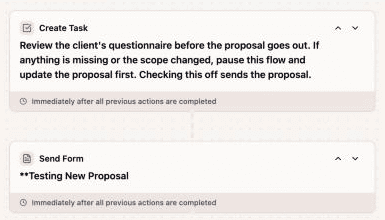
Day to day, that means a client who finishes their questionnaire the day you send it never gets the “just a reminder” email. A client who pays the deposit gets the welcome sequence right away, without you watching for the payment. A client who books a call gets the prep email for that call, at the right time. Every client gets your best day, because the system responds to them instead of to the calendar.
Forms and design
17hats lets you set custom fonts, an accent color and button wording on your documents. Dubsado gives you a lot more room to design forms, proposals and the client portal to look like your brand. I coined the phrase “code-free forms” because Dubsado can look completely custom without a line of code, and for a service business where the proposal is the first real impression, that matters.
What that control looks like in a real business
Katie Chappell, a live illustrator, was expecting her first child, so her done-for-you Dubsado setup had to keep bookings moving while she stepped back for maternity leave. Her system automates 95% of her client experience tasks, which comes to an estimated 125 hours a year, about 16 work days, handled automatically. That only works because each step waits on what the client did, from the signed contract to the finished questionnaire, so nothing depends on Katie remembering to send it.
17hats vs Dubsado: which should you choose?
Choose 17hats if you want your bookkeeping and your client management in one tool, your process is short (quote, contract, invoice, done), and most of your steps count back from one event date. Use the 7-day trial to build one real quote and see if it feels right.
Choose Dubsado if you want a client experience that runs on its own from inquiry to offboarding, you have more than one service with different steps, or you’re tired of being the person who remembers who still owes you a questionnaire. Honestly, that’s most of the service businesses I talk to. If you’re also weighing HoneyBook, I wrote about why I chose Dubsado over HoneyBook.
Either way, map your process before you pick. You can’t automate a process you don’t understand, and the tool that fits is the one that matches how your clients actually move through your business.
Getting Dubsado set up
Dubsado does nothing on its own: every form, email, scheduler and Flow has to be planned and built around your process. That’s the work I do. You can see all my Dubsado setup services in one place, or go straight to the done-for-you Dubsado setup if you want it built for you, or Done-With-You if you want to build it yourself with my plan and support. My Dubsado pricing breakdown covers the plans and my code XOCAIT, which takes 30% off your first payment.
Not sure yet whether Dubsado is the right tool for you? Fill out my contact form and book a discovery call. I won’t start a project without one, and it’s where we figure out which option fits.
Frequently asked questions
Is 17hats cheaper than Dubsado?
Not at full price. Dubsado Premier, the plan with automated workflows, is $525 a year, and 17hats lists $600 a year or $800 for two years. When I checked in October 2026, 17hats was also offering 50% off the first year, so your first year can cost less. Compare the renewal price, since that’s what you’ll pay every year after.
Does 17hats have a client portal like Dubsado?
Yes. 17hats describes its client portal as a secure place for clients to access key information and complete documents. Dubsado includes client portals on both plans, and a Flow can turn a client’s portal on or off as the project moves along.
Can I try both before I decide?
Yes. Dubsado’s free trial is 21 days of full access to Premier with no credit card. 17hats has a 7-day free trial with all features, and you can restart it once it ends.
Does Dubsado do bookkeeping like 17hats?
Dubsado Premier includes a bookkeeping integration. 17hats has bookkeeping built in, with transaction categories and profit and loss reports. If having your books and your clients in one tool matters more to you than workflow control, that’s a point for 17hats.
Ongoing COO-level support to maintain and refine your systems as the business grows so operations stay steady and decisions stop piling up on your plate.

Support
Custom Dubsado, Airtable, and Moxie systems designed for capacity, not survival. Built around how your business actually runs so growth does not create more chaos.

Systems
Map, audit, or optimize the system that is slowing your business down. Workflows, offers, tech stacks, or the process that keeps living in your head instead of your business.

Strategy
services
These are.
Busy isn't a business plan.


In this power-packed session, I show you how to connect Airtable + your CRM for smarter tracking, simplified workflows, and insights that actually move your business forward.
From Guesswork to Growth with Airtable


A step-by-step guide to setting up your new Dubsado account, area by area, so your trial ends with a system you can actually use.
21 Ways to Max Out Your Dubsado Free Trial

Hot Seat, Hot Takes, Hot Damn.

Free masterclasses that show you exactly how scalable businesses are built.




© 0000 Cait Potter Creative, LLC
Privacy Statement and Terms & Conditions