










If you’re comparing Dubsado setup services, the price is easy to find. Mine is published: a Done-For-You Dubsado setup starts at $4,497. The harder question is what you actually get for that number, because “full setup” means something different on every strategist’s sales page. I’m a Dubsado Certified Specialist and I’ve built Dubsado setups for more than 200 businesses since 2020, and mine comes with a set list of what’s included, what you handle, and what isn’t included at all.
A Done-For-You Dubsado setup with me is $4,497+ and takes about four weeks. It includes a 120-minute Process Mapping Session, every workflow we map in that session, payment plans, code-free forms, canned emails written to sound like you, schedulers, a branded client portal, your packages entered for you, a live offboarding call, a Next Steps Guide, and 30 days of support. Your Dubsado subscription is separate. I build everything new, so your current setup keeps running while I work.
What a done-for-you Dubsado setup includes
Here’s every piece, in the order it gets built, and why each one is there. None of these are optional extras. A setup that skips one of them leaves you doing that work by hand.
1. A 120-minute Process Mapping Session
Everything starts here, and honestly, this session matters more than anything else in the project. We map your client experience from first inquiry to offboarding: what the client sees, what you need from them, and which steps can run without you. Every decision we make in this session is one I don’t have to stop and ask you about mid-build. You can read what happens in a process mapping session if you want the detail.
The best sessions are the ones where the owner already knows what they want clients to experience. When Toni Miller came in for Mill Pond Estate, a wedding venue that hadn’t even opened yet, she knew she needed a pre-launch waitlist, self-serve tour booking, and two separate paths for in-house and outside catering. All of that was decided in the session, so the build never stalled on open questions.
2. Every workflow we map
Workflows (Dubsado 3.0 calls them Flows) are what make Dubsado run without you. I build every workflow we map within the session time. There’s no cap on workflows: everything we map in that session gets built. For SugarPop Productions, a photo booth company with wedding, social, and corporate clients, that came to 11 workflows and 107 steps, and 91 of those steps run automatically.
3. Payment plan mapping
Payment plans get planned around how and when you actually get paid: retainers, installments, final balances due before an event. They’re attached to your packages, so when a client books, the right payment schedule comes with it and you aren’t building invoices by hand.
4. Code-free forms
Your lead capture form, questionnaires, proposals, and contracts are designed for you with no custom code. I coined the phrase “code-free forms,” and that’s what you get: forms you can update yourself without touching code. Mill Pond Estate’s setup has 9 forms that get reused 21 times across their workflows, so there are fewer forms to keep up to date.
5. Canned emails written to sound like you
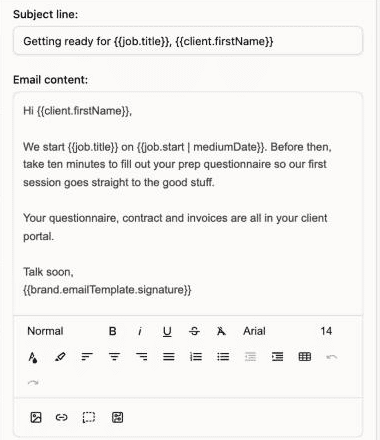
I write your email templates for you, in your voice, with Dubsado smart fields so every email pulls in the right client name, project, and date. This is where most DIY setups stall, because writing 25 emails is a lot of writing. SugarPop’s setup has 24 email templates. Mill Pond’s has 29.
6. Schedulers
Anything a client books with you gets its own Dubsado scheduler: discovery calls, consultations, planning meetings, tours. Each one is set up with the right availability and connected to your workflows, so a client booking a call moves their project forward without you sending a single “here’s my calendar link” email. SugarPop’s setup has 2 schedulers. Mill Pond Estate’s has 3, including the self-serve tour booking that let couples book a venue tour before the venue had opened.
7. A branded client portal
Your client portal is customized to your brand, and you get a bonus Client Portal Guide so you know how to update it later. The portal is where clients go to find their contract, invoices, and forms, so it should look like your business.
8. Packages and products entered for you
Your services, add-ons, and prices go into Dubsado as packages, so every new proposal and invoice pulls from the same list instead of being typed from scratch.
9. Testing before you go live
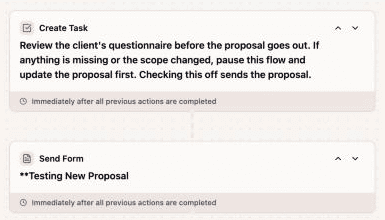
I map, build, and then test the whole system. Part of building it well is deciding where a person should look at something before it sends. I don’t use workflow approvals for that (here’s why). I use a task with clear instructions, placed right before the step that matters.
10. Handoff: a live call, a Next Steps Guide, and 30 days of support
We walk through your finished system together on a 1:1 offboarding call. You get a detailed Next Steps Guide that explains how to run it, and 30 days of support for the questions that only show up once real clients start moving through. You don’t need to know Dubsado before we start, but by the end you should know how your own system runs.
Why I start fresh instead of reusing what you already have
A lot of people come to me with Dubsado half set up already: a few forms, some emails, a workflow or two they built during their free trial. The first question is usually whether reusing that will bring the price down. It won’t, and honestly, it would make the project harder. Getting into an existing account, figuring out what every piece does, what’s connected to what, and what needs to change takes me longer than building it new from your mapped process.
So I always start fresh, and that works in your favor in two ways. You keep running your business exactly the way you do now, with no interruptions, while I build the new system alongside it. And everything I build is made for the process we mapped, instead of being bent around decisions you made before you knew what you needed.
What a done-for-you Dubsado setup costs
My Done-For-You setup is $4,497+, and $4,497 is the average investment for a full setup. The plus is there because some businesses map out bigger than others. On top of that, you pay Dubsado directly for your subscription: Starter is $335 a year and Premier is $525 a year. You need Premier for a setup like this, because automated workflows and scheduling are Premier features. My Dubsado pricing breakdown covers the plans, add-ons, and discount code in more detail.
The more useful number is what the setup gives back:
- SugarPop’s system handles an estimated 1,104 hours of work a year, which works out to about a 514% return on what they invested.
- That same system sends about 4,417 follow-ups, reminders, and updates a year for every SugarPop client, instead of depending on someone remembering to send them.
- Mill Pond Estate’s comes to an estimated 455% return, with 92% of client experience tasks automated.
- Mill Pond saves an estimated 258 hours and $6,450 a year on booked client tasks alone.
- Little Ivy Paper Goods, a custom stationery studio, has 87 of its 101 workflow steps automated and an estimated 739 hours a year handled automatically, about $18,467 a year in assistant time.
If you want to run that math for your own business, here’s how to calculate the ROI of a Dubsado setup.
What you’re responsible for
Done-for-you means I do the building, and you still have work to do during those four weeks. The timeline depends on your onboarding prep and how quickly you respond, so here’s what I need from you:
- Your onboarding questionnaire, on time. Brand details, logins, and business basics, before the mapping session.
- Real decisions in the mapping session. If you don’t know what you want a client to experience at a step, we decide it together, but we do decide it.
- Your Content Approval Questionnaire. This takes more of your time than anything else you do for the project. You review every email I write and give me all of the content for your forms: your questions, your contract terms, your package descriptions. Block real time for it, because the build moves as fast as this comes back.
- Fast, honest feedback. When I send something for review, speak up if you hate it. That’s much easier to fix in week two than after launch.
- Ownership after handoff. Someone has to run the system once it’s built. That’s you, or someone you pay to manage it.
What is not included
Knowing what isn’t included saves both of us an awkward conversation later. A Done-For-You setup does not include your Dubsado subscription, general Dubsado training beyond your own system, reworking the setup you already have (I build new, for the reasons above), or me running your system for you after the 30 days of support end. I build it and hand it back to you to run.
It also doesn’t come in halves. I don’t build just the lead capture and the proposal and leave the rest for later, because there’s no such thing as a partial setup. A workflow that stops at the signed contract means you’re still sending every onboarding email, reminder, and offboarding step by hand, and the pieces you add later won’t connect to the pieces you already have. If the whole build isn’t in the budget yet, a smaller, complete option is a better use of your money than half of a big one.
Is done-for-you the right fit?
Done-For-You is for service businesses that are ready to hand the build off and have the bandwidth to give feedback during it. If that’s not you, there are other ways in:
- Done-With-You ($1,997) if you want to build it yourself with my plan, a step-by-step course, and support while you build.
- Systems Blueprint Intensive ($497) if you’re not sure what to build yet and want a mapped plan first, whoever ends up building it.
For a side-by-side of every option, including what DIY really costs you in time, read How Much Does a Dubsado Setup Cost? Or see all of my Dubsado setup services in one place.
Frequently asked questions
How much do Dubsado setup services cost?
With me, a Done-For-You Dubsado setup is $4,497+ and Done-With-You is $1,997. Your Dubsado subscription is separate: $335 a year for Starter or $525 a year for Premier, and you need Premier for automated workflows and schedulers.
How long does a done-for-you Dubsado setup take?
About four weeks. The biggest factor is how quickly you finish your onboarding questionnaire and your Content Approval Questionnaire, and how quickly you respond to review requests during the build.
Do I need to know how to use Dubsado first?
No. The live offboarding call, the Next Steps Guide, and 30 days of support are there so you learn your own system once it’s built.
I already have some of Dubsado set up. Does that lower the price?
No. It’s harder for me to work out what an existing account has and what needs to change than to build new from your mapped process, so I always start fresh. Your current setup keeps running while I build, so you aren’t interrupted, and you end up with exactly what you need instead of a patched version of what you had.
Can you set up Dubsado before my business launches?
Sometimes. I don’t usually recommend a full setup before an owner knows their process, but it works when you already know exactly what clients should experience. Mill Pond Estate built their waitlist, tour booking, and booking process while the venue was still under construction.
Ongoing COO-level support to maintain and refine your systems as the business grows so operations stay steady and decisions stop piling up on your plate.

Support
Custom Dubsado, Airtable, and Moxie systems designed for capacity, not survival. Built around how your business actually runs so growth does not create more chaos.

Systems
Map, audit, or optimize the system that is slowing your business down. Workflows, offers, tech stacks, or the process that keeps living in your head instead of your business.

Strategy
services
These are.
Busy isn't a business plan.


In this power-packed session, I show you how to connect Airtable + your CRM for smarter tracking, simplified workflows, and insights that actually move your business forward.
From Guesswork to Growth with Airtable


A step-by-step guide to setting up your new Dubsado account, area by area, so your trial ends with a system you can actually use.
21 Ways to Max Out Your Dubsado Free Trial

Hot Seat, Hot Takes, Hot Damn.

Free masterclasses that show you exactly how scalable businesses are built.




© 0000 Cait Potter Creative, LLC
Privacy Statement and Terms & Conditions